Adsense HTML/JavaScript

Showing posts with label ESP32-C3-DevKitM-1. Show all posts

Sunday, July 10, 2022

ESP32-C3/MicroPython BLE UART Communication


In my form posts:
MicroPython bluetooth (BLE) exampls, run on ESP32-C3 show steps to run MicroPython BLE examples, with example of dummy BLE UART example.
MicroPython/ESP32-C3 Exercise: send/receive command via BLE UART modified to send command via UART to control onboard RGB LED remotely.

In this post, it's modified to implement bi-direction BLE UART communication, user enter text, and display on I2C SSD1306 OLED.

For the OLED, read the post ESP32-C3/MicroPython + SSD1306 I2C OLED.

- Once Central connected to Peripheral (both onboard RGB LED ON), user enter text in REPL.
- Central send the text to Peripheral via BLE UART.
- In Peripheral received the text, display on SSD1306 and echo back to Central via BLE UART.
- Central received the text, display on SSD1306.

mpyESP-C3-32S-Kit_ble_simple_peripheral_UART_ssd1306.py

"""
MicroPython/AI-Thinker NodeMCU ESP-C3-32S-Kit
BLE UART Exercise, act as peripheral,
with 128x64 I2C SSD1306 OLED.

Connection between:
ESP32-C3   I2C SSD1306 OLED
============================
GND        GND
3V3        VCC
18         SCL
19         SDA


modified from ble_simple_peripheral.py
"""

# This example demonstrates a UART periperhal.

import bluetooth
import random
import struct
import time
from ble_advertising import advertising_payload

from micropython import const

from machine import Pin, I2C, PWM
import ssd1306

# NodeMCU ESP-C3-32S-Kit onboard LEDs assignment
pwmR = PWM(Pin(3))
pwmG = PWM(Pin(4))
pwmB = PWM(Pin(5))

# set PWM frequency from 1Hz to 40MHz
pwmR.freq(1000)
pwmG.freq(1000)
pwmB.freq(1000)

_IRQ_CENTRAL_CONNECT = const(1)
_IRQ_CENTRAL_DISCONNECT = const(2)
_IRQ_GATTS_WRITE = const(3)

_FLAG_READ = const(0x0002)
_FLAG_WRITE_NO_RESPONSE = const(0x0004)
_FLAG_WRITE = const(0x0008)
_FLAG_NOTIFY = const(0x0010)

_UART_UUID = bluetooth.UUID(
    "6E400001-B5A3-F393-E0A9-E50E24DCCA9E")
_UART_TX = (bluetooth.UUID(
    "6E400003-B5A3-F393-E0A9-E50E24DCCA9E"),
    _FLAG_READ | _FLAG_NOTIFY,
)
_UART_RX = (bluetooth.UUID(
    "6E400002-B5A3-F393-E0A9-E50E24DCCA9E"),
    _FLAG_WRITE | _FLAG_WRITE_NO_RESPONSE,
)
_UART_SERVICE = (
    _UART_UUID,
    (_UART_TX, _UART_RX),
)


class BLESimplePeripheral:
    def __init__(self, ble, name="mpy-uart"):
        self._ble = ble
        self._ble.active(True)
        self._ble.irq(self._irq)
        ((self._handle_tx, self._handle_rx),) \
                           = self._ble.gatts_register_services(
                               (_UART_SERVICE,))
        self._connections = set()
        self._write_callback = None
        self._payload = advertising_payload(
            name=name, services=[_UART_UUID])
        self._advertise()

    def _irq(self, event, data):
        # Track connections so we can send notifications.
        if event == _IRQ_CENTRAL_CONNECT:
            conn_handle, _, _ = data
            print("New connection", conn_handle)
            self._connections.add(conn_handle)
            
            #turn ON GREEN LED
            pwmG.duty(10)
            
            oled_ssd1306.fill(0)    #clear screen
            oled_ssd1306.text("Connected", 0, 0 , 1)
            oled_ssd1306.show()
        elif event == _IRQ_CENTRAL_DISCONNECT:
            conn_handle, _, _ = data
            print("Disconnected", conn_handle)
            self._connections.remove(conn_handle)
            # Start advertising again to allow a new connection.
            self._advertise()
            
            #turn OFF GREEN LED
            pwmG.duty(0)
            
            oled_ssd1306.fill(0)    #clear screen
            oled_ssd1306.text("Disconnected", 0, 0 , 1)
            oled_ssd1306.show()
        elif event == _IRQ_GATTS_WRITE:
            conn_handle, value_handle = data
            value = self._ble.gatts_read(value_handle)
            if (value_handle == self._handle_rx
                and self._write_callback):
                self._write_callback(value)

    def send(self, data):
        for conn_handle in self._connections:
            self._ble.gatts_notify(
                conn_handle, self._handle_tx, data)

    def is_connected(self):
        return len(self._connections) > 0

    def _advertise(self, interval_us=500000):
        print("Starting advertising")
        self._ble.gap_advertise(
            interval_us, adv_data=self._payload)

    def on_write(self, callback):
        self._write_callback = callback


def demo():
    ble = bluetooth.BLE()
    p = BLESimplePeripheral(ble)

    def on_rx(v):
        print("RX", v)
        
        oled_ssd1306.scroll(0,-10)
        oled_ssd1306.fill_rect(0, 50,
                               oled_ssd1306.width-1, 10,
                               0)
        oled_ssd1306.text(v, 0, 50 , 1)
        oled_ssd1306.show()
        
        # echo back in upper case
        p.send(v.upper())
        
    p.on_write(on_rx)

    i = 0
    while True:
        pass
#        if p.is_connected():
#            # Short burst of queued notifications.
#            for _ in range(3):
#                data = str(i) + "_"
#                print("TX", data)
#                p.send(data)
#                i += 1
#        time.sleep_ms(100)

if __name__ == "__main__":
    #All OFF all onboard LED
    pwmR.duty(0)
    pwmG.duty(0)
    pwmB.duty(0)
    
    oled_i2c = I2C(0)
    print("Default I2C:", oled_i2c, "\n")
    
    try:
        oled_ssd1306 = ssd1306.SSD1306_I2C(128, 64, oled_i2c)
        print("Default SSD1306 I2C address:",
              oled_ssd1306.addr, "/",
              hex(oled_ssd1306.addr))
        oled_ssd1306.text('ESP32C3 BLE UART', 0, 0, 1)
        oled_ssd1306.text('Peripheral', 0, 10, 1)
        oled_ssd1306.show()
    except OSError as exc:
        print("OSError!", exc)
        if exc.errno == errno.ENODEV:
            print("No such device")


    demo()


mpyESP32-C3-DevKitM-1_ble_simple_central_UART_128x32.py
"""
MicroPython/Espressif ESP32-C3-DevKitM-1
BLE UART Exercise, act as central,
with 128x32 I2C SSD1306 OLED.

Connection between:
ESP32-C3   I2C SSD1306 OLED
============================
GND        GND
3V3        VCC
18         SCL
19         SDA
"""

# This example finds and connects to a peripheral running the
# UART service (e.g. ble_simple_peripheral.py).

import bluetooth
#import random
#import struct
import time

from ble_advertising import decode_services, decode_name

from micropython import const
from neopixel import NeoPixel
import _thread

from machine import Pin, I2C
import ssd1306

# On Espreffif ESP32-C3-DevKitM-1:
# The onboard RGB LED (WS2812) is connected to GPIO8

np = NeoPixel(Pin(8), 1)

rqs_to_send =False
to_send = ""

_IRQ_CENTRAL_CONNECT = const(1)
_IRQ_CENTRAL_DISCONNECT = const(2)
_IRQ_GATTS_WRITE = const(3)
_IRQ_GATTS_READ_REQUEST = const(4)
_IRQ_SCAN_RESULT = const(5)
_IRQ_SCAN_DONE = const(6)
_IRQ_PERIPHERAL_CONNECT = const(7)
_IRQ_PERIPHERAL_DISCONNECT = const(8)
_IRQ_GATTC_SERVICE_RESULT = const(9)
_IRQ_GATTC_SERVICE_DONE = const(10)
_IRQ_GATTC_CHARACTERISTIC_RESULT = const(11)
_IRQ_GATTC_CHARACTERISTIC_DONE = const(12)
_IRQ_GATTC_DESCRIPTOR_RESULT = const(13)
_IRQ_GATTC_DESCRIPTOR_DONE = const(14)
_IRQ_GATTC_READ_RESULT = const(15)
_IRQ_GATTC_READ_DONE = const(16)
_IRQ_GATTC_WRITE_DONE = const(17)
_IRQ_GATTC_NOTIFY = const(18)
_IRQ_GATTC_INDICATE = const(19)

_ADV_IND = const(0x00)
_ADV_DIRECT_IND = const(0x01)
_ADV_SCAN_IND = const(0x02)
_ADV_NONCONN_IND = const(0x03)

_UART_SERVICE_UUID = bluetooth.UUID(
    "6E400001-B5A3-F393-E0A9-E50E24DCCA9E")
_UART_RX_CHAR_UUID = bluetooth.UUID(
    "6E400002-B5A3-F393-E0A9-E50E24DCCA9E")
_UART_TX_CHAR_UUID = bluetooth.UUID(
    "6E400003-B5A3-F393-E0A9-E50E24DCCA9E")


class BLESimpleCentral:
    def __init__(self, ble):
        self._ble = ble
        self._ble.active(True)
        self._ble.irq(self._irq)

        self._reset()

    def _reset(self):
        # Cached name and address from a successful scan.
        self._name = None
        self._addr_type = None
        self._addr = None

        # Callbacks for completion of various operations.
        # These reset back to None after being invoked.
        self._scan_callback = None
        self._conn_callback = None
        self._read_callback = None

        # Persistent callback for when
        # new data is notified from the device.
        self._notify_callback = None

        # Connected device.
        self._conn_handle = None
        self._start_handle = None
        self._end_handle = None
        self._tx_handle = None
        self._rx_handle = None

    def _irq(self, event, data):
        if event == _IRQ_SCAN_RESULT:
            addr_type, addr, adv_type, rssi, adv_data = data
            if (adv_type in (_ADV_IND, _ADV_DIRECT_IND)
                and
                _UART_SERVICE_UUID in decode_services(adv_data)):
                # Found a potential device,
                # remember it and stop scanning.
                self._addr_type = addr_type
                self._addr = bytes(
                    addr
                )  # Note: addr buffer is owned by
                   #       caller so need to copy it.
                self._name = decode_name(adv_data) or "?"
                self._ble.gap_scan(None)

        elif event == _IRQ_SCAN_DONE:
            if self._scan_callback:
                if self._addr:
                    # Found a device during the scan
                    # (and the scan was explicitly stopped).
                    self._scan_callback(
                        self._addr_type, self._addr, self._name)
                    self._scan_callback = None
                else:
                    # Scan timed out.
                    self._scan_callback(None, None, None)

        elif event == _IRQ_PERIPHERAL_CONNECT:
            # Connect successful.
            conn_handle, addr_type, addr = data
            if addr_type == self._addr_type and addr == self._addr:
                self._conn_handle = conn_handle
                self._ble.gattc_discover_services(self._conn_handle)

        elif event == _IRQ_PERIPHERAL_DISCONNECT:
            # Disconnect (either initiated by us or the remote end).
            conn_handle, _, _ = data
            if conn_handle == self._conn_handle:
                # If it was initiated by us, it'll already be reset.
                self._reset()

        elif event == _IRQ_GATTC_SERVICE_RESULT:
            # Connected device returned a service.
            conn_handle, start_handle, end_handle, uuid = data
            print("service", data)
            if (conn_handle == self._conn_handle
                and
                uuid == _UART_SERVICE_UUID):
                self._start_handle, self._end_handle \
                                    = start_handle, end_handle

        elif event == _IRQ_GATTC_SERVICE_DONE:
            # Service query complete.
            if self._start_handle and self._end_handle:
                self._ble.gattc_discover_characteristics(
                    self._conn_handle,
                    self._start_handle,
                    self._end_handle)
            else:
                print("Failed to find uart service.")

        elif event == _IRQ_GATTC_CHARACTERISTIC_RESULT:
            # Connected device returned a characteristic.
            conn_handle, def_handle, value_handle, properties, uuid = data
            if (conn_handle == self._conn_handle
                and
                uuid == _UART_RX_CHAR_UUID):
                self._rx_handle = value_handle
            if (conn_handle == self._conn_handle
                and
                uuid == _UART_TX_CHAR_UUID):
                self._tx_handle = value_handle

        elif event == _IRQ_GATTC_CHARACTERISTIC_DONE:
            # Characteristic query complete.
            if (self._tx_handle is not None
                and
                self._rx_handle is not None):
                # We've finished connecting and
                # discovering device, fire the connect callback.
                if self._conn_callback:
                    self._conn_callback()
            else:
                print("Failed to find uart rx characteristic.")

        elif event == _IRQ_GATTC_WRITE_DONE:
            conn_handle, value_handle, status = data
            print("TX complete")

        elif event == _IRQ_GATTC_NOTIFY:
            conn_handle, value_handle, notify_data = data
            if (conn_handle == self._conn_handle
                and
                value_handle == self._tx_handle):
                if self._notify_callback:
                    self._notify_callback(notify_data)

    # Returns true if we've successfully connected
    # and discovered characteristics.
    def is_connected(self):
        return (
            self._conn_handle is not None
            and self._tx_handle is not None
            and self._rx_handle is not None
        )

    # Find a device advertising the environmental
    # sensor service.
    def scan(self, callback=None):
        self._addr_type = None
        self._addr = None
        self._scan_callback = callback
        self._ble.gap_scan(2000, 30000, 30000)

    # Connect to the specified device (otherwise
    # use cached address from a scan).
    def connect(self, addr_type=None, addr=None, callback=None):
        self._addr_type = addr_type or self._addr_type
        self._addr = addr or self._addr
        self._conn_callback = callback
        if self._addr_type is None or self._addr is None:
            return False
        self._ble.gap_connect(self._addr_type, self._addr)
        return True

    # Disconnect from current device.
    def disconnect(self):
        if not self._conn_handle:
            return
        self._ble.gap_disconnect(self._conn_handle)
        self._reset()

    # Send data over the UART
    def write(self, v, response=False):
        if not self.is_connected():
            return
        self._ble.gattc_write(self._conn_handle,
                              self._rx_handle,
                              v,
                              1 if response else 0)

    # Set handler for when data is received over the UART.
    def on_notify(self, callback):
        self._notify_callback = callback

def demo():
    global rqs_to_send
    global to_send
    
    ble = bluetooth.BLE()
    central = BLESimpleCentral(ble)

    not_found = False
    
    #Turn ON onboard RGB BLUE
    np[0] = (0, 0, 10)
    np.write()
    
    def on_scan(addr_type, addr, name):
        if addr_type is not None:
            print("Found peripheral:",
                  addr_type, addr, name)
            central.connect()
        else:
            nonlocal not_found
            not_found = True
            print("No peripheral found.")
            
            #Turn ON onboard RGB BLUE
            np[0] = (10, 0, 0)
            np.write()

    central.scan(callback=on_scan)

    # Wait for connection...
    while not central.is_connected():
        time.sleep_ms(100)
        if not_found:
            return

    #Turn ON onboard RGB GREEN
    np[0] = (0, 10, 0)
    np.write()
    
    oled_ssd1306.fill(0)    #clear screen
    oled_ssd1306.text("Connected", 0, 0 , 1)
    oled_ssd1306.show()
            
    print("Connected")
    print("Enter anything to send")
    
    rqs_to_send = False  # clear previous request

    def on_rx(v):
        # convert memoryview to str
        v_str = str(v,'utf8')
        print("RX", v, " : ", v_str)
        
        oled_ssd1306.scroll(0,-10)
        oled_ssd1306.fill_rect(0, 20,
                               oled_ssd1306.width-1, 10,
                               0)
        oled_ssd1306.text(v_str, 0, 20 , 1)
        oled_ssd1306.show()

    central.on_notify(on_rx)

    with_response = False

#    i = 0
    while central.is_connected():
    
        if rqs_to_send:
            central.write(to_send, with_response)
            rqs_to_send = False
            
#        try:
#            v = str(i) + "_"
#            print("TX", v)
#            central.write(v, with_response)
#        except:
#            print("TX failed")
#        i += 1
#       time.sleep_ms(400 if with_response else 30)

    #Turn OFF onboard RGB
    np[0] = (0, 0, 0)
    np.write()
    
    oled_ssd1306.fill(0)    #clear screen
    oled_ssd1306.text("Disconnected", 0, 0 , 1)
    oled_ssd1306.show()
    
    print("Disconnected")


if __name__ == "__main__":
    
    #All OFF all onboard RGB
    np[0] = (0, 0, 0)
    np.write()
    
    oled_i2c = I2C(0)
    print("Default I2C:", oled_i2c, "\n")
    
    try:
        oled_ssd1306 = ssd1306.SSD1306_I2C(128, 32, oled_i2c)
        print("Default SSD1306 I2C address:",
              oled_ssd1306.addr, "/",
              hex(oled_ssd1306.addr))
        oled_ssd1306.text('ESP32C3 BLE UART', 0, 0, 1)
        oled_ssd1306.text('Central', 0, 10, 1)
        oled_ssd1306.show()
    except OSError as exc:
        print("OSError!", exc)
        if exc.errno == errno.ENODEV:
            print("No such device")
    
    def input_thread():
        global rqs_to_send
        global to_send
        while True:
            time.sleep(0.1)
            to_send = input()
            rqs_to_send = True
    
    # In my trial:
    # Without call _thread.stack_size(32768) will easy
    # to force reboot by:
    # ***ERROR*** A stack overflow in task mp_thread has been detected.
    _thread.stack_size(32768)
    _thread.start_new_thread(input_thread, ())
    
    demo()


Wednesday, July 6, 2022

ESP32-C3/MicroPython multithreading exercise, get user input un-blocked using _thread.

This exercise get user input by call input(). But input() is a blocking function, means it blocks further execution of a program until user enter something. In this exercise code, read user input by calling input() and control RGB in two separated thread using _thread.

Please notice that _thread currently is highly experimental and its API is not yet fully settled.


mpyC3_thread.py
"""
ESP32-C3/MicroPython exercise:
read user input non-blocked using _thread

MicroPython libraries _thread (multithreading support)
https://docs.micropython.org/en/latest/library/_thread.html

This module is highly experimental and its API is not yet fully
settled and not yet described in documentation.

So, basically - the excise is by guessing, and run as is.

Tested on Espressif ESP32-C3-DevKitM-1/micropython v1.19.1
"""
import os
import sys
import time
import _thread
import neopixel
from machine import Pin

# On Espreffif ESP32-C3-DevKitM-1:
# The onboard RGB LED (WS2812) is connected to GPIO8
np = neopixel.NeoPixel(Pin(8), 1)

rqs_to_show =False
to_show = ""

print()

print("====================================")
print(sys.implementation[0], os.uname()[3],
      "\nrun on", os.uname()[4])
print("====================================")

# thread to read user input,
# input() will block the program,
# so have to run in another thread.
def input_thread():
    global rqs_to_show
    global to_show
    while True:
        user_input = input()
        to_show = user_input
        rqs_to_show = True
        print("in input_thread() => ", user_input)
        
# thread to change RGB repeatly.
def rgb_thread():
    while True:
        np[0] = (10, 0, 0)
        np.write()
        time.sleep(0.5)
        np[0] = (0, 10, 0)
        np.write()
        time.sleep(0.5)
        np[0] = (0, 0, 10)
        np.write()
        time.sleep(0.5)

_thread.start_new_thread(input_thread, ())
_thread.start_new_thread(rgb_thread, ())

while True:
    if rqs_to_show:
        rqs_to_show = False
        print("in main thread: rqs_to_show -> ", to_show)

Next:
~ applied on real exercise: ESP32-C3/MicroPython BLE UART Communication

Sunday, July 3, 2022

MicroPython/ESP32-C3 Exercise: send/receive command via BLE UART

My former post show steps to MicroPython bluetooth (BLE) exampls, run on ESP32-C3. It's modified to send and receive command to control onboard LED remotely.

ble_simple_peripheral_LED.py (modified from ble_simple_peripheral.py) run on AI-Thinker NodeMCU ESP-C3-32S-Kit, act to be BLE Peripheral.

ble_simple_central_button.py (modified from ble_simple_central.py) run on Espressif ESP32-C3-DevKitM-1, act to be BLE Central.

Both flashed with MicroPython v1.19.1 frameware. ble_advertising.py have to be saved on both central/peripheral MicroPython device.

Once connected, user pressed central's onboard button to send command to peripheral via BLE UART, to toggle peripheral onboard LED.

In peripheral side, turn ON/OFF onboard LED according to received command, and send back the command to central, to control central's onboard LED. 

Once central receive command, turn ON/OFF onboard LED accordingly.

related:
MicroPython/NodeMCU ESP-C3-32S-Kit to control onboard LEDs
MicroPython/ESP32-C3-DevKitM-1 exercise: onboard BOOT button, and RGB LED (Neopixel)


ble_simple_peripheral_LED.py

"""
MicroPython(v1.19.1) exercise
run on AI-Thinker NodeMCU ESP-C3-32S-Kit
act as BLE UART periperhal.

Receive command from central, turn on/off onboard LED,
and send back the command to central.

Modified from MicroPython ble_simple_peripheral.py example
https://github.com/micropython/micropython/
blob/master/examples/bluetooth/ble_simple_central.py

"""

# This example demonstrates a UART periperhal.

import bluetooth
import random
import struct
import time
from ble_advertising import advertising_payload
from machine import Pin

from micropython import const

CMD_LEDON = b'LEDON\r\n'
CMD_LEDOFF = b'LEDOFF\r\n'

# NodeMCU ESP-C3-32S-Kit onboard LEDs assignment
pinR = Pin(3, Pin.OUT)
pinG = Pin(4, Pin.OUT)
pinB = Pin(5, Pin.OUT)

_IRQ_CENTRAL_CONNECT = const(1)
_IRQ_CENTRAL_DISCONNECT = const(2)
_IRQ_GATTS_WRITE = const(3)

_FLAG_READ = const(0x0002)
_FLAG_WRITE_NO_RESPONSE = const(0x0004)
_FLAG_WRITE = const(0x0008)
_FLAG_NOTIFY = const(0x0010)

_UART_UUID = bluetooth.UUID(
    "6E400001-B5A3-F393-E0A9-E50E24DCCA9E")
_UART_TX = (
    bluetooth.UUID(
        "6E400003-B5A3-F393-E0A9-E50E24DCCA9E"),
    _FLAG_READ | _FLAG_NOTIFY,
)
_UART_RX = (
    bluetooth.UUID(
        "6E400002-B5A3-F393-E0A9-E50E24DCCA9E"),
    _FLAG_WRITE | _FLAG_WRITE_NO_RESPONSE,
)
_UART_SERVICE = (
    _UART_UUID,
    (_UART_TX, _UART_RX),
)


class BLESimplePeripheral:
    def __init__(self, ble, name="mpy-uart"):
        self._ble = ble
        self._ble.active(True)
        self._ble.irq(self._irq)
        ((self._handle_tx,
          self._handle_rx),) \
          = self._ble.gatts_register_services(
              (_UART_SERVICE,))
        self._connections = set()
        self._write_callback = None
        self._payload = \
                      advertising_payload(
                          name=name, services=[_UART_UUID])
        self._advertise()

    def _irq(self, event, data):
        # Track connections so we can send notifications.
        if event == _IRQ_CENTRAL_CONNECT:
            conn_handle, _, _ = data
            print("New connection", conn_handle)
            self._connections.add(conn_handle)
        elif event == _IRQ_CENTRAL_DISCONNECT:
            conn_handle, _, _ = data
            print("Disconnected", conn_handle)
            self._connections.remove(conn_handle)
            # Start advertising again to allow a new connection.
            self._advertise()
        elif event == _IRQ_GATTS_WRITE:
            conn_handle, value_handle = data
            value = self._ble.gatts_read(value_handle)
            if (value_handle == self._handle_rx and
                self._write_callback):
                self._write_callback(value)

    def send(self, data):
        for conn_handle in self._connections:
            self._ble.gatts_notify(conn_handle,
                                   self._handle_tx,
                                   data)

    def is_connected(self):
        return len(self._connections) > 0

    def _advertise(self, interval_us=500000):
        print("Starting advertising")
        self._ble.gap_advertise(interval_us,
                                adv_data=self._payload)

    def on_write(self, callback):
        self._write_callback = callback

def Turn_LED(val):
    pinR.value(val)
    pinG.value(val)
    pinB.value(val)

def demo():
    ble = bluetooth.BLE()
    p = BLESimplePeripheral(ble)

    def on_rx(v):
        # command received from central,
        # turn ON/OFF LED accoringly,
        # and send back the command to centrol.
        print("RX", v)
        
        if v == CMD_LEDON:
            Turn_LED(1)
            print("command received: ", CMD_LEDON)
            p.send("from peripheral:")
            p.send(CMD_LEDON)
        elif v == CMD_LEDOFF:
            Turn_LED(0)
            print("command received: ", CMD_LEDOFF)
            p.send("from peripheral:")
            p.send(CMD_LEDOFF)

    p.on_write(on_rx)

    i = 0
    while True:
        """
        if p.is_connected():
            # Short burst of queued notifications.
            for _ in range(3):
                data = str(i) + "_"
                print("TX", data)
                p.send(data)
                i += 1
        """
        time.sleep_ms(100)


if __name__ == "__main__":
    demo()

ble_simple_central_button.py
"""
MicroPython(v1.19.1) exercise
run on Espressif ESP32-C3-DevKitM-1 
act as BLE UART central.

Detect onboard BOOT button,
send command to peripheral to toggle peripheral onboard LED.
and receive command from peripheral, turn on/off onboard.

* No debouncing for BOOT button detection here.

Modified from MicroPython ble_simple_central.py example
https://github.com/micropython/micropython/
blob/master/examples/bluetooth/ble_simple_peripheral.py

"""

# This example finds and connects to a peripheral running the
# UART service (e.g. ble_simple_peripheral.py).

import bluetooth
import random
import struct
import time
import micropython
import machine
import neopixel

from ble_advertising import decode_services, decode_name

from micropython import const

CMD_LEDON = b'LEDON\r\n'
CMD_LEDOFF = b'LEDOFF\r\n'

button_BOOT = machine.Pin(9,
                          machine.Pin.IN,
                          machine.Pin.PULL_UP)
np = neopixel.NeoPixel(machine.Pin(8), 1)

# To turn OFF peripheral LED in first power-up
current_led_val = True
root_button_pressed = True

# Turn OFF onboard RGB
np[0] = (0, 0, 0)
np.write()

def boot_pressed_handler(pin):
    global root_button_pressed
    root_button_pressed = True
    
button_BOOT.irq(trigger=machine.Pin.IRQ_FALLING,
                handler=boot_pressed_handler)

_IRQ_CENTRAL_CONNECT = const(1)
_IRQ_CENTRAL_DISCONNECT = const(2)
_IRQ_GATTS_WRITE = const(3)
_IRQ_GATTS_READ_REQUEST = const(4)
_IRQ_SCAN_RESULT = const(5)
_IRQ_SCAN_DONE = const(6)
_IRQ_PERIPHERAL_CONNECT = const(7)
_IRQ_PERIPHERAL_DISCONNECT = const(8)
_IRQ_GATTC_SERVICE_RESULT = const(9)
_IRQ_GATTC_SERVICE_DONE = const(10)
_IRQ_GATTC_CHARACTERISTIC_RESULT = const(11)
_IRQ_GATTC_CHARACTERISTIC_DONE = const(12)
_IRQ_GATTC_DESCRIPTOR_RESULT = const(13)
_IRQ_GATTC_DESCRIPTOR_DONE = const(14)
_IRQ_GATTC_READ_RESULT = const(15)
_IRQ_GATTC_READ_DONE = const(16)
_IRQ_GATTC_WRITE_DONE = const(17)
_IRQ_GATTC_NOTIFY = const(18)
_IRQ_GATTC_INDICATE = const(19)

_ADV_IND = const(0x00)
_ADV_DIRECT_IND = const(0x01)
_ADV_SCAN_IND = const(0x02)
_ADV_NONCONN_IND = const(0x03)

_UART_SERVICE_UUID = bluetooth.UUID(
    "6E400001-B5A3-F393-E0A9-E50E24DCCA9E")
_UART_RX_CHAR_UUID = bluetooth.UUID(
    "6E400002-B5A3-F393-E0A9-E50E24DCCA9E")
_UART_TX_CHAR_UUID = bluetooth.UUID(
    "6E400003-B5A3-F393-E0A9-E50E24DCCA9E")


class BLESimpleCentral:
    def __init__(self, ble):
        self._ble = ble
        self._ble.active(True)
        self._ble.irq(self._irq)

        self._reset()

    def _reset(self):
        # Cached name and address from a successful scan.
        self._name = None
        self._addr_type = None
        self._addr = None

        # Callbacks for completion of various operations.
        # These reset back to None after being invoked.
        self._scan_callback = None
        self._conn_callback = None
        self._read_callback = None

        # Persistent callback for when new data is
        # notified from the device.
        self._notify_callback = None

        # Connected device.
        self._conn_handle = None
        self._start_handle = None
        self._end_handle = None
        self._tx_handle = None
        self._rx_handle = None

    def _irq(self, event, data):
        if event == _IRQ_SCAN_RESULT:
            addr_type, addr, adv_type, rssi, adv_data = data
            if (adv_type in (_ADV_IND, _ADV_DIRECT_IND) and
                _UART_SERVICE_UUID in decode_services(adv_data)):
                # Found a potential device, remember it
                # and stop scanning.
                self._addr_type = addr_type
                self._addr = bytes(
                    addr
                )  # Note: addr buffer is owned by caller so
                   # need to copy it.
                self._name = decode_name(adv_data) or "?"
                self._ble.gap_scan(None)

        elif event == _IRQ_SCAN_DONE:
            if self._scan_callback:
                if self._addr:
                    # Found a device during the scan
                    # (and the scan was explicitly stopped).
                    self._scan_callback(self._addr_type,
                                        self._addr,
                                        self._name)
                    self._scan_callback = None
                else:
                    # Scan timed out.
                    self._scan_callback(None, None, None)

        elif event == _IRQ_PERIPHERAL_CONNECT:
            # Connect successful.
            conn_handle, addr_type, addr = data
            if addr_type == self._addr_type and addr == self._addr:
                self._conn_handle = conn_handle
                self._ble.gattc_discover_services(self._conn_handle)

        elif event == _IRQ_PERIPHERAL_DISCONNECT:
            # Disconnect (either initiated by us or the remote end).
            conn_handle, _, _ = data
            if conn_handle == self._conn_handle:
                # If it was initiated by us, it'll already be reset.
                self._reset()

        elif event == _IRQ_GATTC_SERVICE_RESULT:
            # Connected device returned a service.
            conn_handle, start_handle, end_handle, uuid = data
            print("service", data)
            if conn_handle == self._conn_handle and uuid == _UART_SERVICE_UUID:
                self._start_handle, self._end_handle = start_handle, end_handle

        elif event == _IRQ_GATTC_SERVICE_DONE:
            # Service query complete.
            if self._start_handle and self._end_handle:
                self._ble.gattc_discover_characteristics(
                    self._conn_handle,
                    self._start_handle,
                    self._end_handle
                )
            else:
                print("Failed to find uart service.")

        elif event == _IRQ_GATTC_CHARACTERISTIC_RESULT:
            # Connected device returned a characteristic.
            conn_handle, def_handle, value_handle, properties, uuid = data
            if (conn_handle == self._conn_handle and
                uuid == _UART_RX_CHAR_UUID):
                self._rx_handle = value_handle
            if (conn_handle == self._conn_handle and
                uuid == _UART_TX_CHAR_UUID):
                self._tx_handle = value_handle

        elif event == _IRQ_GATTC_CHARACTERISTIC_DONE:
            # Characteristic query complete.
            if self._tx_handle is not None and self._rx_handle is not None:
                # We've finished connecting and discovering device,
                # fire the connect callback.
                if self._conn_callback:
                    self._conn_callback()
            else:
                print("Failed to find uart rx characteristic.")

        elif event == _IRQ_GATTC_WRITE_DONE:
            conn_handle, value_handle, status = data
            print("TX complete")

        elif event == _IRQ_GATTC_NOTIFY:
            conn_handle, value_handle, notify_data = data
            if (conn_handle == self._conn_handle
                and value_handle == self._tx_handle):
                if self._notify_callback:
                    self._notify_callback(notify_data)

    # Returns true if we've successfully connected and
    # discovered characteristics.
    def is_connected(self):
        return (
            self._conn_handle is not None
            and self._tx_handle is not None
            and self._rx_handle is not None
        )

    # Find a device advertising the environmental sensor service.
    def scan(self, callback=None):
        self._addr_type = None
        self._addr = None
        self._scan_callback = callback
        self._ble.gap_scan(2000, 30000, 30000)

    # Connect to the specified device
    # (otherwise use cached address from a scan).
    def connect(self, addr_type=None, addr=None, callback=None):
        self._addr_type = addr_type or self._addr_type
        self._addr = addr or self._addr
        self._conn_callback = callback
        if self._addr_type is None or self._addr is None:
            return False
        self._ble.gap_connect(self._addr_type, self._addr)
        return True

    # Disconnect from current device.
    def disconnect(self):
        if not self._conn_handle:
            return
        self._ble.gap_disconnect(self._conn_handle)
        self._reset()

    # Send data over the UART
    def write(self, v, response=False):
        if not self.is_connected():
            return
        self._ble.gattc_write(self._conn_handle,
                              self._rx_handle, v,
                              1 if response else 0)

    # Set handler for when data is received over the UART.
    def on_notify(self, callback):
        self._notify_callback = callback
    
def demo():
    global root_button_pressed
    global current_led_val
    
    ble = bluetooth.BLE()
    central = BLESimpleCentral(ble)

    not_found = False
    
    def send_CMD(cmd):
        try:
            central.write(cmd, with_response)
        except:
            print("TX failed")

    def on_scan(addr_type, addr, name):
        if addr_type is not None:
            print("Found peripheral:", addr_type, addr, name)
            central.connect()
        else:
            nonlocal not_found
            not_found = True
            print("No peripheral found.")

    central.scan(callback=on_scan)

    # Wait for connection...
    while not central.is_connected():
        time.sleep_ms(100)
        if not_found:
            return

    print("Connected")
    
    def on_rx(v):
        # command received from peripheral,
        # update onboard RGB accordingly.
        print("RX", v)
        
        #convert memoryview to str
        cmd = str(v,'utf8')
        print(cmd)
        
        if v == CMD_LEDON:
            np[0] = (3, 3, 0)
            np.write()
        elif v == CMD_LEDOFF:
            np[0] = (0, 0, 0)
            np.write()
            

    central.on_notify(on_rx)

    with_response = False

    while central.is_connected():
        
        if root_button_pressed:
            # BOOT button pressed,
            # send command to peripheral to toggle LED
            root_button_pressed = False
            current_led_val = not current_led_val
            print("- root_button_pressed -", current_led_val)
            
            if current_led_val:
                send_CMD(CMD_LEDON)
                
            else:
                send_CMD(CMD_LEDOFF)

        time.sleep_ms(400 if with_response else 30)

    print("Disconnected")


if __name__ == "__main__":
    demo()

Saturday, July 2, 2022

MicroPython/ESP32-C3-DevKitM-1 exercise: onboard BOOT button, and RGB LED (Neopixel).


Run on Espressif ESP32-C3-DevKitM-1 with MicroPython v1.19.1 on 2022-06-18 installed, the following exercise detect onboard BOOT button, and control onboard RGB LED (Neopixel).


mpyESP32-C3-DevKitM-1_neopixel.py
Simple testing on onboard RGB LED (Neopixel).
import machine
import time
import neopixel

"""
MicroPython v1.19.1/ESP32-C3-DevKitM-1 exercise:
Simple testing on onboard RGB LED (Neopixel).
"""

# On Espreffif ESP32-C3-DevKitM-1:
# The onboard RGB LED (WS2812) is connected to GPIO8

np = neopixel.NeoPixel(machine.Pin(8), 1)

while True:
    np[0] = (0, 0, 0)
    np.write()
    time.sleep(1)
    np[0] = (255, 0, 0)
    np.write()
    time.sleep(1)
    np[0] = (0, 255, 0)
    np.write()
    time.sleep(1)
    np[0] = (0, 0, 255)
    np.write()
    time.sleep(1)
    np[0] = (255, 255, 255)
    np.write()
    time.sleep(1)
    

mpyESP32-C3-DevKitM-1_neopixel_2.py
Control onboard RGB LED (Neopixel), with level control.
import machine
import time
import neopixel

"""
MicroPython v1.19.1/ESP32-C3-DevKitM-1 exercise:
Control onboard RGB LED (Neopixel), with level control.
"""

# On Espreffif ESP32-C3-DevKitM-1:
# The onboard RGB LED (WS2812) is connected to GPIO8

np = neopixel.NeoPixel(machine.Pin(8), 1)

def setNeoPixel(level, enable):
    np[0] = (level * enable[0],
             level * enable[1],
             level * enable[2])
    np.write()
    
def testNeoPixel(enable):
    for l in range(0, 256):
        setNeoPixel(l, enable)
        time.sleep(0.02)

while True:
    np[0] = (0, 0, 0)
    np.write()
    time.sleep(1)

    testNeoPixel([True, False, False])
    testNeoPixel([False, True, False])
    testNeoPixel([False, False, True])
    
    testNeoPixel([True, True, False])
    testNeoPixel([False, True, True])
    testNeoPixel([True, False, True])
    
    testNeoPixel([True, True, True])


mpyESP32-C3-DevKitM-1_button.py
Simple test onboard BOOT button, and verify the logic.
import machine
import time

"""
MicroPython v1.19.1/ESP32-C3-DevKitM-1 exercise:
Simple test onboard BOOT button, and verify the logic.
"""

# On Espreffif ESP32-C3-DevKitM-1:
# The onboard BOOT Button is connected to GPIO9

button_BOOT = machine.Pin(9,
                          machine.Pin.IN,
                          machine.Pin.PULL_UP)

while True:
    time.sleep(0.5)
    print(button_BOOT.value())

mpyESP32-C3-DevKitM-1_button_neopixel.py
Read BOOT button and turn on/off onboard RGB accordingly.
import machine
import time
import neopixel

"""
MicroPython v1.19.1/ESP32-C3-DevKitM-1 exercise:
Read BOOT button and turn on/off onboard RGB accordingly.
"""

# On Espreffif ESP32-C3-DevKitM-1:
# The onboard RGB LED (WS2812) is connected to GPIO8
# The onboard BOOT Button is connected to GPIO9

button_BOOT = machine.Pin(9,
                          machine.Pin.IN,
                          machine.Pin.PULL_UP)
np = neopixel.NeoPixel(machine.Pin(8), 1)

while True:
    time.sleep(0.2)
    if (button_BOOT.value()):  # button released
        np[0] = (0, 0, 0)
    else:                      # button pressed
        np[0] = (0, 3, 0)
    np.write()

mpyESP32-C3-DevKitM-1_button_irq.py
Implement IRQ handler to detect BOOT button pressing, and toggle onboard RGB.
import machine
import time
import neopixel

"""
MicroPython v1.19.1/ESP32-C3-DevKitM-1 exercise:
Implement IRQ handler to detect BOOT button pressing,
and toggle onboard RGB.

* No debouncing for button detection here.
"""

# On Espreffif ESP32-C3-DevKitM-1:
# The onboard RGB LED (WS2812) is connected to GPIO8
# The onboard BOOT Button is connected to GPIO9

button_BOOT = machine.Pin(9,
                          machine.Pin.IN,
                          machine.Pin.PULL_UP)
np = neopixel.NeoPixel(machine.Pin(8), 1)

np[0] = (0, 0, 0)
last_np_state = False
def toggle_LED():
    global last_np_state
    last_np_state =  not last_np_state

    if last_np_state:
        np[0] = (0, 0, 5)
    else:
        np[0] = (0, 0, 0)
    np.write()
    
def boot_pressed_handler(pin):
    print("BOOT button pressed:\t", pin)
    toggle_LED()
    
button_BOOT.irq(trigger=machine.Pin.IRQ_FALLING,
                handler=boot_pressed_handler)

while True:
    pass


Sunday, June 26, 2022

MicroPython bluetooth (BLE) exampls, run on ESP32-C3.

This video just show how MicroPython bluetooth module examples run on ESP32-C3, Ai-Thinker NodeMCU ESP-C3-32S-Kit and Espressif ESP32-C3-DevKitM-1, both running MicroPython v1.19.1 on 2022-06-18. Finally, have bi-direction BLE communication between ESP32-C3 dev. boards.


MicroPython bluetooth module provides an interface to a Bluetooth controller on a board. Currently this supports Bluetooth Low Energy (BLE) in Central, Peripheral, Broadcaster, and Observer roles, as well as GATT Server and Client and L2CAP connection-oriented-channels. A device may operate in multiple roles concurrently. Pairing (and bonding) is supported on some ports.

Note: This module is still under development and its classes, functions, methods and constants are subject to change.

NEXT:
~ It's modified to send/receive command via BLE UART to control LED remotely.
ESP32-C3/MicroPython BLE UART Communication, with user input and display on SSD1306 I2C OLED.


Sunday, June 19, 2022

Flash MicroPython v1.19 firmware on ESP32-C3 (ESP32-C3-DevKitM-1/NodeMCU ESP-C3-32S-Kit)

To flash MicroPython v1.19 firmware on ESP32-C3, tested on Espressif ESP32-C3-DevKitM-1 and AI-Thinker NodeMCU ESP-C3-32S-Kit, both have a single USB connector. All steps run on Raspberry Pi.


To IDENTIFY connected USB port. 

- BEFORE Connect ESP32-C3 dev. board to USB
clear dmesg buffer:
$ sudo dmesg -c

- AFTER ESP32-C3 dev. board connected to USB
display dmesg:
$ dmesg

Download firmware.

Visit https://micropython.org/download/  to download for esp32c3.

Select "ESP32-C3 Espressif"


Flash Firmware.

To erase the entire flash using:

esptool.py --chip esp32c3 --port /dev/ttyUSB0 erase_flash

Flash firmware starting at address 0x0:

esptool.py --chip esp32c3 --port /dev/ttyUSB0 --baud 460800 write_flash -z 0x0 <.bin>


Finally, test with Thonny.


more exercise:
MicroPython/NodeMCU ESP-C3-32S-Kit to control onboard LEDs
MicroPython bluetooth (BLE) exampls
detect onboard BOOT button, and control onboard RGB LED (Neopixel)
send/receive command via BLE UART
multithreading exercise, get user input un-blocked using _thread
ESP32-C3/MicroPython + SSD1306 I2C OLED
ESP32-C3/MicroPython BLE UART Communication


Wednesday, May 4, 2022

ESP32-C3/MicroPython exercise: update time using ntptime

 MicroPython (v1.18 ) exercise run on ESP32-C3-DevKitM-1, to update time using utptime.

"""
MicroPython/ESP32C3 exercise run on ESP32-C3-DevKitM-1,
about time.
"""
import uos
import usys
import time

import network
import ntptime

TIME_OFFSET = +8 * 60 *60   #offset for your timezone

print("\n====================================")
print(usys.implementation[0], uos.uname()[3],
      "\nrun on", uos.uname()[4])
print("====================================\n")

def connect_and_update_ntptime():
    wlan = network.WLAN(network.STA_IF)
    wlan.active(True)
    wlan.disconnect()
    time.sleep(1)
    if not wlan.isconnected():
        print('connecting to network...')
        wlan.connect('ssid', 'password')
        while not wlan.isconnected():
            pass
    print('network config:', wlan.ifconfig())
    
    ntptime.settime()
    wlan.disconnect()

connect_and_update_ntptime()
now_localtime =time.localtime(time.time() + TIME_OFFSET)
print(now_localtime)


Sunday, March 6, 2022

ESP32-C3/CircuitPython 7.2.0 + ST7735 TFT, display bmp in slideshow, and using displayio.OnDiskBitmap/adafruit_imageload.

Exercise of using CircuitPython 7.2.0 on  ESP32-C3-DevKitM-1 with 1.44" 128x128 ST7735 SPI TFT (KMR1441_SPI V2):
- display bmp in slideshow
- display bmp using OnDiskBitmap/adafruit_imageload

The display module used in this exercise is a with 1.44" 128x128 SPI TFT marked "KMR1441_SPI V2".


Connection:

Firstly, connect the display to ESP32-C3-DevKitM-1.

	ST7735		ESP32-C3-DevKitM-1
	------------------------------
	VCC		3V3
	GND		GND
	CS		IO10
	RESET		IO1
	A0		IO0
	SDA		IO3
	SCK		IO2
	LED		3V3

Library:

Visit CircuitPython Library page to download Bundle for Version 7.x, and extract it.

Copy the libraries to lib folder in Circuit device.
- adafruit_st7735r.mpy
- adafruit_display_text folder
- adafruit_slideshow.mpy
- adafruit_imageload folder

Exercise code:

cpyESP32C3_st7735_128x128.py, functional testing.

"""
CircuitPython 7.2.0 exercise run on  ESP32-C3-DevKitM-1
with 1.44" 128x128 (KMR1441_SPI V2)

ref:
adafruit/Adafruit_CircuitPython_ST7735R
https://github.com/adafruit/Adafruit_CircuitPython_ST7735R
"""

from sys import implementation as sysImplementation
import time
import os
import board
import busio
import displayio
import terminalio

from adafruit_st7735r import ST7735R as TFT_ST7735
from adafruit_st7735r import __name__ as ST7735_NAME
from adafruit_st7735r import __version__ as ST7735_VERSION

from adafruit_display_text import label

# Release any resources currently in use for the displays
displayio.release_displays()

#Connection between ESP32-C3 and SPI ST7735 display
                        #marking on display
tft_sck = board.IO2     #SCK
tft_mosi = board.IO3    #SDA
tft_dc = board.IO0      #A0
tft_reset = board.IO1   #RESET
tft_cs = board.IO10     #CS
#Backlight (LED) connect to ESP32-C3 3V3
#TFT VCC - ESP32-C3 3V3
#TFT GND - ESP32-C3 GND

tft_spi = busio.SPI(clock=tft_sck, MOSI=tft_mosi)
display_bus = displayio.FourWire(
    tft_spi, command=tft_dc, chip_select=tft_cs, reset=tft_reset)

display = TFT_ST7735(display_bus, width=128, height=128,
                     rotation=90,
                     bgr=True)

strSys = sysImplementation[0] + ' ' + \
         str(sysImplementation[1][0]) +'.'+ \
         str(sysImplementation[1][1]) +'.'+ \
         str(sysImplementation[1][2])

print("==========================================")

print(strSys)
print('run on ' + os.uname()[4])
print('using', ST7735_NAME, ST7735_VERSION)
print("==========================================")

print(type(display))
print("display.width:  ", display.width)
print("display.height: ", display.height)

# Make the display context
splash = displayio.Group()
display.show(splash)

color_bitmap = displayio.Bitmap(display.width, display.height, 1)
color_palette = displayio.Palette(1)
color_palette[0] = 0x000000
time.sleep(1)

bg_sprite = displayio.TileGrid(color_bitmap,
                               pixel_shader=color_palette, x=0, y=0)
splash.append(bg_sprite)

for c in [["RED", 0xFF0000],
          ["GREEN", 0x00FF00],
          ["BLUE", 0x0000FF]]:
    print(c[0], " : ", hex(c[1]))
    color_palette[0] = c[1]
    time.sleep(2)

splash.remove(bg_sprite)
#---

# Make the display context
#splash = displayio.Group()
#display.show(splash)

color_bitmap = displayio.Bitmap(display.width, display.height, 1)
color_palette = displayio.Palette(1)
color_palette[0] = 0x00FF00

bg_sprite = displayio.TileGrid(color_bitmap,
                               pixel_shader=color_palette, x=0, y=0)
splash.append(bg_sprite)

# Draw a smaller inner rectangle
inner_bitmap = displayio.Bitmap(display.width-2, display.height-2, 1)
inner_palette = displayio.Palette(1)
inner_palette[0] = 0x0000FF
inner_sprite = displayio.TileGrid(inner_bitmap,
                                  pixel_shader=inner_palette, x=1, y=1)
splash.append(inner_sprite)

# Draw a label
text_group1 = displayio.Group(scale=1, x=5, y=10)
text1 = "ESP32-C3"
text_area1 = label.Label(terminalio.FONT, text=text1, color=0xFF0000)
text_group1.append(text_area1)  # Subgroup for text scaling

# Draw a label

text_group2 = displayio.Group(scale=1, x=5, y=25)
text2 = strSys
text_area2 = label.Label(terminalio.FONT, text=text2, color=0xFFFFFF)
text_group2.append(text_area2)  # Subgroup for text scaling

# Draw a label
text_group3 = displayio.Group(scale=1, x=5, y=40)
text3 = ST7735_NAME
text_area3 = label.Label(terminalio.FONT, text=text3, color=0x0000000)
text_group3.append(text_area3)  # Subgroup for text scaling
# Draw a label
text_group4 = displayio.Group(scale=1, x=5, y=55)
text4 = ST7735_VERSION
text_area4 = label.Label(terminalio.FONT, text=text4, color=0x000000)
text_group4.append(text_area4)  # Subgroup for text scaling

text_group5 = displayio.Group(scale=1, x=5, y=70)
text5 = str(display.width) + " x " + str(display.height)
text_area5 = label.Label(terminalio.FONT, text=text5, color=0x000000)
text_group5.append(text_area5)  # Subgroup for text scaling

splash.append(text_group1)
splash.append(text_group2)
splash.append(text_group3)
splash.append(text_group4)
splash.append(text_group5)

time.sleep(3.0)

rot = 90
while True:
    time.sleep(5.0)
    rot = rot + 90
    if (rot>=360):
        rot = 0
    display.rotation = rot
cpyESP32C3_st7735_slideshow.py, Test with exercise in "Creating Slideshows in CircuitPython".
"""
CircuitPython 7.2.0 exercise run on  ESP32-C3-DevKitM-1
with 1.44" 128x128 (KMR1441_SPI V2)
- slideshow

ref:
adafruit/Adafruit_CircuitPython_ST7735R
https://github.com/adafruit/Adafruit_CircuitPython_ST7735R
"""

from sys import implementation as sysImplementation
import time
import os
import board
import busio
import displayio
import terminalio

from adafruit_st7735r import ST7735R as TFT_ST7735
from adafruit_st7735r import __name__ as ST7735_NAME
from adafruit_st7735r import __version__ as ST7735_VERSION

from adafruit_display_text import label

# Release any resources currently in use for the displays
displayio.release_displays()

#Connection between ESP32-C3 and SPI ST7735 display
                        #marking on display
tft_sck = board.IO2     #SCK
tft_mosi = board.IO3    #SDA
tft_dc = board.IO0      #A0
tft_reset = board.IO1   #RESET
tft_cs = board.IO10     #CS
#Backlight (LED) connect to ESP32-C3 3V3
#TFT VCC - ESP32-C3 3V3
#TFT GND - ESP32-C3 GND

tft_spi = busio.SPI(clock=tft_sck, MOSI=tft_mosi)
display_bus = displayio.FourWire(
    tft_spi, command=tft_dc, chip_select=tft_cs, reset=tft_reset)

display = TFT_ST7735(display_bus, width=128, height=128,
                     rotation=90,
                     bgr=True)

strSys = sysImplementation[0] + ' ' + \
         str(sysImplementation[1][0]) +'.'+ \
         str(sysImplementation[1][1]) +'.'+ \
         str(sysImplementation[1][2])

print("==========================================")

print(strSys)
print('run on ' + os.uname()[4])
print('using', ST7735_NAME, ST7735_VERSION)
print("==========================================")

print(type(display))
print("display.width:  ", display.width)
print("display.height: ", display.height)

#===============================
# SPDX-FileCopyrightText: 2019 Anne Barela for Adafruit Industries
#
# SPDX-License-Identifier: MIT

# CircuitPython Slideshow - uses the adafruit_slideshow.mpy library
#import board
from adafruit_slideshow import PlayBackOrder, SlideShow

# Create the slideshow object that plays through once alphabetically.
slideshow = SlideShow(display,
                      folder="/images",
                      loop=True,
                      order=PlayBackOrder.ALPHABETICAL,
                      dwell=5)

while slideshow.update():
    pass
cpyESP32C3_st7735_OnDiskBitmap.py, test with OnDiskBitmap example in "Display a Bitmap".
"""
CircuitPython 7.2.0 exercise run on  ESP32-C3-DevKitM-1
with 1.44" 128x128 (KMR1441_SPI V2)
- OnDiskBitmap

ref:
adafruit/Adafruit_CircuitPython_ST7735R
https://github.com/adafruit/Adafruit_CircuitPython_ST7735R
"""

from sys import implementation as sysImplementation
import time
import os
import board
import busio
import displayio
import terminalio

from adafruit_st7735r import ST7735R as TFT_ST7735
from adafruit_st7735r import __name__ as ST7735_NAME
from adafruit_st7735r import __version__ as ST7735_VERSION

from adafruit_display_text import label

# Release any resources currently in use for the displays
displayio.release_displays()

#Connection between ESP32-C3 and SPI ST7735 display
                        #marking on display
tft_sck = board.IO2     #SCK
tft_mosi = board.IO3    #SDA
tft_dc = board.IO0      #A0
tft_reset = board.IO1   #RESET
tft_cs = board.IO10     #CS
#Backlight (LED) connect to ESP32-C3 3V3
#TFT VCC - ESP32-C3 3V3
#TFT GND - ESP32-C3 GND

tft_spi = busio.SPI(clock=tft_sck, MOSI=tft_mosi)
display_bus = displayio.FourWire(
    tft_spi, command=tft_dc, chip_select=tft_cs, reset=tft_reset)

display = TFT_ST7735(display_bus, width=128, height=128,
                     rotation=90,
                     bgr=True)

strSys = sysImplementation[0] + ' ' + \
         str(sysImplementation[1][0]) +'.'+ \
         str(sysImplementation[1][1]) +'.'+ \
         str(sysImplementation[1][2])

print("==========================================")

print(strSys)
print('run on ' + os.uname()[4])
print('using', ST7735_NAME, ST7735_VERSION)
print("==========================================")

print(type(display))
print("display.width:  ", display.width)
print("display.height: ", display.height)

#===============================
# SPDX-FileCopyrightText: 2019 Carter Nelson for Adafruit Industries
#
# SPDX-License-Identifier: MIT

#import board
#import displayio

#display = board.DISPLAY

# Future method for CircuitPython 7 onwards

# Setup the file as the bitmap data source
bitmap = displayio.OnDiskBitmap("images/002.bmp")

# Create a TileGrid to hold the bitmap
tile_grid = displayio.TileGrid(bitmap, pixel_shader=bitmap.pixel_shader)

# Create a Group to hold the TileGrid
group = displayio.Group()

# Add the TileGrid to the Group
group.append(tile_grid)

# Add the Group to the Display
display.show(group)

# Loop forever so you can enjoy your image
while True:
    pass
cpyESP32C3_st7735_ImageLoad.py, test with example of ImageLoad in "Display a Bitmap"
"""
CircuitPython 7.2.0 exercise run on  ESP32-C3-DevKitM-1
with 1.44" 128x128 (KMR1441_SPI V2)
- ImageLoad

ref:
adafruit/Adafruit_CircuitPython_ST7735R
https://github.com/adafruit/Adafruit_CircuitPython_ST7735R
"""

from sys import implementation as sysImplementation
import time
import os
import board
import busio
import displayio
import terminalio

from adafruit_st7735r import ST7735R as TFT_ST7735
from adafruit_st7735r import __name__ as ST7735_NAME
from adafruit_st7735r import __version__ as ST7735_VERSION

from adafruit_display_text import label

# Release any resources currently in use for the displays
displayio.release_displays()

#Connection between ESP32-C3 and SPI ST7735 display
                        #marking on display
tft_sck = board.IO2     #SCK
tft_mosi = board.IO3    #SDA
tft_dc = board.IO0      #A0
tft_reset = board.IO1   #RESET
tft_cs = board.IO10     #CS
#Backlight (LED) connect to ESP32-C3 3V3
#TFT VCC - ESP32-C3 3V3
#TFT GND - ESP32-C3 GND

tft_spi = busio.SPI(clock=tft_sck, MOSI=tft_mosi)
display_bus = displayio.FourWire(
    tft_spi, command=tft_dc, chip_select=tft_cs, reset=tft_reset)

display = TFT_ST7735(display_bus, width=128, height=128,
                     rotation=90,
                     bgr=True)

strSys = sysImplementation[0] + ' ' + \
         str(sysImplementation[1][0]) +'.'+ \
         str(sysImplementation[1][1]) +'.'+ \
         str(sysImplementation[1][2])

print("==========================================")

print(strSys)
print('run on ' + os.uname()[4])
print('using', ST7735_NAME, ST7735_VERSION)
print("==========================================")

print(type(display))
print("display.width:  ", display.width)
print("display.height: ", display.height)

#===============================
# SPDX-FileCopyrightText: 2019 Carter Nelson for Adafruit Industries
#
# SPDX-License-Identifier: MIT

#import board
#import displayio
import adafruit_imageload

#display = board.DISPLAY

bitmap, palette = adafruit_imageload.load("images/003i.bmp",
                                          bitmap=displayio.Bitmap,
                                          palette=displayio.Palette)

# Create a TileGrid to hold the bitmap
tile_grid = displayio.TileGrid(bitmap, pixel_shader=palette)

# Create a Group to hold the TileGrid
group = displayio.Group()

# Add the TileGrid to the Group
group.append(tile_grid)

# Add the Group to the Display
display.show(group)

# Loop forever so you can enjoy your image
while True:
    pass


Sunday, February 27, 2022

Install CircuitPython 7.2.0 on ESP32-C3 (ESP32-C3-DevKitM-1/NodeMCU ESP-C3-32S-Kit)

CircuitPython 7.2.0 was released. With espressif ESP32-S3 and ESP32-C3 supported (considered alpha and will have bugs and missing functionality).


This post show how to install CircuitPython 7.2.0 on ESP32-C3-DevKitM-1 (ESP32-C3-MINI-1), using Raspberry Pi 4B running Raspberry Pi OS 32-bit (buster). Then test with exercise to read system info, control onboard RGB (NEOPIXEL), and 0.96" 80x160 IPS.


Download Firmware:

Visit CircuitPython Download page, search C3.

I can't find exact board named "ESP32-C3-DevKitM-1", so I try "ESP32-C3-DevKitC-1-N4 by Espressif". DOWNLOAD .BIN NOW under CircuitPython 7.2.0, it's adafruit-circuitpython-espressif_esp32c3_devkitm_1_n4-en_US-7.2.0.bin.

Identify USB port:

Before connect the board to USB.
Run the command to clear dmesg buffer -
$ sudo dmesg -c

Connect the ESP32-C3-DevKitM-1 board to USB.
Run dmesg again, the connected port will be shown -
$ dmesg

Install CircuitPython firmware using esptool:

esptool is needed to flash firmware on ESP devices.
~ Install esptool on Raspberry Pi OS (32 bit)

With esptool installed, you can check the ESP chip ID and Flash using commands:
$ esptool.py --chip auto --port /dev/ttyUSB0 chip_id
$ esptool.py --chip auto --port /dev/ttyUSB0 flash_id

To erase the flash, enter:
$ esptool.py --port /dev/ttyUSB0 erase_flash

To flash the firmware, I follow the command in MicroPython document > Getting started with MicroPython on the ESP32 > Deploying the firmware.
replace:
- chip to esp32c3
- port
- address start from 0x0
- file name
$ esptool.py --chip esp32c3 --port /dev/ttyUSB0 write_flash \-z 0x0 \
adafruit-circuitpython-espressif_esp32c3_devkitm_1_n4-en_US-7.2.0.bin
Exercise code:

cpyESP32C3_info.py, get CircuitPython info
"""
CircuitPython 7.2.0 exercise run on ESP32-C3,
get system info.
"""
import board
import sys
import os
"""
ref:
The entire table of ANSI color codes working in C:
https://gist.github.com/RabaDabaDoba/145049536f815903c79944599c6f952a
"""
class color:
   RED = '\033[1;31;48m'
   BLUE = '\033[1;34;48m'
   BLACK = '\033[1;30;48m'
   END = '\033[1;37;0m'

print(board.board_id)
print(sys.implementation[0] + ' ' +
      str(sys.implementation[1][0]) +'.'+
      str(sys.implementation[1][1]) +'.'+
      str(sys.implementation[1][2]))
print("==========================================")
info = color.RED + \
       sys.implementation[0] + ' ' + \
       os.uname()[3] + color.END + '\n' + \
       'run on ' + color.BLUE + os.uname()[4] + color.END
print(info)
print("==========================================")

print()

cpyESP32C3_NEOPIXEL.py, control onboard RGB (Neopixel).
import time
import os
import microcontroller
import neopixel
import board

def cycleNeopixel(wait):
    for r in range(255):
        pixel[0] = (r, 0, 0)
        time.sleep(wait)
    for r in range(255, 0, -1):
        pixel[0] = (r, 0, 0)
        time.sleep(wait)
        
    for g in range(255):
        pixel[0] = (0, g, 0)
        time.sleep(wait)
    for g in range(255, 0, -1):
        pixel[0] = (0, g, 0)
        time.sleep(wait)
        
    for b in range(255):
        pixel[0] = (0, 0, b)
        time.sleep(wait)
    for b in range(255, 0, -1):
        pixel[0] = (0, 0, b)
        time.sleep(wait)
        
print("==============================")
print("Hello ESP32-C3/CircuitPython NeoPixel exercise")
#print(os.uname())
for u in os.uname():
    print(u)
print()
print("neopixel version: " + neopixel.__version__)
print()

# Create the NeoPixel object
pixel = neopixel.NeoPixel(board.NEOPIXEL,
                          1,
                          pixel_order=neopixel.RGB)
pixel[0] = (0, 0, 0)
time.sleep(2.0)

cycleNeopixel(0.01)

pixel[0] = (0, 0, 0)
time.sleep(2.0)

print("- bye -\n")

cpyESP32C3_st7735_80x160.py, test with 0.96" 80x160 IPS.
"""
CircuitPython 7.2.0 exercise run on ESP32-C3
with unknown brand 0.96 inch 80x160 SPI ST7735 IPS

ref:
adafruit/Adafruit_CircuitPython_ST7735R
https://github.com/adafruit/Adafruit_CircuitPython_ST7735R
"""

from sys import implementation as sysImplementation
import time
import board
import busio
import displayio
import terminalio

from adafruit_st7735r import ST7735R as TFT_ST7735
from adafruit_st7735r import __name__ as ST7735_NAME
from adafruit_st7735r import __version__ as ST7735_VERSION

from adafruit_display_text import label

# Release any resources currently in use for the displays
displayio.release_displays()

#Connection between ESP32-C3 and SPI ST7735 display
                        #marking on display
tft_sck = board.IO2     #SCL
tft_mosi = board.IO3    #SDA
tft_reset = board.IO0   #RES
tft_dc = board.IO1      #DC
tft_cs = board.IO10     #CS
#Backlight (BLK) connect to ESP32-C3 3V3
#TFT VCC - ESP32-C31 3V3
#TFT GND - ESP32-C3 GND

tft_spi = busio.SPI(clock=tft_sck, MOSI=tft_mosi)
display_bus = displayio.FourWire(
    tft_spi, command=tft_dc, chip_select=tft_cs, reset=tft_reset
)

# I find out colrstart/rowstart by try/error and retry
display = TFT_ST7735(display_bus, width=160, height=80,
                     colstart=26, rowstart=1,
                     rotation=90,
                     invert=True
                     )

print(type(display))
print("display.width:  ", display.width)
print("display.height: ", display.height)

# Make the display context
splash = displayio.Group()
display.show(splash)

color_bitmap = displayio.Bitmap(display.width, display.height, 1)
color_palette = displayio.Palette(1)
color_palette[0] = 0x000000
time.sleep(1)

bg_sprite = displayio.TileGrid(color_bitmap,
                               pixel_shader=color_palette, x=0, y=0)
splash.append(bg_sprite)

for c in [["RED", 0xFF0000],
          ["GREEN", 0x00FF00],
          ["BLUE", 0x0000FF]]:
    print(c[0], " : ", hex(c[1]))
    color_palette[0] = c[1]
    time.sleep(2)

splash.remove(bg_sprite)
#---

# Make the display context
#splash = displayio.Group()
#display.show(splash)

color_bitmap = displayio.Bitmap(display.width, display.height, 1)
color_palette = displayio.Palette(1)
color_palette[0] = 0x00FF00

bg_sprite = displayio.TileGrid(color_bitmap,
                               pixel_shader=color_palette, x=0, y=0)
splash.append(bg_sprite)

# Draw a smaller inner rectangle
inner_bitmap = displayio.Bitmap(display.width-2, display.height-2, 1)
inner_palette = displayio.Palette(1)
inner_palette[0] = 0x0000FF
inner_sprite = displayio.TileGrid(inner_bitmap,
                                  pixel_shader=inner_palette, x=1, y=1)
splash.append(inner_sprite)

# Draw a label
text_group1 = displayio.Group(scale=1, x=5, y=10)
text1 = "ESP32-C3"
text_area1 = label.Label(terminalio.FONT, text=text1, color=0xFF0000)
text_group1.append(text_area1)  # Subgroup for text scaling

# Draw a label
strSys = sysImplementation[0] + ' ' + \
         str(sysImplementation[1][0]) +'.'+ \
         str(sysImplementation[1][1]) +'.'+ \
         str(sysImplementation[1][2])
text_group2 = displayio.Group(scale=1, x=5, y=25)
text2 = strSys
text_area2 = label.Label(terminalio.FONT, text=text2, color=0xFFFFFF)
text_group2.append(text_area2)  # Subgroup for text scaling

# Draw a label
text_group3 = displayio.Group(scale=1, x=5, y=40)
text3 = ST7735_NAME
text_area3 = label.Label(terminalio.FONT, text=text3, color=0x0000000)
text_group3.append(text_area3)  # Subgroup for text scaling
# Draw a label
text_group4 = displayio.Group(scale=1, x=5, y=55)
text4 = ST7735_VERSION
text_area4 = label.Label(terminalio.FONT, text=text4, color=0x000000)
text_group4.append(text_area4)  # Subgroup for text scaling

text_group5 = displayio.Group(scale=1, x=5, y=70)
text5 = str(display.width) + " x " + str(display.height)
text_area5 = label.Label(terminalio.FONT, text=text5, color=0x000000)
text_group5.append(text_area5)  # Subgroup for text scaling

splash.append(text_group1)
splash.append(text_group2)
splash.append(text_group3)
splash.append(text_group4)
splash.append(text_group5)

time.sleep(3.0)

rot = 90
while True:
    time.sleep(5.0)
    rot = rot + 90
    if (rot>=360):
        rot = 0
    display.rotation = rot

Download firmware for "ESP-C3-32S by Ai-Thinker",  adafruit-circuitpython-ai_thinker_esp32-c3s-en_US-7.2.0.bin.


Replace the file name in flashing command:
$ esptool.py --chip esp32c3 --port /dev/ttyUSB0 write_flash \-z 0x0
adafruit-circuitpython-ai_thinker_esp32-c3s-en_US-7.2.0.bin
cpyESP32C3_info.py run on NodeMCU ESP-C3-32S-Kit:


check the board assignment:


next:
ESP32-C3/CircuitPython 7.2.0 + ST7735 TFT, display bmp in slideshow, and using displayio.OnDiskBitmap/adafruit_imageload.

Wednesday, February 16, 2022

ESP32-C3/arduino-esp32 + 0.96" 80x160 IPS, create custom class extends Adafruit ST7735 library.

 This exercise run on ESP32-C3-DevKitM-1 in arduino-esp32 2.0.2, display on unknown brand 0.96" 80x160 IPS. 

Library used:
- Adafruit ST7735 and ST7789 Library
- Adafruit GFX Library


Connect:

	TFT_ST7735 ESP32-C3
	-------------------
	VCC        3V3
	GND        GND
	CS         10
	RESET      9
	A0(DC)     8
	SDA        6
	SCK        4
	LED        3V3
	
In my test, if Adafruit_ST7735 is used directly (as in another exercise "ESP32-C3/arduino-esp32 to display on ST7735 and ST7789 SPI LCDs") with option INITR_MINI160x80, the drawing area is shifted and REG and BLUE is swapped.


In this exercise, I create a custom class (MyST7735) extend Adafruit_ST7735:
- call setColRowStart(26, 1) in init() to correct the shifting.
- override setRotation() function, to use ST7735_MADCTL_BGR instead of ST77xx_MADCTL_RGB.

Exercise code:

ESP32C3_ST7735_MINI160x80.ino
/*
 * arduino-esp32 exercise run on ESP32-C3-DevKitM-1,
 * display on 0.96" 80x160 TFT with SPI ST7735,
 * using 'Adafruit ST7735 and ST7789 Library'.
 * 
 * Base on Adafruit ST7735 and ST7789 Library 1.9.1
 * 
 * Fix offset and color with
 * custom class (MyST7735) extending Adafruit_ST7735,
 * to call protected function setColRowStart(),
 * and override setRotation().
 * 
 * ref:
 * Adafruit-ST7735-Library:
 * https://github.com/adafruit/Adafruit-ST7735-Library
 * Adafruit-GFX-Library:
 * https://github.com/adafruit/Adafruit-GFX-Library
 *
 */

#include <Adafruit_GFX.h>    // Core graphics library

//#include <Adafruit_ST7735.h> // Hardware-specific library for ST7735
#include "MyST7735.h"

#define TFT_CS_ST7735   10
#define TFT_RST_ST7735  9 // Or set to -1 and connect to Arduino RESET pin
#define TFT_CS_ST7789   2
#define TFT_RST_ST7789  3   
#define TFT_DC          8

/*
 * Erik:
 * on ESP32-C3-DevKitM-1
 * SS:   7  - not used
 * MOSI: 6
 * MISO: 5  - not used
 * SCK:  4
 * ===================
 * Conection:
 * 
 * TFT_ST7735 ESP32-C3
 * -------------------
 * VCC        3V3
 * GND        GND
 * CS         10
 * RESET      9
 * A0(DC)     8
 * SDA        6
 * SCK        4
 * LED        3V3
 *
 */

//Adafruit_ST7735 tft_ST7735 = Adafruit_ST7735(TFT_CS_ST7735, TFT_DC, TFT_RST_ST7735);
MyST7735 tft_ST7735 = MyST7735(TFT_CS_ST7735, TFT_DC, TFT_RST_ST7735);

void setup(void) {
  delay(500);
  Serial.begin(115200);
  delay(500);
  Serial.print(F("Hello!\n"));
  Serial.print(F("0.96 80X160 (RGB) IPS Test\n\n"));

  //tft_ST7735.initR(INITR_MINI160x80); // Init ST7735S mini display
  tft_ST7735.init();
  
  tft_ST7735.invertDisplay(true);
  tft_ST7735.setRotation(3);
  
  // SPI speed defaults to SPI_DEFAULT_FREQ defined in the library, you can override it here
  // Note that speed allowable depends on chip and quality of wiring, if you go too fast,
  // you may end up with a black screen some times, or all the time.
  //tft.setSPISpeed(40000000);

  Serial.println(F("Initialized"));


  // large block of text
  tft_ST7735.fillScreen(ST77XX_BLACK);
  tft_ST7735.setTextWrap(true);
  tft_ST7735.setTextColor(ST77XX_WHITE);

  drawBorderline();

  delay(1000);
  
  tft_ST7735.setCursor(0, 0);
  tft_ST7735.print("Hello ESP32C3");

  tft_ST7735.setCursor(0, 20);
  tft_ST7735.print("Chip Model: " + String(ESP.getChipModel()));
  tft_ST7735.setCursor(0, 30);
  tft_ST7735.print("rotation: " + String(tft_ST7735.getRotation()));
  tft_ST7735.setCursor(0, 40);
  tft_ST7735.print(String(tft_ST7735.width()) + " x " + String(tft_ST7735.height()));

  delay(1000);
  colorTest();

  delay(1000);
  for(int offset=0; offset<tft_ST7735.height()/2-10; offset++){
    int col;
    if(offset%4 == 0)
      col = ST77XX_WHITE;
    else
      col = ST77XX_BLACK;
      
    tft_ST7735.drawRect(offset, offset, 
                 tft_ST7735.width()-1-2*offset, tft_ST7735.height()-1-2*offset,
                 col);
    delay(100);
  }

  delay(2000);

  tft_ST7735.setRotation(0);

  tft_ST7735.fillScreen(ST77XX_BLACK);
  tft_ST7735.setTextWrap(true);
  tft_ST7735.setTextColor(ST77XX_WHITE);

  tft_ST7735.drawRect(0, 0, 
                 tft_ST7735.width()-1, tft_ST7735.height()-1,
                 ST77XX_WHITE);

  delay(1000);
  colorTest();

  drawBorderline();

  Serial.println("\n\n- setup() end -\n");
  delay(1000);
}

void drawBorderline(){
  tft_ST7735.fillScreen(ST77XX_BLACK);
  tft_ST7735.drawRect(0, 0, 
                 tft_ST7735.width()-1, tft_ST7735.height()-1,
                 ST77XX_WHITE);
  Serial.println();
  Serial.printf("\nrotation %d", tft_ST7735.getRotation());
  Serial.printf("\nwidth %d", tft_ST7735.width());
  Serial.printf("\nheight %d", tft_ST7735.height());
}

void colorTest(){
  tft_ST7735.fillScreen(ST77XX_RED);
  tft_ST7735.setCursor(50, 50);
  tft_ST7735.print("RED");
  delay(1000);
  tft_ST7735.fillScreen(ST77XX_GREEN);
  tft_ST7735.setCursor(50, 50);
  tft_ST7735.print("GREEN");
  delay(1000);
  tft_ST7735.fillScreen(ST77XX_BLUE);
  tft_ST7735.setCursor(50, 50);
  tft_ST7735.print("BLUE");
  delay(1000);
}

/*
 * Cnvert R, G, B (in uint8_t)
 * to color (in uint16_t) in 565 format for Adafruit GFX library
 * rrrrrggg gggbbbbb
 */
uint16_t convertRGBtoColor(uint8_t r, uint8_t g, uint8_t b){
  return (((r & 0xF8) << 8) |
          ((g & 0xFC) << 3) |
          (b >> 3));
}

void loop() {
  
  tft_ST7735.setRotation(1);  
  for (int x = 0; x < tft_ST7735.width(); x++){
    int c =255 *  x/tft_ST7735.width();
    uint16_t color = convertRGBtoColor(c, c, c);
    tft_ST7735.drawLine(x, 0, x, tft_ST7735.height()-1, color);
  }
  delay(1000);
  
  tft_ST7735.setRotation(2);
  for (int x = 0; x < tft_ST7735.width(); x++){
    int r =255 *  x/tft_ST7735.width();
    uint16_t color = convertRGBtoColor(r, 0, 0);
    tft_ST7735.drawLine(x, 0, x, tft_ST7735.height()-1, color);
  }
  delay(1000);
  
  tft_ST7735.setRotation(3);
  for (int x = 0; x < tft_ST7735.width(); x++){
    int g =255 *  x/tft_ST7735.width();
    uint16_t color = convertRGBtoColor(0, g, 0);
    tft_ST7735.drawLine(x, 0, x, tft_ST7735.height()-1, color);
  }
  delay(1000);
  
  tft_ST7735.setRotation(4);
  for (int x = 0; x < tft_ST7735.width(); x++){
    int b =255 *  x/tft_ST7735.width();
    uint16_t color = convertRGBtoColor(0, 0, b);
    tft_ST7735.drawLine(x, 0, x, tft_ST7735.height()-1, color);
  }
  delay(1000);
}


MyST7735.cpp
#include "MyST7735.h"
#include "Adafruit_ST7735.h"
#include "Adafruit_ST77xx.h"

MyST7735::MyST7735(int8_t cs, int8_t dc, int8_t rst)
    : Adafruit_ST7735(cs, dc, rst) {}

/*************************************************************************
    init() to fix offset
    by calling protected function setColRowStart().
*************************************************************************/

void MyST7735::init(void) {
  initR(INITR_MINI160x80);
  setColRowStart(26, 1);
}

/*************************************************************************
    override setRotation() to fix color order using ST7735_MADCTL_BGR.
    To make it simple, option INITR_MINI160x80 is assumed and handled only.
*************************************************************************/
void MyST7735::setRotation(uint8_t m) {
  uint8_t madctl = 0;

  rotation = m & 3; // can't be higher than 3

  switch (rotation) {
  case 0:

    madctl = ST77XX_MADCTL_MX | ST77XX_MADCTL_MY | ST7735_MADCTL_BGR;
    _height = ST7735_TFTHEIGHT_160;
    _width = ST7735_TFTWIDTH_80;
    _xstart = _colstart;
    _ystart = _rowstart;
    break;
  case 1:

    madctl = ST77XX_MADCTL_MY | ST77XX_MADCTL_MV | ST7735_MADCTL_BGR;
    _width = ST7735_TFTHEIGHT_160;
    _height = ST7735_TFTWIDTH_80;
    _ystart = _colstart;
    _xstart = _rowstart;
    break;
  case 2:
    madctl = ST7735_MADCTL_BGR;
    _height = ST7735_TFTHEIGHT_160;
    _width = ST7735_TFTWIDTH_80;
    _xstart = _colstart;
    _ystart = _rowstart;
    break;
  case 3:

    madctl = ST77XX_MADCTL_MX | ST77XX_MADCTL_MV | ST7735_MADCTL_BGR;
    _width = ST7735_TFTHEIGHT_160;
    _height = ST7735_TFTWIDTH_80;
    _ystart = _colstart;
    _xstart = _rowstart;
    break;
  }

  sendCommand(ST77XX_MADCTL, &madctl, 1);
}


MyST7735.h
#ifndef _MyST7735_
#define _MyST7735_

#include "Adafruit_ST77xx.h"
#include "Adafruit_ST7735.h"

#define ST7735_MADCTL_BGR 0x08
#define ST77XX_MADCTL_RGB 0x00

class MyST7735 : public Adafruit_ST7735 {

  public:
  MyST7735(int8_t cs, int8_t dc, int8_t rst);
  void init(void);
  void setRotation(uint8_t m);
  
};

#endif // _MyST7735_


Wednesday, December 15, 2021

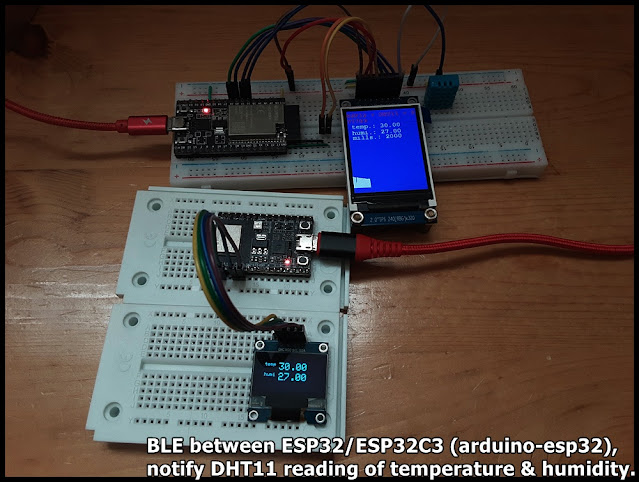
BLE between ESP32/ESP32C3 (arduino-esp32), notify DHT11 reading of temperature & humidity.

This exercise run on ESP32/ESP32-C3 to perform BLE communication, to notify data update. Both run on arduino-esp32 framework.


The BLE server run on ESP32-DevKitC V4, read DHT11 temperature & humidity, display on ST7789 SPI TFT, and notify connected client. The BLE client run on ESP32-C3-DevKitM-1, connect to BLE server, update SSD1306 I2C OLED once notified data updated.

Basically, the server copy from my former exercise "ESP32 + DHT11 temperature & humidity sensor with display on ST7789 and BLE function", the client copy from BLE_client example. 

But with my original setting (follow BLE_notify example) in server side:

  pAdvertising->setScanResponse(false);
  pAdvertising->setMinPreferred(0x0);
both advertisedDevice.haveServiceUUID() and advertisedDevice.isAdvertisingService(serviceUUID) in client return false. So the client cannot find the server.

To solve it, I change the setting (follow BLE_server example):
  pAdvertising->setScanResponse(true);
  pAdvertising->setMinPreferred(0x06);
  pAdvertising->setMinPreferred(0x12);
then both advertisedDevice.haveServiceUUID() and advertisedDevice.isAdvertisingService(serviceUUID) in client return true, such that the server can be found.

ESP32_DHT_ST789_graphic_BLE_2021-12-14.ino, server side run on ESP32-DevKitC V4.
/*
   Execise run on ESP32 (ESP32-DevKitC V4) with arduino-esp32 2.0.1,
   read DHT11 Humidity & Temperature Sensor,
   and display on ST7789 SPI TFT, 2" IPS 240x320, with graph.
   BLE function added.

   Library needed:
   - DHT sensor library for ESPx by beegee_tokyo
   - Adafruit ST7735 and ST7789 Library by Adafruit
   - Adafruit GFX Library by Adafruit

    Modify from examples DHT_ESP32 of DHT sensor library for ESPx

    Connection between DHT11 and ESP32 (GPIO#)
    -----------------------------------------------
    DHT11         ESP32
    -----         -----
    VCC*          3V3
    DATA**        32
    NC
    GND           GND

 *  * - depends on module, my DHT11 module is 3V3~5V operate.

 *  ** - depends on your module, maybe you have to add a
    pull-up resistor (~10K Ohm) betwee DATA and VCC.

    Connection between ST7789 SPI and ESP32 (GPIO#)
    -----------------------------------------------
    ST7789 SPI    ESP32
    ----------    -----
    GND           GND
    VCC           3V3
    SCL           18
    SDA           23
    RES           26
    DC            25
    CS            33
    BLK           3V3

*/
#include "DHTesp.h"
#include <Ticker.h>
#include <Adafruit_GFX.h>    // Core graphics library
#include <Adafruit_ST7789.h> // Hardware-specific library for ST7789
#include <Fonts/FreeMonoBold12pt7b.h>
#include <SPI.h>

#include <BLEDevice.h>
#include <BLEServer.h>
#include <BLEUtils.h>
#include <BLE2902.h>

#ifndef ESP32
#pragma message(THIS EXAMPLE IS FOR ESP32 ONLY!)
#error Select ESP32 board.
#endif

DHTesp dht;

void tempTask(void *pvParameters);
bool getTemperature();
void triggerGetTemp();

/** Task handle for the light value read task */
TaskHandle_t tempTaskHandle = NULL;
/** Ticker for temperature reading */
Ticker tempTicker;
/** Comfort profile */
ComfortState cf;
/** Flag if task should run */
bool tasksEnabled = false;
/** Pin number for DHT11 data pin */
int dhtPin = 32;  //17;

//hardware SPI MOSI   23
//hardware SPI SCK    18
#define TFT_CS        33
#define TFT_RST       26
#define TFT_DC        25
Adafruit_ST7789 tft = Adafruit_ST7789(TFT_CS, TFT_DC, TFT_RST);

bool rqsUpdate = false;
TempAndHumidity updateValues;

unsigned long prvUpdateMillis;

#define FRAME_TOPX    0
#define FRAME_TOPY    200
#define FRAME_WIDTH   240
#define FRAME_HEIGHT  100
#define FRAME_BOTTOMY FRAME_TOPY + FRAME_HEIGHT
#define SCR_HEIGHT    320

int idx = 0;
#define IDX_MAX     240

BLEServer* pServer = NULL;
BLECharacteristic* pCharacteristic = NULL;
BLECharacteristic* pChar_temp = NULL;
BLECharacteristic* pChar_humi = NULL;
bool deviceConnected = false;
bool oldDeviceConnected = false;

// See the following for generating UUIDs:
// https://www.uuidgenerator.net/

#define SERVICE_UUID "FC8601FC-7829-407B-9C2E-4D3F117DFF2D"
#define CHAR_UUID_TEMP "0FD31907-35AE-4BB0-8AB1-51F98C05B326"
#define CHAR_UUID_HUMI "D01D3AF7-818D-4A90-AECF-0E1EC48AA5F0"

class MyServerCallbacks: public BLEServerCallbacks {
    void onConnect(BLEServer* pServer) {
      deviceConnected = true;
      BLEDevice::startAdvertising();
      Serial.println("MyServerCallbacks.onConnect");
    };

    void onDisconnect(BLEServer* pServer) {
      deviceConnected = false;
      Serial.println("MyServerCallbacks.onDisconnect");
    }
};

/**
   initTemp
   Setup DHT library
   Setup task and timer for repeated measurement
   @return bool
      true if task and timer are started
      false if task or timer couldn't be started
*/
bool initTemp() {
  byte resultValue = 0;
  // Initialize temperature sensor
  dht.setup(dhtPin, DHTesp::DHT11);
  Serial.println("DHT initiated");

  // Start task to get temperature
  xTaskCreatePinnedToCore(
    tempTask,                       /* Function to implement the task */
    "tempTask ",                    /* Name of the task */
    4000,                           /* Stack size in words */
    NULL,                           /* Task input parameter */
    5,                              /* Priority of the task */
    &tempTaskHandle,                /* Task handle. */
    1);                             /* Core where the task should run */

  if (tempTaskHandle == NULL) {
    Serial.println("Failed to start task for temperature update");
    return false;
  } else {
    // Start update of environment data every XX seconds
    tempTicker.attach(2, triggerGetTemp);
  }
  return true;
}

/**
   triggerGetTemp
   Sets flag dhtUpdated to true for handling in loop()
   called by Ticker getTempTimer
*/
void triggerGetTemp() {
  if (tempTaskHandle != NULL) {
    xTaskResumeFromISR(tempTaskHandle);
  }
}

/**
   Task to reads temperature from DHT11 sensor
   @param pvParameters
      pointer to task parameters
*/
void tempTask(void *pvParameters) {
  Serial.println("tempTask loop started");
  while (1) // tempTask loop
  {
    if (tasksEnabled) {
      // Get temperature values
      getTemperature();
    }
    // Got sleep again
    vTaskSuspend(NULL);
  }
}

/**
   getTemperature
   Reads temperature from DHT11 sensor
   @return bool
      true if temperature could be aquired
      false if aquisition failed
*/
bool getTemperature() {
  // Reading temperature for humidity takes about 250 milliseconds!
  // Sensor readings may also be up to 2 seconds 'old' (it's a very slow sensor)
  TempAndHumidity newValues = dht.getTempAndHumidity();
  // Check if any reads failed and exit early (to try again).
  if (dht.getStatus() != 0) {
    Serial.println("DHT11 error status: " + String(dht.getStatusString()));
    return false;
  }

  rqsUpdate = true;
  updateValues = newValues;
  return true;
}

void setup()
{
  Serial.begin(115200);
  Serial.println();
  Serial.println("DHT ESP32 example with tasks");

  //init DHT
  initTemp();
  // Signal end of setup() to tasks
  tasksEnabled = true;

  //init BLE
  // Create the BLE Device
  BLEDevice::init("ESP32-DHT11");

  // Create the BLE Server
  pServer = BLEDevice::createServer();

  pServer->setCallbacks(new MyServerCallbacks());

  // Create the BLE Service
  BLEService *pService = pServer->createService(SERVICE_UUID);

  // Create a BLE Characteristic for temp and humi
  pChar_temp = pService->createCharacteristic(
                 CHAR_UUID_TEMP,
                 BLECharacteristic::PROPERTY_READ   |
                 BLECharacteristic::PROPERTY_WRITE  |
                 BLECharacteristic::PROPERTY_NOTIFY |
                 BLECharacteristic::PROPERTY_INDICATE
               );
  pChar_humi = pService->createCharacteristic(
                 CHAR_UUID_HUMI,
                 BLECharacteristic::PROPERTY_READ   |
                 BLECharacteristic::PROPERTY_WRITE  |
                 BLECharacteristic::PROPERTY_NOTIFY |
                 BLECharacteristic::PROPERTY_INDICATE
               );

  pChar_temp->addDescriptor(new BLE2902());
  pChar_humi->addDescriptor(new BLE2902());

  // Start the service
  pService->start();

  // Start advertising
  BLEAdvertising *pAdvertising = BLEDevice::getAdvertising();
  pAdvertising->addServiceUUID(SERVICE_UUID);
  
  // Erik updated@2021-12-14
  //pAdvertising->setScanResponse(false);
  //pAdvertising->setMinPreferred(0x0);  // set value to 0x00 to not advertise this parameter
  
  pAdvertising->setScanResponse(true);
  pAdvertising->setMinPreferred(0x06);  // functions that help with iPhone connections issue
  pAdvertising->setMinPreferred(0x12);
  //print for information only
  Serial.println("pAdvertising->setScanResponse(true)");
  Serial.println("pAdvertising->setMinPreferred(0x06)");
  Serial.println("pAdvertising->setMinPreferred(0x12)");
  
  BLEDevice::startAdvertising();
  Serial.println("Waiting a client connection to notify...");


  //init ST7789
  tft.init(240, 320);           // Init ST7789 320x240
  tft.setRotation(2);
  tft.setFont(&FreeMonoBold12pt7b);
  tft.setTextWrap(true);

  tft.fillScreen(ST77XX_RED);
  delay(300);
  tft.fillScreen(ST77XX_GREEN);
  delay(300);
  tft.fillScreen(ST77XX_BLUE);
  delay(300);

  tft.setCursor(0, 0);
  tft.setTextColor(ST77XX_RED);
  tft.print("\n");
  tft.print("ESP32 + DHT11 + ST7789\n");

  prvUpdateMillis = millis();

}

void loop() {
  if (!tasksEnabled) {
    // Wait 2 seconds to let system settle down
    delay(2000);
    // Enable task that will read values from the DHT sensor
    tasksEnabled = true;
    if (tempTaskHandle != NULL) {
      vTaskResume(tempTaskHandle);
    }
  }

  if (rqsUpdate) {

    unsigned long curUpdateMillis = millis();

    tft.fillRect(0, 53, 240, 75, ST77XX_BLUE );

    tft.setCursor(0, 70);
    tft.setTextColor(ST77XX_WHITE);
    tft.print(" temp.: " + String(updateValues.temperature));
    tft.setCursor(0, 95);
    tft.setTextColor(ST77XX_WHITE);
    tft.print(" humi.: " + String(updateValues.humidity));
    tft.setCursor(0, 115);
    tft.setTextColor(ST77XX_WHITE);
    tft.print(" mills.: " + String(curUpdateMillis - prvUpdateMillis));
    prvUpdateMillis = curUpdateMillis;


    if (idx == 0) {
      tft.fillRect(FRAME_TOPX, FRAME_TOPY,
                   FRAME_WIDTH, SCR_HEIGHT - FRAME_TOPY,
                   ST77XX_BLUE);
    }

    tft.drawLine(
      FRAME_TOPX + idx, FRAME_BOTTOMY,
      FRAME_TOPX + idx, FRAME_BOTTOMY - (int)updateValues.temperature,
      ST77XX_WHITE);

    idx++;
    if (idx >= IDX_MAX)
      idx = 0;

    char bufTemp[5];
    char bufHumi[5];
    //convert floating point value to String
    dtostrf(updateValues.temperature, 0, 2, bufTemp);
    dtostrf(updateValues.humidity, 0, 2, bufHumi);

    pChar_temp->setValue((uint8_t*)bufTemp, 5);
    pChar_temp->notify();
    pChar_humi->setValue((uint8_t*)bufHumi, 5);
    pChar_humi->notify();

    //Serial.println(" T:" + String(updateValues.temperature) + " H:" + String(updateValues.humidity));
    rqsUpdate = false;


  }

  // disconnecting
  if (!deviceConnected && oldDeviceConnected) {
    Serial.println("disconnecting");
    delay(500); // give the bluetooth stack the chance to get things ready
    pServer->startAdvertising(); // restart advertising
    Serial.println("start advertising");
    oldDeviceConnected = deviceConnected;
  }
  // connecting
  if (deviceConnected && !oldDeviceConnected) {
    Serial.println("connecting");
    // do stuff here on connecting
    oldDeviceConnected = deviceConnected;
  }

  yield();
}


ESP32C3_BLE_client.ino, client side run on ESP32-C3-DevKitM-1. Copy from BLE_client example, with UUID updated.
/**
 * A BLE client example that is rich in capabilities.
 * There is a lot new capabilities implemented.
 * author unknown
 * updated by chegewara
 */

#include "BLEDevice.h"
//#include "BLEScan.h"

#define SERVICE_UUID "FC8601FC-7829-407B-9C2E-4D3F117DFF2D"
#define CHAR_UUID_TEMP "0FD31907-35AE-4BB0-8AB1-51F98C05B326"
#define CHAR_UUID_HUMI "D01D3AF7-818D-4A90-AECF-0E1EC48AA5F0"

// The remote service we wish to connect to.
static BLEUUID serviceUUID(SERVICE_UUID);
// The characteristic of the remote service we are interested in.
static BLEUUID    charUUID(CHAR_UUID_TEMP);

static boolean doConnect = false;
static boolean connected = false;
static boolean doScan = false;
static BLERemoteCharacteristic* pRemoteCharacteristic;
static BLEAdvertisedDevice* myDevice;

static void notifyCallback(
  BLERemoteCharacteristic* pBLERemoteCharacteristic,
  uint8_t* pData,
  size_t length,
  bool isNotify) {
    Serial.print("Notify callback for characteristic ");
    Serial.print(pBLERemoteCharacteristic->getUUID().toString().c_str());
    Serial.print(" of data length ");
    Serial.println(length);
    Serial.print("data: ");
    Serial.println((char*)pData);
}

class MyClientCallback : public BLEClientCallbacks {
  void onConnect(BLEClient* pclient) {
  }

  void onDisconnect(BLEClient* pclient) {
    connected = false;
    Serial.println("onDisconnect");
  }
};

bool connectToServer() {
    Serial.print("Forming a connection to ");
    Serial.println(myDevice->getAddress().toString().c_str());
    
    BLEClient*  pClient  = BLEDevice::createClient();
    Serial.println(" - Created client");

    pClient->setClientCallbacks(new MyClientCallback());

    // Connect to the remove BLE Server.
    pClient->connect(myDevice);  // if you pass BLEAdvertisedDevice instead of address, it will be recognized type of peer device address (public or private)
    Serial.println(" - Connected to server");
    pClient->setMTU(517); //set client to request maximum MTU from server (default is 23 otherwise)
  
    // Obtain a reference to the service we are after in the remote BLE server.
    BLERemoteService* pRemoteService = pClient->getService(serviceUUID);
    if (pRemoteService == nullptr) {
      Serial.print("Failed to find our service UUID: ");
      Serial.println(serviceUUID.toString().c_str());
      pClient->disconnect();
      return false;
    }
    Serial.println(" - Found our service");


    // Obtain a reference to the characteristic in the service of the remote BLE server.
    pRemoteCharacteristic = pRemoteService->getCharacteristic(charUUID);
    if (pRemoteCharacteristic == nullptr) {
      Serial.print("Failed to find our characteristic UUID: ");
      Serial.println(charUUID.toString().c_str());
      pClient->disconnect();
      return false;
    }
    Serial.println(" - Found our characteristic");

    // Read the value of the characteristic.
    if(pRemoteCharacteristic->canRead()) {
      std::string value = pRemoteCharacteristic->readValue();
      Serial.print("The characteristic value was: ");
      Serial.println(value.c_str());
    }

    if(pRemoteCharacteristic->canNotify())
      pRemoteCharacteristic->registerForNotify(notifyCallback);

    connected = true;
    return true;
}
/**
 * Scan for BLE servers and find the first one that advertises the service we are looking for.
 */
class MyAdvertisedDeviceCallbacks: public BLEAdvertisedDeviceCallbacks {
 /**
   * Called for each advertising BLE server.
   */
  void onResult(BLEAdvertisedDevice advertisedDevice) {
    Serial.print("BLE Advertised Device found: ");
    Serial.println(advertisedDevice.toString().c_str());

    if(advertisedDevice.haveServiceUUID()){
      Serial.println("- advertisedDevice.haveServiceUUID()");
    }
    if(advertisedDevice.isAdvertisingService(serviceUUID)){
      Serial.println("- advertisedDevice.isAdvertisingService(serviceUUID)");
    }

    // We have found a device, let us now see if it contains the service we are looking for.
    if (advertisedDevice.haveServiceUUID() && advertisedDevice.isAdvertisingService(serviceUUID)) {

      BLEDevice::getScan()->stop();
      myDevice = new BLEAdvertisedDevice(advertisedDevice);
      doConnect = true;
      doScan = true;

      Serial.println("*** device found ***");

    } // Found our server
  } // onResult
}; // MyAdvertisedDeviceCallbacks


void setup() {
  Serial.begin(115200);
  Serial.println("Starting Arduino BLE Client application...");
  BLEDevice::init("");

  // Retrieve a Scanner and set the callback we want to use to be informed when we
  // have detected a new device.  Specify that we want active scanning and start the
  // scan to run for 5 seconds.
  BLEScan* pBLEScan = BLEDevice::getScan();
  pBLEScan->setAdvertisedDeviceCallbacks(new MyAdvertisedDeviceCallbacks());
  pBLEScan->setInterval(1349);
  pBLEScan->setWindow(449);
  pBLEScan->setActiveScan(true);
  pBLEScan->start(5, false);
} // End of setup.


// This is the Arduino main loop function.
void loop() {

  // If the flag "doConnect" is true then we have scanned for and found the desired
  // BLE Server with which we wish to connect.  Now we connect to it.  Once we are 
  // connected we set the connected flag to be true.
  if (doConnect == true) {
    if (connectToServer()) {
      Serial.println("We are now connected to the BLE Server.");
    } else {
      Serial.println("We have failed to connect to the server; there is nothin more we will do.");
    }
    doConnect = false;
  }

  // If we are connected to a peer BLE Server, update the characteristic each time we are reached
  // with the current time since boot.
  if (connected) {
    String newValue = "Time since boot: " + String(millis()/1000);
    Serial.println("Setting new characteristic value to \"" + newValue + "\"");
    
    // Set the characteristic's value to be the array of bytes that is actually a string.
    pRemoteCharacteristic->writeValue(newValue.c_str(), newValue.length());
  }else if(doScan){
    BLEDevice::getScan()->start(0);  // this is just example to start scan after disconnect, most likely there is better way to do it in arduino
  }
  
  delay(1000); // Delay a second between loops.
} // End of loop


ESP32C3_BLE_DHT11_client.ino, updated to recognize temperature & humidity.
/**
 * modified from BLE_client
 * to work with ESP32_DHT_ST789_graphic_BLE.ino,
 * to monitor temp/humi.
 */

#include "BLEDevice.h"
//#include "BLEScan.h"

#define SERVICE_UUID "FC8601FC-7829-407B-9C2E-4D3F117DFF2D"
#define CHAR_UUID_TEMP "0FD31907-35AE-4BB0-8AB1-51F98C05B326"
#define CHAR_UUID_HUMI "D01D3AF7-818D-4A90-AECF-0E1EC48AA5F0"

// The remote service we wish to connect to.
static BLEUUID serviceUUID(SERVICE_UUID);
// The characteristic of the remote service we are interested in.
static BLEUUID  charUUID_TEMP(CHAR_UUID_TEMP);
static BLEUUID  charUUID_HUMI(CHAR_UUID_HUMI);

static boolean doConnect = false;
static boolean connected = false;
static boolean doScan = false;
static BLERemoteCharacteristic* pRemoteChar_temp;
static BLERemoteCharacteristic* pRemoteChar_humi;
static BLEAdvertisedDevice* myDevice;

static void notifyCallback(
  BLERemoteCharacteristic* pBLERemoteCharacteristic,
  uint8_t* pData,
  size_t length,
  bool isNotify) {

    String strCharUUID = pBLERemoteCharacteristic->getUUID().toString().c_str();
    Serial.printf("Notify callback for characteristic: ");
    strCharUUID.toUpperCase();
    Serial.println(strCharUUID);

    if(strCharUUID.equals(CHAR_UUID_TEMP)){
      Serial.print("temp: ");
      for (int i=0; i<length; i++)
          Serial.print((char) pData[i]);
    }else if(strCharUUID.equals(CHAR_UUID_HUMI)){
      Serial.print("humi: ");
      for (int i=0; i<length; i++)
          Serial.print((char) pData[i]);
    }

    Serial.println();
}

class MyClientCallback : public BLEClientCallbacks {
  void onConnect(BLEClient* pclient) {
  }

  void onDisconnect(BLEClient* pclient) {
    connected = false;
    Serial.println("onDisconnect");
  }
};

bool connectToServer() {
    Serial.print("Forming a connection to ");
    Serial.println(myDevice->getAddress().toString().c_str());
    
    BLEClient*  pClient  = BLEDevice::createClient();
    Serial.println(" - Created client");

    pClient->setClientCallbacks(new MyClientCallback());

    // Connect to the remove BLE Server.
    // if you pass BLEAdvertisedDevice instead of address, 
    // it will be recognized type of peer device address (public or private)
    pClient->connect(myDevice);  
    Serial.println(" - Connected to server");
    //set client to request maximum MTU from server (default is 23 otherwise)
    pClient->setMTU(517); 
  
    // Obtain a reference to the service we are after in the remote BLE server.
    BLERemoteService* pRemoteService = pClient->getService(serviceUUID);
    if (pRemoteService == nullptr) {
      Serial.print("Failed to find our service UUID: ");
      Serial.println(serviceUUID.toString().c_str());
      pClient->disconnect();
      return false;
    }
    Serial.println(" - Found our service");


    // Obtain a reference to the characteristic in the service 
    // of the remote BLE server.
    pRemoteChar_temp = pRemoteService->getCharacteristic(charUUID_TEMP);
    if (pRemoteChar_temp == nullptr) {
      Serial.print("Failed to find our characteristic UUID: ");
      Serial.println(charUUID_TEMP.toString().c_str());
      pClient->disconnect();
      return false;
    }
    Serial.println(" - Found temp characteristic");

    pRemoteChar_humi = pRemoteService->getCharacteristic(charUUID_HUMI);
    if (pRemoteChar_humi == nullptr) {
      Serial.print("Failed to find our characteristic UUID: ");
      Serial.println(charUUID_TEMP.toString().c_str());
      pClient->disconnect();
      return false;
    }
    Serial.println(" - Found humi characteristic");

    // Read the value of the characteristic.
    if(pRemoteChar_temp->canRead()) {
      std::string value = pRemoteChar_temp->readValue();
      Serial.print("The characteristic temp value was: ");
      Serial.println(value.c_str());
    }
    if(pRemoteChar_humi->canRead()) {
      std::string value = pRemoteChar_humi->readValue();
      Serial.print("The characteristic humi value was: ");
      Serial.println(value.c_str());
    }

    if(pRemoteChar_temp->canNotify())
      pRemoteChar_temp->registerForNotify(notifyCallback);
    if(pRemoteChar_humi->canNotify())
      pRemoteChar_humi->registerForNotify(notifyCallback);

    connected = true;
    return true;
}
/**
 * Scan for BLE servers and 
 * find the first one that advertises the service we are looking for.
 */
class MyAdvertisedDeviceCallbacks: public BLEAdvertisedDeviceCallbacks {
 /**
   * Called for each advertising BLE server.
   */
  void onResult(BLEAdvertisedDevice advertisedDevice) {
    Serial.print("BLE Advertised Device found: ");
    Serial.println(advertisedDevice.toString().c_str());

    if(advertisedDevice.haveServiceUUID()){
      Serial.println("- haveServiceUUID()");
    }
    if(advertisedDevice.isAdvertisingService(serviceUUID)){
      Serial.println("- isAdvertisingService(serviceUUID)");
    }

    // We have found a device, 
    // let us now see if it contains the service we are looking for.
    if (advertisedDevice.haveServiceUUID() && 
      advertisedDevice.isAdvertisingService(serviceUUID)) {

      BLEDevice::getScan()->stop();
      myDevice = new BLEAdvertisedDevice(advertisedDevice);
      doConnect = true;
      doScan = true;

      Serial.println("*** device found ***");

    } // Found our server
  } // onResult
}; // MyAdvertisedDeviceCallbacks


void setup() {
  Serial.begin(115200);
  Serial.println("Starting Arduino BLE Client application...");
  BLEDevice::init("");

  // Retrieve a Scanner and set the callback we want to use to be informed when we
  // have detected a new device.  Specify that we want active scanning and start the
  // scan to run for 5 seconds.
  BLEScan* pBLEScan = BLEDevice::getScan();
  pBLEScan->setAdvertisedDeviceCallbacks(new MyAdvertisedDeviceCallbacks());
  pBLEScan->setInterval(1349);
  pBLEScan->setWindow(449);
  pBLEScan->setActiveScan(true);
  pBLEScan->start(5, false);
} // End of setup.


// This is the Arduino main loop function.
void loop() {

  // If the flag "doConnect" is true then we have scanned for and found the desired
  // BLE Server with which we wish to connect.  Now we connect to it.  Once we are 
  // connected we set the connected flag to be true.
  if (doConnect == true) {
    if (connectToServer()) {
      Serial.println("We are now connected to the BLE Server.");
    } else {
      Serial.println("We have failed to connect to the server.");
    }
    doConnect = false;
  }

  // If we are connected to a peer BLE Server, 
  // update the characteristic each time we are reached
  // with the current time since boot.
  if (connected) {

  }else if(doScan){
    // this is just example to start scan after disconnect, 
    // most likely there is better way to do it in arduino
    BLEDevice::getScan()->start(0);  
  }
  
  delay(1000); // Delay a second between loops.
} // End of loop


ESP32C3_BLE_DHT11_SSD1306_client.ino, with display on SSD1306 I2C OLED. For the SSD1306 part, refer to last exercise "ESP32-C3-DevKitM-1 display on ssd1306 I2C OLED using Adafruit SSD1306 library".
/**
 * modified from BLE_client
 * to work with ESP32_DHT_ST789_graphic_BLE.ino,
 * to monitor temp/humi.
 * and display on SSD1306 I2C OLED
 */

#include "BLEDevice.h"
//#include "BLEScan.h"
#include <SPI.h>
#include <Wire.h>
#include <Adafruit_GFX.h>
#include <Adafruit_SSD1306.h>

#define SCREEN_WIDTH 128 // OLED display width, in pixels
#define SCREEN_HEIGHT 64 // OLED display height, in pixels

#define SDA_pin 3
#define SCL_pin 2
#define OLED_RESET     -1
#define SCREEN_ADDRESS 0x3C //0x3D ///
Adafruit_SSD1306 display;

#define SERVICE_UUID "FC8601FC-7829-407B-9C2E-4D3F117DFF2D"
#define CHAR_UUID_TEMP "0FD31907-35AE-4BB0-8AB1-51F98C05B326"
#define CHAR_UUID_HUMI "D01D3AF7-818D-4A90-AECF-0E1EC48AA5F0"

// The remote service we wish to connect to.
static BLEUUID serviceUUID(SERVICE_UUID);
// The characteristic of the remote service we are interested in.
static BLEUUID  charUUID_TEMP(CHAR_UUID_TEMP);
static BLEUUID  charUUID_HUMI(CHAR_UUID_HUMI);

static boolean doConnect = false;
static boolean connected = false;
static boolean doScan = false;
static BLERemoteCharacteristic* pRemoteChar_temp;
static BLERemoteCharacteristic* pRemoteChar_humi;
static BLEAdvertisedDevice* myDevice;

static void notifyCallback(
  BLERemoteCharacteristic* pBLERemoteCharacteristic,
  uint8_t* pData,
  size_t length,
  bool isNotify) {

    String strCharUUID = pBLERemoteCharacteristic->getUUID().toString().c_str();
    Serial.printf("Notify callback for characteristic: ");
    strCharUUID.toUpperCase();
    Serial.println(strCharUUID);

    if(strCharUUID.equals(CHAR_UUID_TEMP)){
      Serial.print("temp: ");

      String strTemp = (char*)pData;
      Serial.print(strTemp);
      displayTemp(strTemp);
      
    }else if(strCharUUID.equals(CHAR_UUID_HUMI)){
      Serial.print("humi: ");

      String strHumi = (char*)pData;
      Serial.print(strHumi);
      displayHumi(strHumi);
    }

    Serial.println();
}

class MyClientCallback : public BLEClientCallbacks {
  void onConnect(BLEClient* pclient) {
    displayPrompt("onConnect");
  }

  void onDisconnect(BLEClient* pclient) {
    connected = false;
    Serial.println("onDisconnect");
    displayPrompt("onDisconnect");
  }
};

bool connectToServer() {
    Serial.print("Forming a connection to ");
    Serial.println(myDevice->getAddress().toString().c_str());
    
    BLEClient*  pClient  = BLEDevice::createClient();
    Serial.println(" - Created client");

    pClient->setClientCallbacks(new MyClientCallback());

    // Connect to the remove BLE Server.
    // if you pass BLEAdvertisedDevice instead of address, 
    // it will be recognized type of peer device address (public or private)
    pClient->connect(myDevice);  
    Serial.println(" - Connected to server");
    //set client to request maximum MTU from server (default is 23 otherwise)
    pClient->setMTU(517); 
  
    // Obtain a reference to the service we are after in the remote BLE server.
    BLERemoteService* pRemoteService = pClient->getService(serviceUUID);
    if (pRemoteService == nullptr) {
      Serial.print("Failed to find our service UUID: ");
      Serial.println(serviceUUID.toString().c_str());
      pClient->disconnect();
      return false;
    }
    Serial.println(" - Found our service");


    // Obtain a reference to the characteristic in the service 
    // of the remote BLE server.
    pRemoteChar_temp = pRemoteService->getCharacteristic(charUUID_TEMP);
    if (pRemoteChar_temp == nullptr) {
      Serial.print("Failed to find our characteristic UUID: ");
      Serial.println(charUUID_TEMP.toString().c_str());
      pClient->disconnect();
      return false;
    }
    Serial.println(" - Found temp characteristic");

    pRemoteChar_humi = pRemoteService->getCharacteristic(charUUID_HUMI);
    if (pRemoteChar_humi == nullptr) {
      Serial.print("Failed to find our characteristic UUID: ");
      Serial.println(charUUID_TEMP.toString().c_str());
      pClient->disconnect();
      return false;
    }
    Serial.println(" - Found humi characteristic");

    // Read the value of the characteristic.
    if(pRemoteChar_temp->canRead()) {
      std::string value = pRemoteChar_temp->readValue();
      Serial.print("The characteristic temp value was: ");
      Serial.println(value.c_str());
      displayTemp(value.c_str());
    }
    if(pRemoteChar_humi->canRead()) {
      std::string value = pRemoteChar_humi->readValue();
      Serial.print("The characteristic humi value was: ");
      Serial.println(value.c_str());
      displayHumi(value.c_str());
    }

    if(pRemoteChar_temp->canNotify())
      pRemoteChar_temp->registerForNotify(notifyCallback);
    if(pRemoteChar_humi->canNotify())
      pRemoteChar_humi->registerForNotify(notifyCallback);

    connected = true;
    return true;
}
/**
 * Scan for BLE servers and 
 * find the first one that advertises the service we are looking for.
 */
class MyAdvertisedDeviceCallbacks: public BLEAdvertisedDeviceCallbacks {
 /**
   * Called for each advertising BLE server.
   */
  void onResult(BLEAdvertisedDevice advertisedDevice) {
    Serial.print("BLE Advertised Device found: ");
    Serial.println(advertisedDevice.toString().c_str());

    if(advertisedDevice.haveServiceUUID()){
      Serial.println("- haveServiceUUID()");
    }
    if(advertisedDevice.isAdvertisingService(serviceUUID)){
      Serial.println("- isAdvertisingService(serviceUUID)");
    }

    // We have found a device, 
    // let us now see if it contains the service we are looking for.
    if (advertisedDevice.haveServiceUUID() && 
      advertisedDevice.isAdvertisingService(serviceUUID)) {

      BLEDevice::getScan()->stop();
      myDevice = new BLEAdvertisedDevice(advertisedDevice);
      doConnect = true;
      doScan = true;

      Serial.println("*** device found ***");
      displayPrompt("found");

    } // Found our server
  } // onResult
}; // MyAdvertisedDeviceCallbacks

void initScreen(){

  Wire.setPins(SDA_pin,SCL_pin);
  display = Adafruit_SSD1306(SCREEN_WIDTH, SCREEN_HEIGHT, &Wire, OLED_RESET);
  
  // SSD1306_SWITCHCAPVCC = generate display voltage from 3.3V internally
  if(!display.begin(SSD1306_SWITCHCAPVCC, SCREEN_ADDRESS)) {
    Serial.println(F("SSD1306 allocation failed"));
    for(;;); // Don't proceed, loop forever
  }

  display.clearDisplay();
  display.display();
  delay(500);

  display.setTextSize(2);
  display.setTextColor(SSD1306_WHITE); // Draw white text
  display.cp437(true);         // Use full 256 char 'Code Page 437' font

  display.setCursor(10, 10);
  display.printf("ESP32C3");
  display.setCursor(10, 28);
  display.printf("BLE");

  display.fillRect(0, 0, display.width()-1, display.height()-1, SSD1306_INVERSE);
  display.display();
  delay(3000);

  // Clear the buffer
  display.clearDisplay();
  display.display();

}


void displayTemp(String temp){

  //erase display of old temp
  display.fillRect(40, 10, 80, 18, SSD1306_BLACK);
  
  display.setCursor(10, 10);
  display.setTextSize(1);
  display.print("temp");
  display.setCursor(40, 10);
  display.setTextSize(2);
  display.print(temp);
  display.display();
}

void displayHumi(String humi){

  //erase display of old humi
  display.fillRect(40, 30, 80, 18, SSD1306_BLACK);
  
  display.setCursor(10, 30);
  display.setTextSize(1);
  display.print("humi");
  display.setCursor(40, 30);
  display.setTextSize(2);
  display.print(humi);
  display.display();
}

void displayPrompt(String prompt){

  //erase display of old temp
  display.fillRect(10, 10, 110, 40, SSD1306_BLACK);

  display.setCursor(40, 10);
  display.setTextSize(1);
  display.print(prompt);
  display.display();
}


void setup() {
  Serial.begin(115200);
  Serial.println("Starting Arduino BLE Client application...");

  initScreen();
  
  BLEDevice::init("");

  // Retrieve a Scanner and set the callback we want to use to be informed when we
  // have detected a new device.  Specify that we want active scanning and start the
  // scan to run for 5 seconds.
  BLEScan* pBLEScan = BLEDevice::getScan();
  pBLEScan->setAdvertisedDeviceCallbacks(new MyAdvertisedDeviceCallbacks());
  pBLEScan->setInterval(1349);
  pBLEScan->setWindow(449);
  pBLEScan->setActiveScan(true);
  pBLEScan->start(5, false);
  
  displayPrompt("Scan");
  Serial.println("Scan");
} // End of setup.


// This is the Arduino main loop function.
void loop() {

  // If the flag "doConnect" is true then we have scanned for and found the desired
  // BLE Server with which we wish to connect.  Now we connect to it.  Once we are 
  // connected we set the connected flag to be true.
  if (doConnect == true) {
    if (connectToServer()) {
      Serial.println("We are now connected to the BLE Server.");
    } else {
      Serial.println("We have failed to connect to the server.");
    }
    doConnect = false;
  }

  // If we are connected to a peer BLE Server, 
  // update the characteristic each time we are reached
  // with the current time since boot.
  if (connected) {

  }else if(doScan){
    // this is just example to start scan after disconnect, 
    // most likely there is better way to do it in arduino
    displayPrompt("Scan");
    Serial.println("Scan");
    BLEDevice::getScan()->start(0);  
  }
  
  delay(1000); // Delay a second between loops.
} // End of loop