This exercise run on ESP32/ESP32-C3 to perform BLE communication, to notify data update. Both run on arduino-esp32 framework.
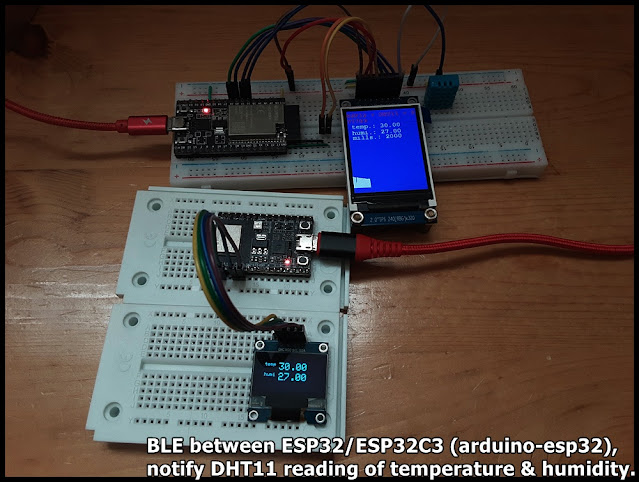
The BLE server run on ESP32-DevKitC V4, read DHT11 temperature & humidity, display on ST7789 SPI TFT, and notify connected client. The BLE client run on ESP32-C3-DevKitM-1, connect to BLE server, update SSD1306 I2C OLED once notified data updated.
Basically, the server copy from my former exercise "ESP32 + DHT11 temperature & humidity sensor with display on ST7789 and BLE function", the client copy from BLE_client example.
But with my original setting (follow BLE_notify example) in server side:
  pAdvertising->setScanResponse(false);
  pAdvertising->setMinPreferred(0x0);
To solve it, I change the setting (follow BLE_server example):
  pAdvertising->setScanResponse(true);
  pAdvertising->setMinPreferred(0x06);
  pAdvertising->setMinPreferred(0x12);
/*
   Execise run on ESP32 (ESP32-DevKitC V4) with arduino-esp32 2.0.1,
   read DHT11 Humidity & Temperature Sensor,
   and display on ST7789 SPI TFT, 2" IPS 240x320, with graph.
   BLE function added.

   Library needed:
   - DHT sensor library for ESPx by beegee_tokyo
   - Adafruit ST7735 and ST7789 Library by Adafruit
   - Adafruit GFX Library by Adafruit

    Modify from examples DHT_ESP32 of DHT sensor library for ESPx

    Connection between DHT11 and ESP32 (GPIO#)
    -----------------------------------------------
    DHT11         ESP32
    -----         -----
    VCC*          3V3
    DATA**        32
    NC
    GND           GND

 *  * - depends on module, my DHT11 module is 3V3~5V operate.

 *  ** - depends on your module, maybe you have to add a
    pull-up resistor (~10K Ohm) betwee DATA and VCC.

    Connection between ST7789 SPI and ESP32 (GPIO#)
    -----------------------------------------------
    ST7789 SPI    ESP32
    ----------    -----
    GND           GND
    VCC           3V3
    SCL           18
    SDA           23
    RES           26
    DC            25
    CS            33
    BLK           3V3

*/
#include "DHTesp.h"
#include <Ticker.h>
#include <Adafruit_GFX.h>    // Core graphics library
#include <Adafruit_ST7789.h> // Hardware-specific library for ST7789
#include <Fonts/FreeMonoBold12pt7b.h>
#include <SPI.h>

#include <BLEDevice.h>
#include <BLEServer.h>
#include <BLEUtils.h>
#include <BLE2902.h>

#ifndef ESP32
#pragma message(THIS EXAMPLE IS FOR ESP32 ONLY!)
#error Select ESP32 board.
#endif

DHTesp dht;

void tempTask(void *pvParameters);
bool getTemperature();
void triggerGetTemp();

/** Task handle for the light value read task */
TaskHandle_t tempTaskHandle = NULL;
/** Ticker for temperature reading */
Ticker tempTicker;
/** Comfort profile */
ComfortState cf;
/** Flag if task should run */
bool tasksEnabled = false;
/** Pin number for DHT11 data pin */
int dhtPin = 32;  //17;

//hardware SPI MOSI   23
//hardware SPI SCK    18
#define TFT_CS        33
#define TFT_RST       26
#define TFT_DC        25
Adafruit_ST7789 tft = Adafruit_ST7789(TFT_CS, TFT_DC, TFT_RST);

bool rqsUpdate = false;
TempAndHumidity updateValues;

unsigned long prvUpdateMillis;

#define FRAME_TOPX    0
#define FRAME_TOPY    200
#define FRAME_WIDTH   240
#define FRAME_HEIGHT  100
#define FRAME_BOTTOMY FRAME_TOPY + FRAME_HEIGHT
#define SCR_HEIGHT    320

int idx = 0;
#define IDX_MAX     240

BLEServer* pServer = NULL;
BLECharacteristic* pCharacteristic = NULL;
BLECharacteristic* pChar_temp = NULL;
BLECharacteristic* pChar_humi = NULL;
bool deviceConnected = false;
bool oldDeviceConnected = false;

// See the following for generating UUIDs:
// https://www.uuidgenerator.net/

#define SERVICE_UUID "FC8601FC-7829-407B-9C2E-4D3F117DFF2D"
#define CHAR_UUID_TEMP "0FD31907-35AE-4BB0-8AB1-51F98C05B326"
#define CHAR_UUID_HUMI "D01D3AF7-818D-4A90-AECF-0E1EC48AA5F0"

class MyServerCallbacks: public BLEServerCallbacks {
    void onConnect(BLEServer* pServer) {
      deviceConnected = true;
      BLEDevice::startAdvertising();
      Serial.println("MyServerCallbacks.onConnect");
    };

    void onDisconnect(BLEServer* pServer) {
      deviceConnected = false;
      Serial.println("MyServerCallbacks.onDisconnect");
    }
};

/**
   initTemp
   Setup DHT library
   Setup task and timer for repeated measurement
   @return bool
      true if task and timer are started
      false if task or timer couldn't be started
*/
bool initTemp() {
  byte resultValue = 0;
  // Initialize temperature sensor
  dht.setup(dhtPin, DHTesp::DHT11);
  Serial.println("DHT initiated");

  // Start task to get temperature
  xTaskCreatePinnedToCore(
    tempTask,                       /* Function to implement the task */
    "tempTask ",                    /* Name of the task */
    4000,                           /* Stack size in words */
    NULL,                           /* Task input parameter */
    5,                              /* Priority of the task */
    &tempTaskHandle,                /* Task handle. */
    1);                             /* Core where the task should run */

  if (tempTaskHandle == NULL) {
    Serial.println("Failed to start task for temperature update");
    return false;
  } else {
    // Start update of environment data every XX seconds
    tempTicker.attach(2, triggerGetTemp);
  }
  return true;
}

/**
   triggerGetTemp
   Sets flag dhtUpdated to true for handling in loop()
   called by Ticker getTempTimer
*/
void triggerGetTemp() {
  if (tempTaskHandle != NULL) {
    xTaskResumeFromISR(tempTaskHandle);
  }
}

/**
   Task to reads temperature from DHT11 sensor
   @param pvParameters
      pointer to task parameters
*/
void tempTask(void *pvParameters) {
  Serial.println("tempTask loop started");
  while (1) // tempTask loop
  {
    if (tasksEnabled) {
      // Get temperature values
      getTemperature();
    }
    // Got sleep again
    vTaskSuspend(NULL);
  }
}

/**
   getTemperature
   Reads temperature from DHT11 sensor
   @return bool
      true if temperature could be aquired
      false if aquisition failed
*/
bool getTemperature() {
  // Reading temperature for humidity takes about 250 milliseconds!
  // Sensor readings may also be up to 2 seconds 'old' (it's a very slow sensor)
  TempAndHumidity newValues = dht.getTempAndHumidity();
  // Check if any reads failed and exit early (to try again).
  if (dht.getStatus() != 0) {
    Serial.println("DHT11 error status: " + String(dht.getStatusString()));
    return false;
  }

  rqsUpdate = true;
  updateValues = newValues;
  return true;
}

void setup()
{
  Serial.begin(115200);
  Serial.println();
  Serial.println("DHT ESP32 example with tasks");

  //init DHT
  initTemp();
  // Signal end of setup() to tasks
  tasksEnabled = true;

  //init BLE
  // Create the BLE Device
  BLEDevice::init("ESP32-DHT11");

  // Create the BLE Server
  pServer = BLEDevice::createServer();

  pServer->setCallbacks(new MyServerCallbacks());

  // Create the BLE Service
  BLEService *pService = pServer->createService(SERVICE_UUID);

  // Create a BLE Characteristic for temp and humi
  pChar_temp = pService->createCharacteristic(
                 CHAR_UUID_TEMP,
                 BLECharacteristic::PROPERTY_READ   |
                 BLECharacteristic::PROPERTY_WRITE  |
                 BLECharacteristic::PROPERTY_NOTIFY |
                 BLECharacteristic::PROPERTY_INDICATE
               );
  pChar_humi = pService->createCharacteristic(
                 CHAR_UUID_HUMI,
                 BLECharacteristic::PROPERTY_READ   |
                 BLECharacteristic::PROPERTY_WRITE  |
                 BLECharacteristic::PROPERTY_NOTIFY |
                 BLECharacteristic::PROPERTY_INDICATE
               );

  pChar_temp->addDescriptor(new BLE2902());
  pChar_humi->addDescriptor(new BLE2902());

  // Start the service
  pService->start();

  // Start advertising
  BLEAdvertising *pAdvertising = BLEDevice::getAdvertising();
  pAdvertising->addServiceUUID(SERVICE_UUID);

  // Erik updated@2021-12-14
  //pAdvertising->setScanResponse(false);
  //pAdvertising->setMinPreferred(0x0);  // set value to 0x00 to not advertise this parameter

  pAdvertising->setScanResponse(true);
  pAdvertising->setMinPreferred(0x06);  // functions that help with iPhone connections issue
  pAdvertising->setMinPreferred(0x12);
  //print for information only
  Serial.println("pAdvertising->setScanResponse(true)");
  Serial.println("pAdvertising->setMinPreferred(0x06)");
  Serial.println("pAdvertising->setMinPreferred(0x12)");

  BLEDevice::startAdvertising();
  Serial.println("Waiting a client connection to notify...");


  //init ST7789
  tft.init(240, 320);           // Init ST7789 320x240
  tft.setRotation(2);
  tft.setFont(&FreeMonoBold12pt7b);
  tft.setTextWrap(true);

  tft.fillScreen(ST77XX_RED);
  delay(300);
  tft.fillScreen(ST77XX_GREEN);
  delay(300);
  tft.fillScreen(ST77XX_BLUE);
  delay(300);

  tft.setCursor(0, 0);
  tft.setTextColor(ST77XX_RED);
  tft.print("\n");
  tft.print("ESP32 + DHT11 + ST7789\n");

  prvUpdateMillis = millis();

}

void loop() {
  if (!tasksEnabled) {
    // Wait 2 seconds to let system settle down
    delay(2000);
    // Enable task that will read values from the DHT sensor
    tasksEnabled = true;
    if (tempTaskHandle != NULL) {
      vTaskResume(tempTaskHandle);
    }
  }

  if (rqsUpdate) {

    unsigned long curUpdateMillis = millis();

    tft.fillRect(0, 53, 240, 75, ST77XX_BLUE );

    tft.setCursor(0, 70);
    tft.setTextColor(ST77XX_WHITE);
    tft.print(" temp.: " + String(updateValues.temperature));
    tft.setCursor(0, 95);
    tft.setTextColor(ST77XX_WHITE);
    tft.print(" humi.: " + String(updateValues.humidity));
    tft.setCursor(0, 115);
    tft.setTextColor(ST77XX_WHITE);
    tft.print(" mills.: " + String(curUpdateMillis - prvUpdateMillis));
    prvUpdateMillis = curUpdateMillis;


    if (idx == 0) {
      tft.fillRect(FRAME_TOPX, FRAME_TOPY,
                   FRAME_WIDTH, SCR_HEIGHT - FRAME_TOPY,
                   ST77XX_BLUE);
    }

    tft.drawLine(
      FRAME_TOPX + idx, FRAME_BOTTOMY,
      FRAME_TOPX + idx, FRAME_BOTTOMY - (int)updateValues.temperature,
      ST77XX_WHITE);

    idx++;
    if (idx >= IDX_MAX)
      idx = 0;

    char bufTemp[5];
    char bufHumi[5];
    //convert floating point value to String
    dtostrf(updateValues.temperature, 0, 2, bufTemp);
    dtostrf(updateValues.humidity, 0, 2, bufHumi);

    pChar_temp->setValue((uint8_t*)bufTemp, 5);
    pChar_temp->notify();
    pChar_humi->setValue((uint8_t*)bufHumi, 5);
    pChar_humi->notify();

    //Serial.println(" T:" + String(updateValues.temperature) + " H:" + String(updateValues.humidity));
    rqsUpdate = false;


  }

  // disconnecting
  if (!deviceConnected && oldDeviceConnected) {
    Serial.println("disconnecting");
    delay(500); // give the bluetooth stack the chance to get things ready
    pServer->startAdvertising(); // restart advertising
    Serial.println("start advertising");
    oldDeviceConnected = deviceConnected;
  }
  // connecting
  if (deviceConnected && !oldDeviceConnected) {
    Serial.println("connecting");
    // do stuff here on connecting
    oldDeviceConnected = deviceConnected;
  }

  yield();
}
/**
 * A BLE client example that is rich in capabilities.
 * There is a lot new capabilities implemented.
 * author unknown
 * updated by chegewara
 */

#include "BLEDevice.h"
//#include "BLEScan.h"

#define SERVICE_UUID "FC8601FC-7829-407B-9C2E-4D3F117DFF2D"
#define CHAR_UUID_TEMP "0FD31907-35AE-4BB0-8AB1-51F98C05B326"
#define CHAR_UUID_HUMI "D01D3AF7-818D-4A90-AECF-0E1EC48AA5F0"

// The remote service we wish to connect to.
static BLEUUID serviceUUID(SERVICE_UUID);
// The characteristic of the remote service we are interested in.
static BLEUUID    charUUID(CHAR_UUID_TEMP);

static boolean doConnect = false;
static boolean connected = false;
static boolean doScan = false;
static BLERemoteCharacteristic* pRemoteCharacteristic;
static BLEAdvertisedDevice* myDevice;

static void notifyCallback(
  BLERemoteCharacteristic* pBLERemoteCharacteristic,
  uint8_t* pData,
  size_t length,
  bool isNotify) {
    Serial.print("Notify callback for characteristic ");
    Serial.print(pBLERemoteCharacteristic->getUUID().toString().c_str());
    Serial.print(" of data length ");
    Serial.println(length);
    Serial.print("data: ");
    Serial.println((char*)pData);
}

class MyClientCallback : public BLEClientCallbacks {
  void onConnect(BLEClient* pclient) {
  }

  void onDisconnect(BLEClient* pclient) {
    connected = false;
    Serial.println("onDisconnect");
  }
};

bool connectToServer() {
    Serial.print("Forming a connection to ");
    Serial.println(myDevice->getAddress().toString().c_str());

    BLEClient*  pClient  = BLEDevice::createClient();
    Serial.println(" - Created client");

    pClient->setClientCallbacks(new MyClientCallback());

    // Connect to the remove BLE Server.
    pClient->connect(myDevice);  // if you pass BLEAdvertisedDevice instead of address, it will be recognized type of peer device address (public or private)
    Serial.println(" - Connected to server");
    pClient->setMTU(517); //set client to request maximum MTU from server (default is 23 otherwise)

    // Obtain a reference to the service we are after in the remote BLE server.
    BLERemoteService* pRemoteService = pClient->getService(serviceUUID);
    if (pRemoteService == nullptr) {
      Serial.print("Failed to find our service UUID: ");
      Serial.println(serviceUUID.toString().c_str());
      pClient->disconnect();
      return false;
    }
    Serial.println(" - Found our service");


    // Obtain a reference to the characteristic in the service of the remote BLE server.
    pRemoteCharacteristic = pRemoteService->getCharacteristic(charUUID);
    if (pRemoteCharacteristic == nullptr) {
      Serial.print("Failed to find our characteristic UUID: ");
      Serial.println(charUUID.toString().c_str());
      pClient->disconnect();
      return false;
    }
    Serial.println(" - Found our characteristic");

    // Read the value of the characteristic.
    if(pRemoteCharacteristic->canRead()) {
      std::string value = pRemoteCharacteristic->readValue();
      Serial.print("The characteristic value was: ");
      Serial.println(value.c_str());
    }

    if(pRemoteCharacteristic->canNotify())
      pRemoteCharacteristic->registerForNotify(notifyCallback);

    connected = true;
    return true;
}
/**
 * Scan for BLE servers and find the first one that advertises the service we are looking for.
 */
class MyAdvertisedDeviceCallbacks: public BLEAdvertisedDeviceCallbacks {
 /**
   * Called for each advertising BLE server.
   */
  void onResult(BLEAdvertisedDevice advertisedDevice) {
    Serial.print("BLE Advertised Device found: ");
    Serial.println(advertisedDevice.toString().c_str());

    if(advertisedDevice.haveServiceUUID()){
      Serial.println("- advertisedDevice.haveServiceUUID()");
    }
    if(advertisedDevice.isAdvertisingService(serviceUUID)){
      Serial.println("- advertisedDevice.isAdvertisingService(serviceUUID)");
    }

    // We have found a device, let us now see if it contains the service we are looking for.
    if (advertisedDevice.haveServiceUUID() && advertisedDevice.isAdvertisingService(serviceUUID)) {

      BLEDevice::getScan()->stop();
      myDevice = new BLEAdvertisedDevice(advertisedDevice);
      doConnect = true;
      doScan = true;

      Serial.println("*** device found ***");

    } // Found our server
  } // onResult
}; // MyAdvertisedDeviceCallbacks


void setup() {
  Serial.begin(115200);
  Serial.println("Starting Arduino BLE Client application...");
  BLEDevice::init("");

  // Retrieve a Scanner and set the callback we want to use to be informed when we
  // have detected a new device.  Specify that we want active scanning and start the
  // scan to run for 5 seconds.
  BLEScan* pBLEScan = BLEDevice::getScan();
  pBLEScan->setAdvertisedDeviceCallbacks(new MyAdvertisedDeviceCallbacks());
  pBLEScan->setInterval(1349);
  pBLEScan->setWindow(449);
  pBLEScan->setActiveScan(true);
  pBLEScan->start(5, false);
} // End of setup.


// This is the Arduino main loop function.
void loop() {

  // If the flag "doConnect" is true then we have scanned for and found the desired
  // BLE Server with which we wish to connect.  Now we connect to it.  Once we are
  // connected we set the connected flag to be true.
  if (doConnect == true) {
    if (connectToServer()) {
      Serial.println("We are now connected to the BLE Server.");
    } else {
      Serial.println("We have failed to connect to the server; there is nothin more we will do.");
    }
    doConnect = false;
  }

  // If we are connected to a peer BLE Server, update the characteristic each time we are reached
  // with the current time since boot.
  if (connected) {
    String newValue = "Time since boot: " + String(millis()/1000);
    Serial.println("Setting new characteristic value to \"" + newValue + "\"");

    // Set the characteristic's value to be the array of bytes that is actually a string.
    pRemoteCharacteristic->writeValue(newValue.c_str(), newValue.length());
  }else if(doScan){
    BLEDevice::getScan()->start(0);  // this is just example to start scan after disconnect, most likely there is better way to do it in arduino
  }

  delay(1000); // Delay a second between loops.
} // End of loop
ESP32C3_BLE_DHT11_client.ino, updated to recognize temperature & humidity.
/**
 * modified from BLE_client
 * to work with ESP32_DHT_ST789_graphic_BLE.ino,
 * to monitor temp/humi.
 */

#include "BLEDevice.h"
//#include "BLEScan.h"

#define SERVICE_UUID "FC8601FC-7829-407B-9C2E-4D3F117DFF2D"
#define CHAR_UUID_TEMP "0FD31907-35AE-4BB0-8AB1-51F98C05B326"
#define CHAR_UUID_HUMI "D01D3AF7-818D-4A90-AECF-0E1EC48AA5F0"

// The remote service we wish to connect to.
static BLEUUID serviceUUID(SERVICE_UUID);
// The characteristic of the remote service we are interested in.
static BLEUUID  charUUID_TEMP(CHAR_UUID_TEMP);
static BLEUUID  charUUID_HUMI(CHAR_UUID_HUMI);

static boolean doConnect = false;
static boolean connected = false;
static boolean doScan = false;
static BLERemoteCharacteristic* pRemoteChar_temp;
static BLERemoteCharacteristic* pRemoteChar_humi;
static BLEAdvertisedDevice* myDevice;

static void notifyCallback(
  BLERemoteCharacteristic* pBLERemoteCharacteristic,
  uint8_t* pData,
  size_t length,
  bool isNotify) {

    String strCharUUID = pBLERemoteCharacteristic->getUUID().toString().c_str();
    Serial.printf("Notify callback for characteristic: ");
    strCharUUID.toUpperCase();
    Serial.println(strCharUUID);

    if(strCharUUID.equals(CHAR_UUID_TEMP)){
      Serial.print("temp: ");
      for (int i=0; i<length; i++)
          Serial.print((char) pData[i]);
    }else if(strCharUUID.equals(CHAR_UUID_HUMI)){
      Serial.print("humi: ");
      for (int i=0; i<length; i++)
          Serial.print((char) pData[i]);
    }

    Serial.println();
}

class MyClientCallback : public BLEClientCallbacks {
  void onConnect(BLEClient* pclient) {
  }

  void onDisconnect(BLEClient* pclient) {
    connected = false;
    Serial.println("onDisconnect");
  }
};

bool connectToServer() {
    Serial.print("Forming a connection to ");
    Serial.println(myDevice->getAddress().toString().c_str());

    BLEClient*  pClient  = BLEDevice::createClient();
    Serial.println(" - Created client");

    pClient->setClientCallbacks(new MyClientCallback());

    // Connect to the remove BLE Server.
    // if you pass BLEAdvertisedDevice instead of address,
    // it will be recognized type of peer device address (public or private)
    pClient->connect(myDevice);
    Serial.println(" - Connected to server");
    //set client to request maximum MTU from server (default is 23 otherwise)
    pClient->setMTU(517);

    // Obtain a reference to the service we are after in the remote BLE server.
    BLERemoteService* pRemoteService = pClient->getService(serviceUUID);
    if (pRemoteService == nullptr) {
      Serial.print("Failed to find our service UUID: ");
      Serial.println(serviceUUID.toString().c_str());
      pClient->disconnect();
      return false;
    }
    Serial.println(" - Found our service");


    // Obtain a reference to the characteristic in the service
    // of the remote BLE server.
    pRemoteChar_temp = pRemoteService->getCharacteristic(charUUID_TEMP);
    if (pRemoteChar_temp == nullptr) {
      Serial.print("Failed to find our characteristic UUID: ");
      Serial.println(charUUID_TEMP.toString().c_str());
      pClient->disconnect();
      return false;
    }
    Serial.println(" - Found temp characteristic");

    pRemoteChar_humi = pRemoteService->getCharacteristic(charUUID_HUMI);
    if (pRemoteChar_humi == nullptr) {
      Serial.print("Failed to find our characteristic UUID: ");
      Serial.println(charUUID_TEMP.toString().c_str());
      pClient->disconnect();
      return false;
    }
    Serial.println(" - Found humi characteristic");

    // Read the value of the characteristic.
    if(pRemoteChar_temp->canRead()) {
      std::string value = pRemoteChar_temp->readValue();
      Serial.print("The characteristic temp value was: ");
      Serial.println(value.c_str());
    }
    if(pRemoteChar_humi->canRead()) {
      std::string value = pRemoteChar_humi->readValue();
      Serial.print("The characteristic humi value was: ");
      Serial.println(value.c_str());
    }

    if(pRemoteChar_temp->canNotify())
      pRemoteChar_temp->registerForNotify(notifyCallback);
    if(pRemoteChar_humi->canNotify())
      pRemoteChar_humi->registerForNotify(notifyCallback);

    connected = true;
    return true;
}
/**
 * Scan for BLE servers and
 * find the first one that advertises the service we are looking for.
 */
class MyAdvertisedDeviceCallbacks: public BLEAdvertisedDeviceCallbacks {
 /**
   * Called for each advertising BLE server.
   */
  void onResult(BLEAdvertisedDevice advertisedDevice) {
    Serial.print("BLE Advertised Device found: ");
    Serial.println(advertisedDevice.toString().c_str());

    if(advertisedDevice.haveServiceUUID()){
      Serial.println("- haveServiceUUID()");
    }
    if(advertisedDevice.isAdvertisingService(serviceUUID)){
      Serial.println("- isAdvertisingService(serviceUUID)");
    }

    // We have found a device,
    // let us now see if it contains the service we are looking for.
    if (advertisedDevice.haveServiceUUID() &&
      advertisedDevice.isAdvertisingService(serviceUUID)) {

      BLEDevice::getScan()->stop();
      myDevice = new BLEAdvertisedDevice(advertisedDevice);
      doConnect = true;
      doScan = true;

      Serial.println("*** device found ***");

    } // Found our server
  } // onResult
}; // MyAdvertisedDeviceCallbacks


void setup() {
  Serial.begin(115200);
  Serial.println("Starting Arduino BLE Client application...");
  BLEDevice::init("");

  // Retrieve a Scanner and set the callback we want to use to be informed when we
  // have detected a new device.  Specify that we want active scanning and start the
  // scan to run for 5 seconds.
  BLEScan* pBLEScan = BLEDevice::getScan();
  pBLEScan->setAdvertisedDeviceCallbacks(new MyAdvertisedDeviceCallbacks());
  pBLEScan->setInterval(1349);
  pBLEScan->setWindow(449);
  pBLEScan->setActiveScan(true);
  pBLEScan->start(5, false);
} // End of setup.


// This is the Arduino main loop function.
void loop() {

  // If the flag "doConnect" is true then we have scanned for and found the desired
  // BLE Server with which we wish to connect.  Now we connect to it.  Once we are
  // connected we set the connected flag to be true.
  if (doConnect == true) {
    if (connectToServer()) {
      Serial.println("We are now connected to the BLE Server.");
    } else {
      Serial.println("We have failed to connect to the server.");
    }
    doConnect = false;
  }

  // If we are connected to a peer BLE Server,
  // update the characteristic each time we are reached
  // with the current time since boot.
  if (connected) {

  }else if(doScan){
    // this is just example to start scan after disconnect,
    // most likely there is better way to do it in arduino
    BLEDevice::getScan()->start(0);
  }

  delay(1000); // Delay a second between loops.
} // End of loop
ESP32C3_BLE_DHT11_SSD1306_client.ino, with display on SSD1306 I2C OLED. For the SSD1306 part, refer to last exercise "ESP32-C3-DevKitM-1 display on ssd1306 I2C OLED using Adafruit SSD1306 library".
/**
 * modified from BLE_client
 * to work with ESP32_DHT_ST789_graphic_BLE.ino,
 * to monitor temp/humi.
 * and display on SSD1306 I2C OLED
 */

#include "BLEDevice.h"
//#include "BLEScan.h"
#include <SPI.h>
#include <Wire.h>
#include <Adafruit_GFX.h>
#include <Adafruit_SSD1306.h>

#define SCREEN_WIDTH 128 // OLED display width, in pixels
#define SCREEN_HEIGHT 64 // OLED display height, in pixels

#define SDA_pin 3
#define SCL_pin 2
#define OLED_RESET     -1
#define SCREEN_ADDRESS 0x3C //0x3D ///
Adafruit_SSD1306 display;

#define SERVICE_UUID "FC8601FC-7829-407B-9C2E-4D3F117DFF2D"
#define CHAR_UUID_TEMP "0FD31907-35AE-4BB0-8AB1-51F98C05B326"
#define CHAR_UUID_HUMI "D01D3AF7-818D-4A90-AECF-0E1EC48AA5F0"

// The remote service we wish to connect to.
static BLEUUID serviceUUID(SERVICE_UUID);
// The characteristic of the remote service we are interested in.
static BLEUUID  charUUID_TEMP(CHAR_UUID_TEMP);
static BLEUUID  charUUID_HUMI(CHAR_UUID_HUMI);

static boolean doConnect = false;
static boolean connected = false;
static boolean doScan = false;
static BLERemoteCharacteristic* pRemoteChar_temp;
static BLERemoteCharacteristic* pRemoteChar_humi;
static BLEAdvertisedDevice* myDevice;

static void notifyCallback(
  BLERemoteCharacteristic* pBLERemoteCharacteristic,
  uint8_t* pData,
  size_t length,
  bool isNotify) {

    String strCharUUID = pBLERemoteCharacteristic->getUUID().toString().c_str();
    Serial.printf("Notify callback for characteristic: ");
    strCharUUID.toUpperCase();
    Serial.println(strCharUUID);

    if(strCharUUID.equals(CHAR_UUID_TEMP)){
      Serial.print("temp: ");

      String strTemp = (char*)pData;
      Serial.print(strTemp);
      displayTemp(strTemp);

    }else if(strCharUUID.equals(CHAR_UUID_HUMI)){
      Serial.print("humi: ");

      String strHumi = (char*)pData;
      Serial.print(strHumi);
      displayHumi(strHumi);
    }

    Serial.println();
}

class MyClientCallback : public BLEClientCallbacks {
  void onConnect(BLEClient* pclient) {
    displayPrompt("onConnect");
  }

  void onDisconnect(BLEClient* pclient) {
    connected = false;
    Serial.println("onDisconnect");
    displayPrompt("onDisconnect");
  }
};

bool connectToServer() {
    Serial.print("Forming a connection to ");
    Serial.println(myDevice->getAddress().toString().c_str());

    BLEClient*  pClient  = BLEDevice::createClient();
    Serial.println(" - Created client");

    pClient->setClientCallbacks(new MyClientCallback());

    // Connect to the remove BLE Server.
    // if you pass BLEAdvertisedDevice instead of address,
    // it will be recognized type of peer device address (public or private)
    pClient->connect(myDevice);
    Serial.println(" - Connected to server");
    //set client to request maximum MTU from server (default is 23 otherwise)
    pClient->setMTU(517);

    // Obtain a reference to the service we are after in the remote BLE server.
    BLERemoteService* pRemoteService = pClient->getService(serviceUUID);
    if (pRemoteService == nullptr) {
      Serial.print("Failed to find our service UUID: ");
      Serial.println(serviceUUID.toString().c_str());
      pClient->disconnect();
      return false;
    }
    Serial.println(" - Found our service");


    // Obtain a reference to the characteristic in the service
    // of the remote BLE server.
    pRemoteChar_temp = pRemoteService->getCharacteristic(charUUID_TEMP);
    if (pRemoteChar_temp == nullptr) {
      Serial.print("Failed to find our characteristic UUID: ");
      Serial.println(charUUID_TEMP.toString().c_str());
      pClient->disconnect();
      return false;
    }
    Serial.println(" - Found temp characteristic");

    pRemoteChar_humi = pRemoteService->getCharacteristic(charUUID_HUMI);
    if (pRemoteChar_humi == nullptr) {
      Serial.print("Failed to find our characteristic UUID: ");
      Serial.println(charUUID_TEMP.toString().c_str());
      pClient->disconnect();
      return false;
    }
    Serial.println(" - Found humi characteristic");

    // Read the value of the characteristic.
    if(pRemoteChar_temp->canRead()) {
      std::string value = pRemoteChar_temp->readValue();
      Serial.print("The characteristic temp value was: ");
      Serial.println(value.c_str());
      displayTemp(value.c_str());
    }
    if(pRemoteChar_humi->canRead()) {
      std::string value = pRemoteChar_humi->readValue();
      Serial.print("The characteristic humi value was: ");
      Serial.println(value.c_str());
      displayHumi(value.c_str());
    }

    if(pRemoteChar_temp->canNotify())
      pRemoteChar_temp->registerForNotify(notifyCallback);
    if(pRemoteChar_humi->canNotify())
      pRemoteChar_humi->registerForNotify(notifyCallback);

    connected = true;
    return true;
}
/**
 * Scan for BLE servers and
 * find the first one that advertises the service we are looking for.
 */
class MyAdvertisedDeviceCallbacks: public BLEAdvertisedDeviceCallbacks {
 /**
   * Called for each advertising BLE server.
   */
  void onResult(BLEAdvertisedDevice advertisedDevice) {
    Serial.print("BLE Advertised Device found: ");
    Serial.println(advertisedDevice.toString().c_str());

    if(advertisedDevice.haveServiceUUID()){
      Serial.println("- haveServiceUUID()");
    }
    if(advertisedDevice.isAdvertisingService(serviceUUID)){
      Serial.println("- isAdvertisingService(serviceUUID)");
    }

    // We have found a device,
    // let us now see if it contains the service we are looking for.
    if (advertisedDevice.haveServiceUUID() &&
      advertisedDevice.isAdvertisingService(serviceUUID)) {

      BLEDevice::getScan()->stop();
      myDevice = new BLEAdvertisedDevice(advertisedDevice);
      doConnect = true;
      doScan = true;

      Serial.println("*** device found ***");
      displayPrompt("found");

    } // Found our server
  } // onResult
}; // MyAdvertisedDeviceCallbacks

void initScreen(){

  Wire.setPins(SDA_pin,SCL_pin);
  display = Adafruit_SSD1306(SCREEN_WIDTH, SCREEN_HEIGHT, &Wire, OLED_RESET);

  // SSD1306_SWITCHCAPVCC = generate display voltage from 3.3V internally
  if(!display.begin(SSD1306_SWITCHCAPVCC, SCREEN_ADDRESS)) {
    Serial.println(F("SSD1306 allocation failed"));
    for(;;); // Don't proceed, loop forever
  }

  display.clearDisplay();
  display.display();
  delay(500);

  display.setTextSize(2);
  display.setTextColor(SSD1306_WHITE); // Draw white text
  display.cp437(true);         // Use full 256 char 'Code Page 437' font

  display.setCursor(10, 10);
  display.printf("ESP32C3");
  display.setCursor(10, 28);
  display.printf("BLE");

  display.fillRect(0, 0, display.width()-1, display.height()-1, SSD1306_INVERSE);
  display.display();
  delay(3000);

  // Clear the buffer
  display.clearDisplay();
  display.display();

}


void displayTemp(String temp){

  //erase display of old temp
  display.fillRect(40, 10, 80, 18, SSD1306_BLACK);

  display.setCursor(10, 10);
  display.setTextSize(1);
  display.print("temp");
  display.setCursor(40, 10);
  display.setTextSize(2);
  display.print(temp);
  display.display();
}

void displayHumi(String humi){

  //erase display of old humi
  display.fillRect(40, 30, 80, 18, SSD1306_BLACK);

  display.setCursor(10, 30);
  display.setTextSize(1);
  display.print("humi");
  display.setCursor(40, 30);
  display.setTextSize(2);
  display.print(humi);
  display.display();
}

void displayPrompt(String prompt){

  //erase display of old temp
  display.fillRect(10, 10, 110, 40, SSD1306_BLACK);

  display.setCursor(40, 10);
  display.setTextSize(1);
  display.print(prompt);
  display.display();
}


void setup() {
  Serial.begin(115200);
  Serial.println("Starting Arduino BLE Client application...");

  initScreen();

  BLEDevice::init("");

  // Retrieve a Scanner and set the callback we want to use to be informed when we
  // have detected a new device.  Specify that we want active scanning and start the
  // scan to run for 5 seconds.
  BLEScan* pBLEScan = BLEDevice::getScan();
  pBLEScan->setAdvertisedDeviceCallbacks(new MyAdvertisedDeviceCallbacks());
  pBLEScan->setInterval(1349);
  pBLEScan->setWindow(449);
  pBLEScan->setActiveScan(true);
  pBLEScan->start(5, false);

  displayPrompt("Scan");
  Serial.println("Scan");
} // End of setup.


// This is the Arduino main loop function.
void loop() {

  // If the flag "doConnect" is true then we have scanned for and found the desired
  // BLE Server with which we wish to connect.  Now we connect to it.  Once we are
  // connected we set the connected flag to be true.
  if (doConnect == true) {
    if (connectToServer()) {
      Serial.println("We are now connected to the BLE Server.");
    } else {
      Serial.println("We have failed to connect to the server.");
    }
    doConnect = false;
  }

  // If we are connected to a peer BLE Server,
  // update the characteristic each time we are reached
  // with the current time since boot.
  if (connected) {

  }else if(doScan){
    // this is just example to start scan after disconnect,
    // most likely there is better way to do it in arduino
    displayPrompt("Scan");
    Serial.println("Scan");
    BLEDevice::getScan()->start(0);
  }

  delay(1000); // Delay a second between loops.
} // End of loop


