Adsense HTML/JavaScript

Showing posts with label ESP32. Show all posts

Wednesday, December 15, 2021

BLE between ESP32/ESP32C3 (arduino-esp32), notify DHT11 reading of temperature & humidity.

This exercise run on ESP32/ESP32-C3 to perform BLE communication, to notify data update. Both run on arduino-esp32 framework.
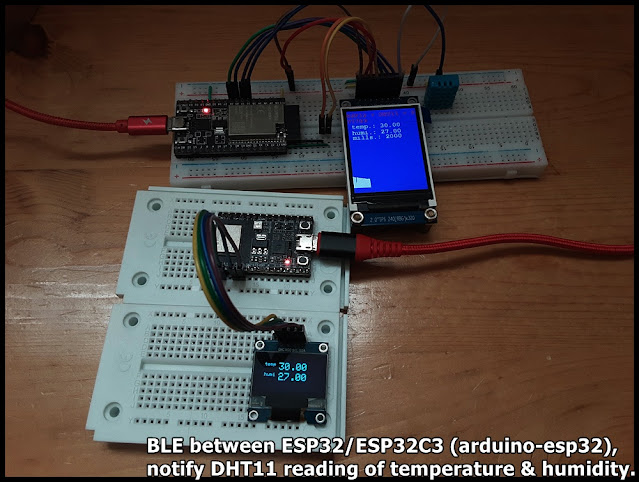

The BLE server run on ESP32-DevKitC V4, read DHT11 temperature & humidity, display on ST7789 SPI TFT, and notify connected client. The BLE client run on ESP32-C3-DevKitM-1, connect to BLE server, update SSD1306 I2C OLED once notified data updated.

Basically, the server copy from my former exercise "ESP32 + DHT11 temperature & humidity sensor with display on ST7789 and BLE function", the client copy from BLE_client example. 

But with my original setting (follow BLE_notify example) in server side:

  pAdvertising->setScanResponse(false);
  pAdvertising->setMinPreferred(0x0);
both advertisedDevice.haveServiceUUID() and advertisedDevice.isAdvertisingService(serviceUUID) in client return false. So the client cannot find the server.

To solve it, I change the setting (follow BLE_server example):
  pAdvertising->setScanResponse(true);
  pAdvertising->setMinPreferred(0x06);
  pAdvertising->setMinPreferred(0x12);
then both advertisedDevice.haveServiceUUID() and advertisedDevice.isAdvertisingService(serviceUUID) in client return true, such that the server can be found.

ESP32_DHT_ST789_graphic_BLE_2021-12-14.ino, server side run on ESP32-DevKitC V4.
/*
   Execise run on ESP32 (ESP32-DevKitC V4) with arduino-esp32 2.0.1,
   read DHT11 Humidity & Temperature Sensor,
   and display on ST7789 SPI TFT, 2" IPS 240x320, with graph.
   BLE function added.

   Library needed:
   - DHT sensor library for ESPx by beegee_tokyo
   - Adafruit ST7735 and ST7789 Library by Adafruit
   - Adafruit GFX Library by Adafruit

    Modify from examples DHT_ESP32 of DHT sensor library for ESPx

    Connection between DHT11 and ESP32 (GPIO#)
    -----------------------------------------------
    DHT11         ESP32
    -----         -----
    VCC*          3V3
    DATA**        32
    NC
    GND           GND

 *  * - depends on module, my DHT11 module is 3V3~5V operate.

 *  ** - depends on your module, maybe you have to add a
    pull-up resistor (~10K Ohm) betwee DATA and VCC.

    Connection between ST7789 SPI and ESP32 (GPIO#)
    -----------------------------------------------
    ST7789 SPI    ESP32
    ----------    -----
    GND           GND
    VCC           3V3
    SCL           18
    SDA           23
    RES           26
    DC            25
    CS            33
    BLK           3V3

*/
#include "DHTesp.h"
#include <Ticker.h>
#include <Adafruit_GFX.h>    // Core graphics library
#include <Adafruit_ST7789.h> // Hardware-specific library for ST7789
#include <Fonts/FreeMonoBold12pt7b.h>
#include <SPI.h>

#include <BLEDevice.h>
#include <BLEServer.h>
#include <BLEUtils.h>
#include <BLE2902.h>

#ifndef ESP32
#pragma message(THIS EXAMPLE IS FOR ESP32 ONLY!)
#error Select ESP32 board.
#endif

DHTesp dht;

void tempTask(void *pvParameters);
bool getTemperature();
void triggerGetTemp();

/** Task handle for the light value read task */
TaskHandle_t tempTaskHandle = NULL;
/** Ticker for temperature reading */
Ticker tempTicker;
/** Comfort profile */
ComfortState cf;
/** Flag if task should run */
bool tasksEnabled = false;
/** Pin number for DHT11 data pin */
int dhtPin = 32;  //17;

//hardware SPI MOSI   23
//hardware SPI SCK    18
#define TFT_CS        33
#define TFT_RST       26
#define TFT_DC        25
Adafruit_ST7789 tft = Adafruit_ST7789(TFT_CS, TFT_DC, TFT_RST);

bool rqsUpdate = false;
TempAndHumidity updateValues;

unsigned long prvUpdateMillis;

#define FRAME_TOPX    0
#define FRAME_TOPY    200
#define FRAME_WIDTH   240
#define FRAME_HEIGHT  100
#define FRAME_BOTTOMY FRAME_TOPY + FRAME_HEIGHT
#define SCR_HEIGHT    320

int idx = 0;
#define IDX_MAX     240

BLEServer* pServer = NULL;
BLECharacteristic* pCharacteristic = NULL;
BLECharacteristic* pChar_temp = NULL;
BLECharacteristic* pChar_humi = NULL;
bool deviceConnected = false;
bool oldDeviceConnected = false;

// See the following for generating UUIDs:
// https://www.uuidgenerator.net/

#define SERVICE_UUID "FC8601FC-7829-407B-9C2E-4D3F117DFF2D"
#define CHAR_UUID_TEMP "0FD31907-35AE-4BB0-8AB1-51F98C05B326"
#define CHAR_UUID_HUMI "D01D3AF7-818D-4A90-AECF-0E1EC48AA5F0"

class MyServerCallbacks: public BLEServerCallbacks {
    void onConnect(BLEServer* pServer) {
      deviceConnected = true;
      BLEDevice::startAdvertising();
      Serial.println("MyServerCallbacks.onConnect");
    };

    void onDisconnect(BLEServer* pServer) {
      deviceConnected = false;
      Serial.println("MyServerCallbacks.onDisconnect");
    }
};

/**
   initTemp
   Setup DHT library
   Setup task and timer for repeated measurement
   @return bool
      true if task and timer are started
      false if task or timer couldn't be started
*/
bool initTemp() {
  byte resultValue = 0;
  // Initialize temperature sensor
  dht.setup(dhtPin, DHTesp::DHT11);
  Serial.println("DHT initiated");

  // Start task to get temperature
  xTaskCreatePinnedToCore(
    tempTask,                       /* Function to implement the task */
    "tempTask ",                    /* Name of the task */
    4000,                           /* Stack size in words */
    NULL,                           /* Task input parameter */
    5,                              /* Priority of the task */
    &tempTaskHandle,                /* Task handle. */
    1);                             /* Core where the task should run */

  if (tempTaskHandle == NULL) {
    Serial.println("Failed to start task for temperature update");
    return false;
  } else {
    // Start update of environment data every XX seconds
    tempTicker.attach(2, triggerGetTemp);
  }
  return true;
}

/**
   triggerGetTemp
   Sets flag dhtUpdated to true for handling in loop()
   called by Ticker getTempTimer
*/
void triggerGetTemp() {
  if (tempTaskHandle != NULL) {
    xTaskResumeFromISR(tempTaskHandle);
  }
}

/**
   Task to reads temperature from DHT11 sensor
   @param pvParameters
      pointer to task parameters
*/
void tempTask(void *pvParameters) {
  Serial.println("tempTask loop started");
  while (1) // tempTask loop
  {
    if (tasksEnabled) {
      // Get temperature values
      getTemperature();
    }
    // Got sleep again
    vTaskSuspend(NULL);
  }
}

/**
   getTemperature
   Reads temperature from DHT11 sensor
   @return bool
      true if temperature could be aquired
      false if aquisition failed
*/
bool getTemperature() {
  // Reading temperature for humidity takes about 250 milliseconds!
  // Sensor readings may also be up to 2 seconds 'old' (it's a very slow sensor)
  TempAndHumidity newValues = dht.getTempAndHumidity();
  // Check if any reads failed and exit early (to try again).
  if (dht.getStatus() != 0) {
    Serial.println("DHT11 error status: " + String(dht.getStatusString()));
    return false;
  }

  rqsUpdate = true;
  updateValues = newValues;
  return true;
}

void setup()
{
  Serial.begin(115200);
  Serial.println();
  Serial.println("DHT ESP32 example with tasks");

  //init DHT
  initTemp();
  // Signal end of setup() to tasks
  tasksEnabled = true;

  //init BLE
  // Create the BLE Device
  BLEDevice::init("ESP32-DHT11");

  // Create the BLE Server
  pServer = BLEDevice::createServer();

  pServer->setCallbacks(new MyServerCallbacks());

  // Create the BLE Service
  BLEService *pService = pServer->createService(SERVICE_UUID);

  // Create a BLE Characteristic for temp and humi
  pChar_temp = pService->createCharacteristic(
                 CHAR_UUID_TEMP,
                 BLECharacteristic::PROPERTY_READ   |
                 BLECharacteristic::PROPERTY_WRITE  |
                 BLECharacteristic::PROPERTY_NOTIFY |
                 BLECharacteristic::PROPERTY_INDICATE
               );
  pChar_humi = pService->createCharacteristic(
                 CHAR_UUID_HUMI,
                 BLECharacteristic::PROPERTY_READ   |
                 BLECharacteristic::PROPERTY_WRITE  |
                 BLECharacteristic::PROPERTY_NOTIFY |
                 BLECharacteristic::PROPERTY_INDICATE
               );

  pChar_temp->addDescriptor(new BLE2902());
  pChar_humi->addDescriptor(new BLE2902());

  // Start the service
  pService->start();

  // Start advertising
  BLEAdvertising *pAdvertising = BLEDevice::getAdvertising();
  pAdvertising->addServiceUUID(SERVICE_UUID);
  
  // Erik updated@2021-12-14
  //pAdvertising->setScanResponse(false);
  //pAdvertising->setMinPreferred(0x0);  // set value to 0x00 to not advertise this parameter
  
  pAdvertising->setScanResponse(true);
  pAdvertising->setMinPreferred(0x06);  // functions that help with iPhone connections issue
  pAdvertising->setMinPreferred(0x12);
  //print for information only
  Serial.println("pAdvertising->setScanResponse(true)");
  Serial.println("pAdvertising->setMinPreferred(0x06)");
  Serial.println("pAdvertising->setMinPreferred(0x12)");
  
  BLEDevice::startAdvertising();
  Serial.println("Waiting a client connection to notify...");


  //init ST7789
  tft.init(240, 320);           // Init ST7789 320x240
  tft.setRotation(2);
  tft.setFont(&FreeMonoBold12pt7b);
  tft.setTextWrap(true);

  tft.fillScreen(ST77XX_RED);
  delay(300);
  tft.fillScreen(ST77XX_GREEN);
  delay(300);
  tft.fillScreen(ST77XX_BLUE);
  delay(300);

  tft.setCursor(0, 0);
  tft.setTextColor(ST77XX_RED);
  tft.print("\n");
  tft.print("ESP32 + DHT11 + ST7789\n");

  prvUpdateMillis = millis();

}

void loop() {
  if (!tasksEnabled) {
    // Wait 2 seconds to let system settle down
    delay(2000);
    // Enable task that will read values from the DHT sensor
    tasksEnabled = true;
    if (tempTaskHandle != NULL) {
      vTaskResume(tempTaskHandle);
    }
  }

  if (rqsUpdate) {

    unsigned long curUpdateMillis = millis();

    tft.fillRect(0, 53, 240, 75, ST77XX_BLUE );

    tft.setCursor(0, 70);
    tft.setTextColor(ST77XX_WHITE);
    tft.print(" temp.: " + String(updateValues.temperature));
    tft.setCursor(0, 95);
    tft.setTextColor(ST77XX_WHITE);
    tft.print(" humi.: " + String(updateValues.humidity));
    tft.setCursor(0, 115);
    tft.setTextColor(ST77XX_WHITE);
    tft.print(" mills.: " + String(curUpdateMillis - prvUpdateMillis));
    prvUpdateMillis = curUpdateMillis;


    if (idx == 0) {
      tft.fillRect(FRAME_TOPX, FRAME_TOPY,
                   FRAME_WIDTH, SCR_HEIGHT - FRAME_TOPY,
                   ST77XX_BLUE);
    }

    tft.drawLine(
      FRAME_TOPX + idx, FRAME_BOTTOMY,
      FRAME_TOPX + idx, FRAME_BOTTOMY - (int)updateValues.temperature,
      ST77XX_WHITE);

    idx++;
    if (idx >= IDX_MAX)
      idx = 0;

    char bufTemp[5];
    char bufHumi[5];
    //convert floating point value to String
    dtostrf(updateValues.temperature, 0, 2, bufTemp);
    dtostrf(updateValues.humidity, 0, 2, bufHumi);

    pChar_temp->setValue((uint8_t*)bufTemp, 5);
    pChar_temp->notify();
    pChar_humi->setValue((uint8_t*)bufHumi, 5);
    pChar_humi->notify();

    //Serial.println(" T:" + String(updateValues.temperature) + " H:" + String(updateValues.humidity));
    rqsUpdate = false;


  }

  // disconnecting
  if (!deviceConnected && oldDeviceConnected) {
    Serial.println("disconnecting");
    delay(500); // give the bluetooth stack the chance to get things ready
    pServer->startAdvertising(); // restart advertising
    Serial.println("start advertising");
    oldDeviceConnected = deviceConnected;
  }
  // connecting
  if (deviceConnected && !oldDeviceConnected) {
    Serial.println("connecting");
    // do stuff here on connecting
    oldDeviceConnected = deviceConnected;
  }

  yield();
}


ESP32C3_BLE_client.ino, client side run on ESP32-C3-DevKitM-1. Copy from BLE_client example, with UUID updated.
/**
 * A BLE client example that is rich in capabilities.
 * There is a lot new capabilities implemented.
 * author unknown
 * updated by chegewara
 */

#include "BLEDevice.h"
//#include "BLEScan.h"

#define SERVICE_UUID "FC8601FC-7829-407B-9C2E-4D3F117DFF2D"
#define CHAR_UUID_TEMP "0FD31907-35AE-4BB0-8AB1-51F98C05B326"
#define CHAR_UUID_HUMI "D01D3AF7-818D-4A90-AECF-0E1EC48AA5F0"

// The remote service we wish to connect to.
static BLEUUID serviceUUID(SERVICE_UUID);
// The characteristic of the remote service we are interested in.
static BLEUUID    charUUID(CHAR_UUID_TEMP);

static boolean doConnect = false;
static boolean connected = false;
static boolean doScan = false;
static BLERemoteCharacteristic* pRemoteCharacteristic;
static BLEAdvertisedDevice* myDevice;

static void notifyCallback(
  BLERemoteCharacteristic* pBLERemoteCharacteristic,
  uint8_t* pData,
  size_t length,
  bool isNotify) {
    Serial.print("Notify callback for characteristic ");
    Serial.print(pBLERemoteCharacteristic->getUUID().toString().c_str());
    Serial.print(" of data length ");
    Serial.println(length);
    Serial.print("data: ");
    Serial.println((char*)pData);
}

class MyClientCallback : public BLEClientCallbacks {
  void onConnect(BLEClient* pclient) {
  }

  void onDisconnect(BLEClient* pclient) {
    connected = false;
    Serial.println("onDisconnect");
  }
};

bool connectToServer() {
    Serial.print("Forming a connection to ");
    Serial.println(myDevice->getAddress().toString().c_str());
    
    BLEClient*  pClient  = BLEDevice::createClient();
    Serial.println(" - Created client");

    pClient->setClientCallbacks(new MyClientCallback());

    // Connect to the remove BLE Server.
    pClient->connect(myDevice);  // if you pass BLEAdvertisedDevice instead of address, it will be recognized type of peer device address (public or private)
    Serial.println(" - Connected to server");
    pClient->setMTU(517); //set client to request maximum MTU from server (default is 23 otherwise)
  
    // Obtain a reference to the service we are after in the remote BLE server.
    BLERemoteService* pRemoteService = pClient->getService(serviceUUID);
    if (pRemoteService == nullptr) {
      Serial.print("Failed to find our service UUID: ");
      Serial.println(serviceUUID.toString().c_str());
      pClient->disconnect();
      return false;
    }
    Serial.println(" - Found our service");


    // Obtain a reference to the characteristic in the service of the remote BLE server.
    pRemoteCharacteristic = pRemoteService->getCharacteristic(charUUID);
    if (pRemoteCharacteristic == nullptr) {
      Serial.print("Failed to find our characteristic UUID: ");
      Serial.println(charUUID.toString().c_str());
      pClient->disconnect();
      return false;
    }
    Serial.println(" - Found our characteristic");

    // Read the value of the characteristic.
    if(pRemoteCharacteristic->canRead()) {
      std::string value = pRemoteCharacteristic->readValue();
      Serial.print("The characteristic value was: ");
      Serial.println(value.c_str());
    }

    if(pRemoteCharacteristic->canNotify())
      pRemoteCharacteristic->registerForNotify(notifyCallback);

    connected = true;
    return true;
}
/**
 * Scan for BLE servers and find the first one that advertises the service we are looking for.
 */
class MyAdvertisedDeviceCallbacks: public BLEAdvertisedDeviceCallbacks {
 /**
   * Called for each advertising BLE server.
   */
  void onResult(BLEAdvertisedDevice advertisedDevice) {
    Serial.print("BLE Advertised Device found: ");
    Serial.println(advertisedDevice.toString().c_str());

    if(advertisedDevice.haveServiceUUID()){
      Serial.println("- advertisedDevice.haveServiceUUID()");
    }
    if(advertisedDevice.isAdvertisingService(serviceUUID)){
      Serial.println("- advertisedDevice.isAdvertisingService(serviceUUID)");
    }

    // We have found a device, let us now see if it contains the service we are looking for.
    if (advertisedDevice.haveServiceUUID() && advertisedDevice.isAdvertisingService(serviceUUID)) {

      BLEDevice::getScan()->stop();
      myDevice = new BLEAdvertisedDevice(advertisedDevice);
      doConnect = true;
      doScan = true;

      Serial.println("*** device found ***");

    } // Found our server
  } // onResult
}; // MyAdvertisedDeviceCallbacks


void setup() {
  Serial.begin(115200);
  Serial.println("Starting Arduino BLE Client application...");
  BLEDevice::init("");

  // Retrieve a Scanner and set the callback we want to use to be informed when we
  // have detected a new device.  Specify that we want active scanning and start the
  // scan to run for 5 seconds.
  BLEScan* pBLEScan = BLEDevice::getScan();
  pBLEScan->setAdvertisedDeviceCallbacks(new MyAdvertisedDeviceCallbacks());
  pBLEScan->setInterval(1349);
  pBLEScan->setWindow(449);
  pBLEScan->setActiveScan(true);
  pBLEScan->start(5, false);
} // End of setup.


// This is the Arduino main loop function.
void loop() {

  // If the flag "doConnect" is true then we have scanned for and found the desired
  // BLE Server with which we wish to connect.  Now we connect to it.  Once we are 
  // connected we set the connected flag to be true.
  if (doConnect == true) {
    if (connectToServer()) {
      Serial.println("We are now connected to the BLE Server.");
    } else {
      Serial.println("We have failed to connect to the server; there is nothin more we will do.");
    }
    doConnect = false;
  }

  // If we are connected to a peer BLE Server, update the characteristic each time we are reached
  // with the current time since boot.
  if (connected) {
    String newValue = "Time since boot: " + String(millis()/1000);
    Serial.println("Setting new characteristic value to \"" + newValue + "\"");
    
    // Set the characteristic's value to be the array of bytes that is actually a string.
    pRemoteCharacteristic->writeValue(newValue.c_str(), newValue.length());
  }else if(doScan){
    BLEDevice::getScan()->start(0);  // this is just example to start scan after disconnect, most likely there is better way to do it in arduino
  }
  
  delay(1000); // Delay a second between loops.
} // End of loop


ESP32C3_BLE_DHT11_client.ino, updated to recognize temperature & humidity.
/**
 * modified from BLE_client
 * to work with ESP32_DHT_ST789_graphic_BLE.ino,
 * to monitor temp/humi.
 */

#include "BLEDevice.h"
//#include "BLEScan.h"

#define SERVICE_UUID "FC8601FC-7829-407B-9C2E-4D3F117DFF2D"
#define CHAR_UUID_TEMP "0FD31907-35AE-4BB0-8AB1-51F98C05B326"
#define CHAR_UUID_HUMI "D01D3AF7-818D-4A90-AECF-0E1EC48AA5F0"

// The remote service we wish to connect to.
static BLEUUID serviceUUID(SERVICE_UUID);
// The characteristic of the remote service we are interested in.
static BLEUUID  charUUID_TEMP(CHAR_UUID_TEMP);
static BLEUUID  charUUID_HUMI(CHAR_UUID_HUMI);

static boolean doConnect = false;
static boolean connected = false;
static boolean doScan = false;
static BLERemoteCharacteristic* pRemoteChar_temp;
static BLERemoteCharacteristic* pRemoteChar_humi;
static BLEAdvertisedDevice* myDevice;

static void notifyCallback(
  BLERemoteCharacteristic* pBLERemoteCharacteristic,
  uint8_t* pData,
  size_t length,
  bool isNotify) {

    String strCharUUID = pBLERemoteCharacteristic->getUUID().toString().c_str();
    Serial.printf("Notify callback for characteristic: ");
    strCharUUID.toUpperCase();
    Serial.println(strCharUUID);

    if(strCharUUID.equals(CHAR_UUID_TEMP)){
      Serial.print("temp: ");
      for (int i=0; i<length; i++)
          Serial.print((char) pData[i]);
    }else if(strCharUUID.equals(CHAR_UUID_HUMI)){
      Serial.print("humi: ");
      for (int i=0; i<length; i++)
          Serial.print((char) pData[i]);
    }

    Serial.println();
}

class MyClientCallback : public BLEClientCallbacks {
  void onConnect(BLEClient* pclient) {
  }

  void onDisconnect(BLEClient* pclient) {
    connected = false;
    Serial.println("onDisconnect");
  }
};

bool connectToServer() {
    Serial.print("Forming a connection to ");
    Serial.println(myDevice->getAddress().toString().c_str());
    
    BLEClient*  pClient  = BLEDevice::createClient();
    Serial.println(" - Created client");

    pClient->setClientCallbacks(new MyClientCallback());

    // Connect to the remove BLE Server.
    // if you pass BLEAdvertisedDevice instead of address, 
    // it will be recognized type of peer device address (public or private)
    pClient->connect(myDevice);  
    Serial.println(" - Connected to server");
    //set client to request maximum MTU from server (default is 23 otherwise)
    pClient->setMTU(517); 
  
    // Obtain a reference to the service we are after in the remote BLE server.
    BLERemoteService* pRemoteService = pClient->getService(serviceUUID);
    if (pRemoteService == nullptr) {
      Serial.print("Failed to find our service UUID: ");
      Serial.println(serviceUUID.toString().c_str());
      pClient->disconnect();
      return false;
    }
    Serial.println(" - Found our service");


    // Obtain a reference to the characteristic in the service 
    // of the remote BLE server.
    pRemoteChar_temp = pRemoteService->getCharacteristic(charUUID_TEMP);
    if (pRemoteChar_temp == nullptr) {
      Serial.print("Failed to find our characteristic UUID: ");
      Serial.println(charUUID_TEMP.toString().c_str());
      pClient->disconnect();
      return false;
    }
    Serial.println(" - Found temp characteristic");

    pRemoteChar_humi = pRemoteService->getCharacteristic(charUUID_HUMI);
    if (pRemoteChar_humi == nullptr) {
      Serial.print("Failed to find our characteristic UUID: ");
      Serial.println(charUUID_TEMP.toString().c_str());
      pClient->disconnect();
      return false;
    }
    Serial.println(" - Found humi characteristic");

    // Read the value of the characteristic.
    if(pRemoteChar_temp->canRead()) {
      std::string value = pRemoteChar_temp->readValue();
      Serial.print("The characteristic temp value was: ");
      Serial.println(value.c_str());
    }
    if(pRemoteChar_humi->canRead()) {
      std::string value = pRemoteChar_humi->readValue();
      Serial.print("The characteristic humi value was: ");
      Serial.println(value.c_str());
    }

    if(pRemoteChar_temp->canNotify())
      pRemoteChar_temp->registerForNotify(notifyCallback);
    if(pRemoteChar_humi->canNotify())
      pRemoteChar_humi->registerForNotify(notifyCallback);

    connected = true;
    return true;
}
/**
 * Scan for BLE servers and 
 * find the first one that advertises the service we are looking for.
 */
class MyAdvertisedDeviceCallbacks: public BLEAdvertisedDeviceCallbacks {
 /**
   * Called for each advertising BLE server.
   */
  void onResult(BLEAdvertisedDevice advertisedDevice) {
    Serial.print("BLE Advertised Device found: ");
    Serial.println(advertisedDevice.toString().c_str());

    if(advertisedDevice.haveServiceUUID()){
      Serial.println("- haveServiceUUID()");
    }
    if(advertisedDevice.isAdvertisingService(serviceUUID)){
      Serial.println("- isAdvertisingService(serviceUUID)");
    }

    // We have found a device, 
    // let us now see if it contains the service we are looking for.
    if (advertisedDevice.haveServiceUUID() && 
      advertisedDevice.isAdvertisingService(serviceUUID)) {

      BLEDevice::getScan()->stop();
      myDevice = new BLEAdvertisedDevice(advertisedDevice);
      doConnect = true;
      doScan = true;

      Serial.println("*** device found ***");

    } // Found our server
  } // onResult
}; // MyAdvertisedDeviceCallbacks


void setup() {
  Serial.begin(115200);
  Serial.println("Starting Arduino BLE Client application...");
  BLEDevice::init("");

  // Retrieve a Scanner and set the callback we want to use to be informed when we
  // have detected a new device.  Specify that we want active scanning and start the
  // scan to run for 5 seconds.
  BLEScan* pBLEScan = BLEDevice::getScan();
  pBLEScan->setAdvertisedDeviceCallbacks(new MyAdvertisedDeviceCallbacks());
  pBLEScan->setInterval(1349);
  pBLEScan->setWindow(449);
  pBLEScan->setActiveScan(true);
  pBLEScan->start(5, false);
} // End of setup.


// This is the Arduino main loop function.
void loop() {

  // If the flag "doConnect" is true then we have scanned for and found the desired
  // BLE Server with which we wish to connect.  Now we connect to it.  Once we are 
  // connected we set the connected flag to be true.
  if (doConnect == true) {
    if (connectToServer()) {
      Serial.println("We are now connected to the BLE Server.");
    } else {
      Serial.println("We have failed to connect to the server.");
    }
    doConnect = false;
  }

  // If we are connected to a peer BLE Server, 
  // update the characteristic each time we are reached
  // with the current time since boot.
  if (connected) {

  }else if(doScan){
    // this is just example to start scan after disconnect, 
    // most likely there is better way to do it in arduino
    BLEDevice::getScan()->start(0);  
  }
  
  delay(1000); // Delay a second between loops.
} // End of loop


ESP32C3_BLE_DHT11_SSD1306_client.ino, with display on SSD1306 I2C OLED. For the SSD1306 part, refer to last exercise "ESP32-C3-DevKitM-1 display on ssd1306 I2C OLED using Adafruit SSD1306 library".
/**
 * modified from BLE_client
 * to work with ESP32_DHT_ST789_graphic_BLE.ino,
 * to monitor temp/humi.
 * and display on SSD1306 I2C OLED
 */

#include "BLEDevice.h"
//#include "BLEScan.h"
#include <SPI.h>
#include <Wire.h>
#include <Adafruit_GFX.h>
#include <Adafruit_SSD1306.h>

#define SCREEN_WIDTH 128 // OLED display width, in pixels
#define SCREEN_HEIGHT 64 // OLED display height, in pixels

#define SDA_pin 3
#define SCL_pin 2
#define OLED_RESET     -1
#define SCREEN_ADDRESS 0x3C //0x3D ///
Adafruit_SSD1306 display;

#define SERVICE_UUID "FC8601FC-7829-407B-9C2E-4D3F117DFF2D"
#define CHAR_UUID_TEMP "0FD31907-35AE-4BB0-8AB1-51F98C05B326"
#define CHAR_UUID_HUMI "D01D3AF7-818D-4A90-AECF-0E1EC48AA5F0"

// The remote service we wish to connect to.
static BLEUUID serviceUUID(SERVICE_UUID);
// The characteristic of the remote service we are interested in.
static BLEUUID  charUUID_TEMP(CHAR_UUID_TEMP);
static BLEUUID  charUUID_HUMI(CHAR_UUID_HUMI);

static boolean doConnect = false;
static boolean connected = false;
static boolean doScan = false;
static BLERemoteCharacteristic* pRemoteChar_temp;
static BLERemoteCharacteristic* pRemoteChar_humi;
static BLEAdvertisedDevice* myDevice;

static void notifyCallback(
  BLERemoteCharacteristic* pBLERemoteCharacteristic,
  uint8_t* pData,
  size_t length,
  bool isNotify) {

    String strCharUUID = pBLERemoteCharacteristic->getUUID().toString().c_str();
    Serial.printf("Notify callback for characteristic: ");
    strCharUUID.toUpperCase();
    Serial.println(strCharUUID);

    if(strCharUUID.equals(CHAR_UUID_TEMP)){
      Serial.print("temp: ");

      String strTemp = (char*)pData;
      Serial.print(strTemp);
      displayTemp(strTemp);
      
    }else if(strCharUUID.equals(CHAR_UUID_HUMI)){
      Serial.print("humi: ");

      String strHumi = (char*)pData;
      Serial.print(strHumi);
      displayHumi(strHumi);
    }

    Serial.println();
}

class MyClientCallback : public BLEClientCallbacks {
  void onConnect(BLEClient* pclient) {
    displayPrompt("onConnect");
  }

  void onDisconnect(BLEClient* pclient) {
    connected = false;
    Serial.println("onDisconnect");
    displayPrompt("onDisconnect");
  }
};

bool connectToServer() {
    Serial.print("Forming a connection to ");
    Serial.println(myDevice->getAddress().toString().c_str());
    
    BLEClient*  pClient  = BLEDevice::createClient();
    Serial.println(" - Created client");

    pClient->setClientCallbacks(new MyClientCallback());

    // Connect to the remove BLE Server.
    // if you pass BLEAdvertisedDevice instead of address, 
    // it will be recognized type of peer device address (public or private)
    pClient->connect(myDevice);  
    Serial.println(" - Connected to server");
    //set client to request maximum MTU from server (default is 23 otherwise)
    pClient->setMTU(517); 
  
    // Obtain a reference to the service we are after in the remote BLE server.
    BLERemoteService* pRemoteService = pClient->getService(serviceUUID);
    if (pRemoteService == nullptr) {
      Serial.print("Failed to find our service UUID: ");
      Serial.println(serviceUUID.toString().c_str());
      pClient->disconnect();
      return false;
    }
    Serial.println(" - Found our service");


    // Obtain a reference to the characteristic in the service 
    // of the remote BLE server.
    pRemoteChar_temp = pRemoteService->getCharacteristic(charUUID_TEMP);
    if (pRemoteChar_temp == nullptr) {
      Serial.print("Failed to find our characteristic UUID: ");
      Serial.println(charUUID_TEMP.toString().c_str());
      pClient->disconnect();
      return false;
    }
    Serial.println(" - Found temp characteristic");

    pRemoteChar_humi = pRemoteService->getCharacteristic(charUUID_HUMI);
    if (pRemoteChar_humi == nullptr) {
      Serial.print("Failed to find our characteristic UUID: ");
      Serial.println(charUUID_TEMP.toString().c_str());
      pClient->disconnect();
      return false;
    }
    Serial.println(" - Found humi characteristic");

    // Read the value of the characteristic.
    if(pRemoteChar_temp->canRead()) {
      std::string value = pRemoteChar_temp->readValue();
      Serial.print("The characteristic temp value was: ");
      Serial.println(value.c_str());
      displayTemp(value.c_str());
    }
    if(pRemoteChar_humi->canRead()) {
      std::string value = pRemoteChar_humi->readValue();
      Serial.print("The characteristic humi value was: ");
      Serial.println(value.c_str());
      displayHumi(value.c_str());
    }

    if(pRemoteChar_temp->canNotify())
      pRemoteChar_temp->registerForNotify(notifyCallback);
    if(pRemoteChar_humi->canNotify())
      pRemoteChar_humi->registerForNotify(notifyCallback);

    connected = true;
    return true;
}
/**
 * Scan for BLE servers and 
 * find the first one that advertises the service we are looking for.
 */
class MyAdvertisedDeviceCallbacks: public BLEAdvertisedDeviceCallbacks {
 /**
   * Called for each advertising BLE server.
   */
  void onResult(BLEAdvertisedDevice advertisedDevice) {
    Serial.print("BLE Advertised Device found: ");
    Serial.println(advertisedDevice.toString().c_str());

    if(advertisedDevice.haveServiceUUID()){
      Serial.println("- haveServiceUUID()");
    }
    if(advertisedDevice.isAdvertisingService(serviceUUID)){
      Serial.println("- isAdvertisingService(serviceUUID)");
    }

    // We have found a device, 
    // let us now see if it contains the service we are looking for.
    if (advertisedDevice.haveServiceUUID() && 
      advertisedDevice.isAdvertisingService(serviceUUID)) {

      BLEDevice::getScan()->stop();
      myDevice = new BLEAdvertisedDevice(advertisedDevice);
      doConnect = true;
      doScan = true;

      Serial.println("*** device found ***");
      displayPrompt("found");

    } // Found our server
  } // onResult
}; // MyAdvertisedDeviceCallbacks

void initScreen(){

  Wire.setPins(SDA_pin,SCL_pin);
  display = Adafruit_SSD1306(SCREEN_WIDTH, SCREEN_HEIGHT, &Wire, OLED_RESET);
  
  // SSD1306_SWITCHCAPVCC = generate display voltage from 3.3V internally
  if(!display.begin(SSD1306_SWITCHCAPVCC, SCREEN_ADDRESS)) {
    Serial.println(F("SSD1306 allocation failed"));
    for(;;); // Don't proceed, loop forever
  }

  display.clearDisplay();
  display.display();
  delay(500);

  display.setTextSize(2);
  display.setTextColor(SSD1306_WHITE); // Draw white text
  display.cp437(true);         // Use full 256 char 'Code Page 437' font

  display.setCursor(10, 10);
  display.printf("ESP32C3");
  display.setCursor(10, 28);
  display.printf("BLE");

  display.fillRect(0, 0, display.width()-1, display.height()-1, SSD1306_INVERSE);
  display.display();
  delay(3000);

  // Clear the buffer
  display.clearDisplay();
  display.display();

}


void displayTemp(String temp){

  //erase display of old temp
  display.fillRect(40, 10, 80, 18, SSD1306_BLACK);
  
  display.setCursor(10, 10);
  display.setTextSize(1);
  display.print("temp");
  display.setCursor(40, 10);
  display.setTextSize(2);
  display.print(temp);
  display.display();
}

void displayHumi(String humi){

  //erase display of old humi
  display.fillRect(40, 30, 80, 18, SSD1306_BLACK);
  
  display.setCursor(10, 30);
  display.setTextSize(1);
  display.print("humi");
  display.setCursor(40, 30);
  display.setTextSize(2);
  display.print(humi);
  display.display();
}

void displayPrompt(String prompt){

  //erase display of old temp
  display.fillRect(10, 10, 110, 40, SSD1306_BLACK);

  display.setCursor(40, 10);
  display.setTextSize(1);
  display.print(prompt);
  display.display();
}


void setup() {
  Serial.begin(115200);
  Serial.println("Starting Arduino BLE Client application...");

  initScreen();
  
  BLEDevice::init("");

  // Retrieve a Scanner and set the callback we want to use to be informed when we
  // have detected a new device.  Specify that we want active scanning and start the
  // scan to run for 5 seconds.
  BLEScan* pBLEScan = BLEDevice::getScan();
  pBLEScan->setAdvertisedDeviceCallbacks(new MyAdvertisedDeviceCallbacks());
  pBLEScan->setInterval(1349);
  pBLEScan->setWindow(449);
  pBLEScan->setActiveScan(true);
  pBLEScan->start(5, false);
  
  displayPrompt("Scan");
  Serial.println("Scan");
} // End of setup.


// This is the Arduino main loop function.
void loop() {

  // If the flag "doConnect" is true then we have scanned for and found the desired
  // BLE Server with which we wish to connect.  Now we connect to it.  Once we are 
  // connected we set the connected flag to be true.
  if (doConnect == true) {
    if (connectToServer()) {
      Serial.println("We are now connected to the BLE Server.");
    } else {
      Serial.println("We have failed to connect to the server.");
    }
    doConnect = false;
  }

  // If we are connected to a peer BLE Server, 
  // update the characteristic each time we are reached
  // with the current time since boot.
  if (connected) {

  }else if(doScan){
    // this is just example to start scan after disconnect, 
    // most likely there is better way to do it in arduino
    displayPrompt("Scan");
    Serial.println("Scan");
    BLEDevice::getScan()->start(0);  
  }
  
  delay(1000); // Delay a second between loops.
} // End of loop


Monday, December 6, 2021

arduino-esp32: ESP32 + DHT11 temperature & humidity sensor with display on ST7789 and BLE function

Exercise on ESP32 (Arduino framework) work with DHT11 temperature & humidity sensor, with display on ST7789 SPI LCD and also with BLE function.

The DHT11 (or DHT22 and similar) are cheap temperature and humidity sensors. The communicate with a uC is over a single wire.

The electric connection to the ESP32 is very simple, as the DHT series can be powered direct with 3.3V. Only 3 wires are needed: VCC, GND and the data line.

Important is that a 10kΩ or at least 4.7kΩ resistor is needed between the data line and VCC. Sometimes this resistor is already integrated in the module, sometimes its necessary to add it.

ref: https://desire.giesecke.tk/index.php/2018/01/30/esp32-dht11/


Library used:

DHT sensor library for ESPx by beegee_tokyo is used in this exercise.

To display on ST7789 SPI SPI LCD, Adafruit ST7735 and ST7789 Library and Adafruit GFX Library are used. (related: ESP32-C3/arduino-esp32 to display on ST7735 and ST7789 SPI LCDs)


Connection:


	Connection between DHT11 and ESP32 (GPIO#)
	-----------------------------------------------
	DHT11         ESP32
	-----         -----
	VCC*          3V3
	DATA**        32
	NC    
	GND           GND

	* - depends on module, my DHT11 module is 3V3~5V operate. 

	** - depends on your module, maybe you have to add a 
	     pull-up resistor (~10K Ohm) betwee DATA and VCC.

	Connection between ST7789 SPI and ESP32 (GPIO#)
	-----------------------------------------------
	ST7789 SPI    ESP32
	----------    -----
	GND           GND
	VCC           3V3
	SCL           18
	SDA           23
	RES           26
	DC            25
	CS            33
	BLK           3V3
 

Exercise code:

ESP32_DHT_ST789.ino, modified from DHT_ESP32 example of DHT sensor library for ESPx, with interface to ST7789 SPI LCD.

#include "DHTesp.h"
#include <Ticker.h>
#include <Adafruit_GFX.h>    // Core graphics library
#include <Adafruit_ST7789.h> // Hardware-specific library for ST7789
#include <Fonts/FreeMonoBold12pt7b.h>
#include <SPI.h>

#ifndef ESP32
#pragma message(THIS EXAMPLE IS FOR ESP32 ONLY!)
#error Select ESP32 board.
#endif

/**************************************************************/
/* Example how to read DHT sensors from an ESP32 using multi- */
/* tasking.                                                   */
/* This example depends on the Ticker library to wake up      */
/* the task every 5  seconds                                  */
/**************************************************************/

DHTesp dht;

void tempTask(void *pvParameters);
bool getTemperature();
void triggerGetTemp();

/** Task handle for the light value read task */
TaskHandle_t tempTaskHandle = NULL;
/** Ticker for temperature reading */
Ticker tempTicker;
/** Comfort profile */
ComfortState cf;
/** Flag if task should run */
bool tasksEnabled = false;
/** Pin number for DHT11 data pin */
int dhtPin = 32;  //17;

#define TFT_CS        33
#define TFT_RST       26
#define TFT_DC        25
Adafruit_ST7789 tft = Adafruit_ST7789(TFT_CS, TFT_DC, TFT_RST);

bool rqsUpdate = false;
TempAndHumidity updateValues;


/**
 * initTemp
 * Setup DHT library
 * Setup task and timer for repeated measurement
 * @return bool
 *    true if task and timer are started
 *    false if task or timer couldn't be started
 */
bool initTemp() {
  byte resultValue = 0;
  // Initialize temperature sensor
	dht.setup(dhtPin, DHTesp::DHT11);
	Serial.println("DHT initiated");

  // Start task to get temperature
	xTaskCreatePinnedToCore(
			tempTask,                       /* Function to implement the task */
			"tempTask ",                    /* Name of the task */
			4000,                           /* Stack size in words */
			NULL,                           /* Task input parameter */
			5,                              /* Priority of the task */
			&tempTaskHandle,                /* Task handle. */
			1);                             /* Core where the task should run */

  if (tempTaskHandle == NULL) {
    Serial.println("Failed to start task for temperature update");
    return false;
  } else {
    // Start update of environment data every 20 seconds
    tempTicker.attach(5, triggerGetTemp);
  }
  return true;
}

/**
 * triggerGetTemp
 * Sets flag dhtUpdated to true for handling in loop()
 * called by Ticker getTempTimer
 */
void triggerGetTemp() {
  if (tempTaskHandle != NULL) {
	   xTaskResumeFromISR(tempTaskHandle);
  }
}

/**
 * Task to reads temperature from DHT11 sensor
 * @param pvParameters
 *    pointer to task parameters
 */
void tempTask(void *pvParameters) {
	Serial.println("tempTask loop started");
	while (1) // tempTask loop
  {
    if (tasksEnabled) {
      // Get temperature values
			getTemperature();
		}
    // Got sleep again
		vTaskSuspend(NULL);
	}
}

/**
 * getTemperature
 * Reads temperature from DHT11 sensor
 * @return bool
 *    true if temperature could be aquired
 *    false if aquisition failed
*/
bool getTemperature() {
	// Reading temperature for humidity takes about 250 milliseconds!
	// Sensor readings may also be up to 2 seconds 'old' (it's a very slow sensor)
  TempAndHumidity newValues = dht.getTempAndHumidity();
	// Check if any reads failed and exit early (to try again).
	if (dht.getStatus() != 0) {
		Serial.println("DHT11 error status: " + String(dht.getStatusString()));
		return false;
	}

	float heatIndex = dht.computeHeatIndex(newValues.temperature, newValues.humidity);
  float dewPoint = dht.computeDewPoint(newValues.temperature, newValues.humidity);
  float cr = dht.getComfortRatio(cf, newValues.temperature, newValues.humidity);

  String comfortStatus;
  switch(cf) {
    case Comfort_OK:
      comfortStatus = "Comfort_OK";
      break;
    case Comfort_TooHot:
      comfortStatus = "Comfort_TooHot";
      break;
    case Comfort_TooCold:
      comfortStatus = "Comfort_TooCold";
      break;
    case Comfort_TooDry:
      comfortStatus = "Comfort_TooDry";
      break;
    case Comfort_TooHumid:
      comfortStatus = "Comfort_TooHumid";
      break;
    case Comfort_HotAndHumid:
      comfortStatus = "Comfort_HotAndHumid";
      break;
    case Comfort_HotAndDry:
      comfortStatus = "Comfort_HotAndDry";
      break;
    case Comfort_ColdAndHumid:
      comfortStatus = "Comfort_ColdAndHumid";
      break;
    case Comfort_ColdAndDry:
      comfortStatus = "Comfort_ColdAndDry";
      break;
    default:
      comfortStatus = "Unknown:";
      break;
  };

  Serial.println(" T:" + String(newValues.temperature)
                + " H:" + String(newValues.humidity) 
                + " I:" + String(heatIndex) 
                + " D:" + String(dewPoint) 
                + " " + comfortStatus);
	rqsUpdate = true;
	updateValues = newValues;
	return true;
}

void setup()
{
  Serial.begin(115200);
  Serial.println();
  Serial.println("DHT ESP32 example with tasks");

  //init DHT
  initTemp();
  // Signal end of setup() to tasks
  tasksEnabled = true;

  //init ST7789
  tft.init(240, 320);           // Init ST7789 320x240
  tft.setRotation(3);
  tft.setFont(&FreeMonoBold12pt7b);
  tft.setTextWrap(true);
  
  tft.fillScreen(ST77XX_RED);
  delay(300);
  tft.fillScreen(ST77XX_GREEN);
  delay(300);
  tft.fillScreen(ST77XX_BLUE);
  delay(300);
  tft.fillScreen(ST77XX_BLACK);
  delay(300);

  tft.setCursor(0, 0);
  tft.setTextColor(ST77XX_RED);
  
  tft.setCursor(0, 0);
  tft.setTextColor(ST77XX_RED);
  tft.print("\n");
  tft.print("ESP32 + DHT11 + ST7789\n");

}

void loop() {
  if (!tasksEnabled) {
    // Wait 2 seconds to let system settle down
    delay(2000);
    // Enable task that will read values from the DHT sensor
    tasksEnabled = true;
    if (tempTaskHandle != NULL) {
			vTaskResume(tempTaskHandle);
		}
  }

  if(rqsUpdate){

    tft.fillRect(10, 30, 300, 53, ST77XX_BLACK);
    
    tft.setCursor(5, 50);
    tft.setTextColor(ST77XX_WHITE);
    tft.print(" temperature:  " + String(updateValues.temperature));
    tft.setCursor(5, 75);
    tft.setTextColor(ST77XX_WHITE);
    tft.print(" humidity:     " + String(updateValues.humidity));
    
    Serial.println(" T:" + String(updateValues.temperature) + " H:" + String(updateValues.humidity));
    rqsUpdate = false;
  }
  
  yield();
}


ESP32_DHT_ST789_graphic.ino, display on ST7789 SPI LCD with graph.
/*
 * Execise run on ESP32 (ESP32-DevKitC V4) with arduino-esp32 2.0.1,
 * read DHT11 Humidity & Temperature Sensor,
 * and display on ST7789 SPI TFT, 2" IPS 240x320, with graph.
 * 
 * Library needed: 
 * - DHT sensor library for ESPx by beegee_tokyo
 * - Adafruit ST7735 and ST7789 Library by Adafruit 
 * - Adafruit GFX Library by Adafruit
 * 
 *  Modify from examples DHT_ESP32 of DHT sensor library for ESPx
 *  
 *  Connection between DHT11 and ESP32 (GPIO#)
 *  -----------------------------------------------
 *  DHT11         ESP32
 *  -----         -----
 *  VCC*          3V3
 *  DATA**        32
 *  NC    
 *  GND           GND
 *  
 *  * - depends on module, my DHT11 module is 3V3~5V operate. 
 *  
 *  ** - depends on your module, maybe you have to add a 
 *  pull-up resistor (~10K Ohm) betwee DATA and VCC.
 *  
 *  Connection between ST7789 SPI and ESP32 (GPIO#)
 *  -----------------------------------------------
 *  ST7789 SPI    ESP32
 *  ----------    -----
 *  GND           GND
 *  VCC           3V3
 *  SCL           18
 *  SDA           23
 *  RES           26
 *  DC            25
 *  CS            33
 *  BLK           3V3
 *  
 */
#include "DHTesp.h"
#include <Ticker.h>
#include <Adafruit_GFX.h>    // Core graphics library
#include <Adafruit_ST7789.h> // Hardware-specific library for ST7789
#include <Fonts/FreeMonoBold12pt7b.h>
#include <SPI.h>

#ifndef ESP32
#pragma message(THIS EXAMPLE IS FOR ESP32 ONLY!)
#error Select ESP32 board.
#endif

DHTesp dht;

void tempTask(void *pvParameters);
bool getTemperature();
void triggerGetTemp();

/** Task handle for the light value read task */
TaskHandle_t tempTaskHandle = NULL;
/** Ticker for temperature reading */
Ticker tempTicker;
/** Comfort profile */
ComfortState cf;
/** Flag if task should run */
bool tasksEnabled = false;
/** Pin number for DHT11 data pin */
int dhtPin = 32;  //17;

//hardware SPI MOSI   23
//hardware SPI SCK    18
#define TFT_CS        33
#define TFT_RST       26
#define TFT_DC        25
Adafruit_ST7789 tft = Adafruit_ST7789(TFT_CS, TFT_DC, TFT_RST);

bool rqsUpdate = false;
TempAndHumidity updateValues;

unsigned long prvUpdateMillis;

#define FRAME_TOPX    0
#define FRAME_TOPY    200
#define FRAME_WIDTH   240
#define FRAME_HEIGHT  100
#define FRAME_BOTTOMY FRAME_TOPY + FRAME_HEIGHT
#define SCR_HEIGHT    320

int idx = 0;
#define IDX_MAX     240

/**
 * initTemp
 * Setup DHT library
 * Setup task and timer for repeated measurement
 * @return bool
 *    true if task and timer are started
 *    false if task or timer couldn't be started
 */
bool initTemp() {
  byte resultValue = 0;
  // Initialize temperature sensor
	dht.setup(dhtPin, DHTesp::DHT11);
	Serial.println("DHT initiated");

  // Start task to get temperature
	xTaskCreatePinnedToCore(
			tempTask,                       /* Function to implement the task */
			"tempTask ",                    /* Name of the task */
			4000,                           /* Stack size in words */
			NULL,                           /* Task input parameter */
			5,                              /* Priority of the task */
			&tempTaskHandle,                /* Task handle. */
			1);                             /* Core where the task should run */

  if (tempTaskHandle == NULL) {
    Serial.println("Failed to start task for temperature update");
    return false;
  } else {
    // Start update of environment data every XX seconds
    tempTicker.attach(2, triggerGetTemp);
  }
  return true;
}

/**
 * triggerGetTemp
 * Sets flag dhtUpdated to true for handling in loop()
 * called by Ticker getTempTimer
 */
void triggerGetTemp() {
  if (tempTaskHandle != NULL) {
	   xTaskResumeFromISR(tempTaskHandle);
  }
}

/**
 * Task to reads temperature from DHT11 sensor
 * @param pvParameters
 *    pointer to task parameters
 */
void tempTask(void *pvParameters) {
	Serial.println("tempTask loop started");
	while (1) // tempTask loop
  {
    if (tasksEnabled) {
      // Get temperature values
			getTemperature();
		}
    // Got sleep again
		vTaskSuspend(NULL);
	}
}

/**
 * getTemperature
 * Reads temperature from DHT11 sensor
 * @return bool
 *    true if temperature could be aquired
 *    false if aquisition failed
*/
bool getTemperature() {
	// Reading temperature for humidity takes about 250 milliseconds!
	// Sensor readings may also be up to 2 seconds 'old' (it's a very slow sensor)
  TempAndHumidity newValues = dht.getTempAndHumidity();
	// Check if any reads failed and exit early (to try again).
	if (dht.getStatus() != 0) {
		Serial.println("DHT11 error status: " + String(dht.getStatusString()));
		return false;
	}

	float heatIndex = dht.computeHeatIndex(newValues.temperature, newValues.humidity);
  float dewPoint = dht.computeDewPoint(newValues.temperature, newValues.humidity);
  float cr = dht.getComfortRatio(cf, newValues.temperature, newValues.humidity);

  String comfortStatus;
  switch(cf) {
    case Comfort_OK:
      comfortStatus = "Comfort_OK";
      break;
    case Comfort_TooHot:
      comfortStatus = "Comfort_TooHot";
      break;
    case Comfort_TooCold:
      comfortStatus = "Comfort_TooCold";
      break;
    case Comfort_TooDry:
      comfortStatus = "Comfort_TooDry";
      break;
    case Comfort_TooHumid:
      comfortStatus = "Comfort_TooHumid";
      break;
    case Comfort_HotAndHumid:
      comfortStatus = "Comfort_HotAndHumid";
      break;
    case Comfort_HotAndDry:
      comfortStatus = "Comfort_HotAndDry";
      break;
    case Comfort_ColdAndHumid:
      comfortStatus = "Comfort_ColdAndHumid";
      break;
    case Comfort_ColdAndDry:
      comfortStatus = "Comfort_ColdAndDry";
      break;
    default:
      comfortStatus = "Unknown:";
      break;
  };

  Serial.println(" T:" + String(newValues.temperature)
                + " H:" + String(newValues.humidity) 
                + " I:" + String(heatIndex) 
                + " D:" + String(dewPoint) 
                + " " + comfortStatus);
	rqsUpdate = true;
	updateValues = newValues;
	return true;
}

void setup()
{
  Serial.begin(115200);
  Serial.println();
  Serial.println("DHT ESP32 example with tasks");

  //init DHT
  initTemp();
  // Signal end of setup() to tasks
  tasksEnabled = true;

  //init ST7789
  tft.init(240, 320);           // Init ST7789 320x240
  tft.setRotation(2);
  tft.setFont(&FreeMonoBold12pt7b);
  tft.setTextWrap(true);
  
  tft.fillScreen(ST77XX_RED);
  delay(300);
  tft.fillScreen(ST77XX_GREEN);
  delay(300);
  tft.fillScreen(ST77XX_BLUE);
  delay(300);

  tft.setCursor(0, 0);
  tft.setTextColor(ST77XX_RED);
  tft.print("\n");
  tft.print("ESP32 + DHT11 + ST7789\n");

  prvUpdateMillis = millis();

}

void loop() {
  if (!tasksEnabled) {
    // Wait 2 seconds to let system settle down
    delay(2000);
    // Enable task that will read values from the DHT sensor
    tasksEnabled = true;
    if (tempTaskHandle != NULL) {
			vTaskResume(tempTaskHandle);
		}
  }

  if(rqsUpdate){

    unsigned long curUpdateMillis = millis();

    tft.fillRect(0, 53, 240, 75, ST77XX_BLUE );
    
    tft.setCursor(0, 70);
    tft.setTextColor(ST77XX_WHITE);
    tft.print(" temp.: " + String(updateValues.temperature));
    tft.setCursor(0, 95);
    tft.setTextColor(ST77XX_WHITE);
    tft.print(" humi.: " + String(updateValues.humidity));
    tft.setCursor(0, 115);
    tft.setTextColor(ST77XX_WHITE);
    tft.print(" mills.: " + String(curUpdateMillis-prvUpdateMillis));
    prvUpdateMillis = curUpdateMillis;


    if(idx==0){
      tft.fillRect(FRAME_TOPX, FRAME_TOPY, 
                  FRAME_WIDTH, SCR_HEIGHT-FRAME_TOPY, 
                  ST77XX_BLUE);
    }
  
    tft.drawLine(
      FRAME_TOPX+idx, FRAME_BOTTOMY, 
      FRAME_TOPX+idx, FRAME_BOTTOMY-(int)updateValues.temperature, 
      ST77XX_WHITE);

    idx++;
    if(idx >= IDX_MAX)
      idx = 0;
    
    Serial.println(" T:" + String(updateValues.temperature) + " H:" + String(updateValues.humidity));
    rqsUpdate = false;
  }
  
  yield();
}


ESP32_DHT_ST789_graphic_BLE.ino, with display on ST7789 SPI LCD, and BLE function added.
/*
   Execise run on ESP32 (ESP32-DevKitC V4) with arduino-esp32 2.0.1,
   read DHT11 Humidity & Temperature Sensor,
   and display on ST7789 SPI TFT, 2" IPS 240x320, with graph.
   BLE function added.

   Library needed:
   - DHT sensor library for ESPx by beegee_tokyo
   - Adafruit ST7735 and ST7789 Library by Adafruit
   - Adafruit GFX Library by Adafruit

    Modify from examples DHT_ESP32 of DHT sensor library for ESPx

    Connection between DHT11 and ESP32 (GPIO#)
    -----------------------------------------------
    DHT11         ESP32
    -----         -----
    VCC*          3V3
    DATA**        32
    NC
    GND           GND

 *  * - depends on module, my DHT11 module is 3V3~5V operate.

 *  ** - depends on your module, maybe you have to add a
    pull-up resistor (~10K Ohm) betwee DATA and VCC.

    Connection between ST7789 SPI and ESP32 (GPIO#)
    -----------------------------------------------
    ST7789 SPI    ESP32
    ----------    -----
    GND           GND
    VCC           3V3
    SCL           18
    SDA           23
    RES           26
    DC            25
    CS            33
    BLK           3V3

*/
#include "DHTesp.h"
#include <Ticker.h>
#include <Adafruit_GFX.h>    // Core graphics library
#include <Adafruit_ST7789.h> // Hardware-specific library for ST7789
#include <Fonts/FreeMonoBold12pt7b.h>
#include <SPI.h>

#include <BLEDevice.h>
#include <BLEServer.h>
#include <BLEUtils.h>
#include <BLE2902.h>

#ifndef ESP32
#pragma message(THIS EXAMPLE IS FOR ESP32 ONLY!)
#error Select ESP32 board.
#endif

DHTesp dht;

void tempTask(void *pvParameters);
bool getTemperature();
void triggerGetTemp();

/** Task handle for the light value read task */
TaskHandle_t tempTaskHandle = NULL;
/** Ticker for temperature reading */
Ticker tempTicker;
/** Comfort profile */
ComfortState cf;
/** Flag if task should run */
bool tasksEnabled = false;
/** Pin number for DHT11 data pin */
int dhtPin = 32;  //17;

//hardware SPI MOSI   23
//hardware SPI SCK    18
#define TFT_CS        33
#define TFT_RST       26
#define TFT_DC        25
Adafruit_ST7789 tft = Adafruit_ST7789(TFT_CS, TFT_DC, TFT_RST);

bool rqsUpdate = false;
TempAndHumidity updateValues;

unsigned long prvUpdateMillis;

#define FRAME_TOPX    0
#define FRAME_TOPY    200
#define FRAME_WIDTH   240
#define FRAME_HEIGHT  100
#define FRAME_BOTTOMY FRAME_TOPY + FRAME_HEIGHT
#define SCR_HEIGHT    320

int idx = 0;
#define IDX_MAX     240

BLEServer* pServer = NULL;
BLECharacteristic* pCharacteristic = NULL;
BLECharacteristic* pChar_temp = NULL;
BLECharacteristic* pChar_humi = NULL;
bool deviceConnected = false;
bool oldDeviceConnected = false;

// See the following for generating UUIDs:
// https://www.uuidgenerator.net/

#define SERVICE_UUID "FC8601FC-7829-407B-9C2E-4D3F117DFF2D"
#define CHAR_UUID_TEMP "0FD31907-35AE-4BB0-8AB1-51F98C05B326"
#define CHAR_UUID_HUMI "D01D3AF7-818D-4A90-AECF-0E1EC48AA5F0"

class MyServerCallbacks: public BLEServerCallbacks {
    void onConnect(BLEServer* pServer) {
      deviceConnected = true;
      BLEDevice::startAdvertising();
      Serial.println("MyServerCallbacks.onConnect");
    };

    void onDisconnect(BLEServer* pServer) {
      deviceConnected = false;
      Serial.println("MyServerCallbacks.onDisconnect");
    }
};

/**
   initTemp
   Setup DHT library
   Setup task and timer for repeated measurement
   @return bool
      true if task and timer are started
      false if task or timer couldn't be started
*/
bool initTemp() {
  byte resultValue = 0;
  // Initialize temperature sensor
  dht.setup(dhtPin, DHTesp::DHT11);
  Serial.println("DHT initiated");

  // Start task to get temperature
  xTaskCreatePinnedToCore(
    tempTask,                       /* Function to implement the task */
    "tempTask ",                    /* Name of the task */
    4000,                           /* Stack size in words */
    NULL,                           /* Task input parameter */
    5,                              /* Priority of the task */
    &tempTaskHandle,                /* Task handle. */
    1);                             /* Core where the task should run */

  if (tempTaskHandle == NULL) {
    Serial.println("Failed to start task for temperature update");
    return false;
  } else {
    // Start update of environment data every XX seconds
    tempTicker.attach(2, triggerGetTemp);
  }
  return true;
}

/**
   triggerGetTemp
   Sets flag dhtUpdated to true for handling in loop()
   called by Ticker getTempTimer
*/
void triggerGetTemp() {
  if (tempTaskHandle != NULL) {
    xTaskResumeFromISR(tempTaskHandle);
  }
}

/**
   Task to reads temperature from DHT11 sensor
   @param pvParameters
      pointer to task parameters
*/
void tempTask(void *pvParameters) {
  Serial.println("tempTask loop started");
  while (1) // tempTask loop
  {
    if (tasksEnabled) {
      // Get temperature values
      getTemperature();
    }
    // Got sleep again
    vTaskSuspend(NULL);
  }
}

/**
   getTemperature
   Reads temperature from DHT11 sensor
   @return bool
      true if temperature could be aquired
      false if aquisition failed
*/
bool getTemperature() {
  // Reading temperature for humidity takes about 250 milliseconds!
  // Sensor readings may also be up to 2 seconds 'old' (it's a very slow sensor)
  TempAndHumidity newValues = dht.getTempAndHumidity();
  // Check if any reads failed and exit early (to try again).
  if (dht.getStatus() != 0) {
    Serial.println("DHT11 error status: " + String(dht.getStatusString()));
    return false;
  }

  rqsUpdate = true;
  updateValues = newValues;
  return true;
}

void setup()
{
  Serial.begin(115200);
  Serial.println();
  Serial.println("DHT ESP32 example with tasks");

  //init DHT
  initTemp();
  // Signal end of setup() to tasks
  tasksEnabled = true;

  //init BLE
  // Create the BLE Device
  BLEDevice::init("ESP32-DHT11");

  // Create the BLE Server
  pServer = BLEDevice::createServer();

  pServer->setCallbacks(new MyServerCallbacks());

  // Create the BLE Service
  BLEService *pService = pServer->createService(SERVICE_UUID);

  // Create a BLE Characteristic for temp and humi
  pChar_temp = pService->createCharacteristic(
                 CHAR_UUID_TEMP,
                 BLECharacteristic::PROPERTY_READ   |
                 BLECharacteristic::PROPERTY_WRITE  |
                 BLECharacteristic::PROPERTY_NOTIFY |
                 BLECharacteristic::PROPERTY_INDICATE
               );
  pChar_humi = pService->createCharacteristic(
                 CHAR_UUID_HUMI,
                 BLECharacteristic::PROPERTY_READ   |
                 BLECharacteristic::PROPERTY_WRITE  |
                 BLECharacteristic::PROPERTY_NOTIFY |
                 BLECharacteristic::PROPERTY_INDICATE
               );

  pChar_temp->addDescriptor(new BLE2902());
  pChar_humi->addDescriptor(new BLE2902());

  // Start the service
  pService->start();

  // Start advertising
  BLEAdvertising *pAdvertising = BLEDevice::getAdvertising();
  pAdvertising->addServiceUUID(SERVICE_UUID);
  pAdvertising->setScanResponse(false);
  pAdvertising->setMinPreferred(0x0);  // set value to 0x00 to not advertise this parameter
  BLEDevice::startAdvertising();
  Serial.println("Waiting a client connection to notify...");


  //init ST7789
  tft.init(240, 320);           // Init ST7789 320x240
  tft.setRotation(2);
  tft.setFont(&FreeMonoBold12pt7b);
  tft.setTextWrap(true);

  tft.fillScreen(ST77XX_RED);
  delay(300);
  tft.fillScreen(ST77XX_GREEN);
  delay(300);
  tft.fillScreen(ST77XX_BLUE);
  delay(300);

  tft.setCursor(0, 0);
  tft.setTextColor(ST77XX_RED);
  tft.print("\n");
  tft.print("ESP32 + DHT11 + ST7789\n");

  prvUpdateMillis = millis();

}

void loop() {
  if (!tasksEnabled) {
    // Wait 2 seconds to let system settle down
    delay(2000);
    // Enable task that will read values from the DHT sensor
    tasksEnabled = true;
    if (tempTaskHandle != NULL) {
      vTaskResume(tempTaskHandle);
    }
  }

  if (rqsUpdate) {

    unsigned long curUpdateMillis = millis();

    tft.fillRect(0, 53, 240, 75, ST77XX_BLUE );

    tft.setCursor(0, 70);
    tft.setTextColor(ST77XX_WHITE);
    tft.print(" temp.: " + String(updateValues.temperature));
    tft.setCursor(0, 95);
    tft.setTextColor(ST77XX_WHITE);
    tft.print(" humi.: " + String(updateValues.humidity));
    tft.setCursor(0, 115);
    tft.setTextColor(ST77XX_WHITE);
    tft.print(" mills.: " + String(curUpdateMillis - prvUpdateMillis));
    prvUpdateMillis = curUpdateMillis;


    if (idx == 0) {
      tft.fillRect(FRAME_TOPX, FRAME_TOPY,
                   FRAME_WIDTH, SCR_HEIGHT - FRAME_TOPY,
                   ST77XX_BLUE);
    }

    tft.drawLine(
      FRAME_TOPX + idx, FRAME_BOTTOMY,
      FRAME_TOPX + idx, FRAME_BOTTOMY - (int)updateValues.temperature,
      ST77XX_WHITE);

    idx++;
    if (idx >= IDX_MAX)
      idx = 0;

    char bufTemp[5];
    char bufHumi[5];
    //convert floating point value to String
    dtostrf(updateValues.temperature, 0, 2, bufTemp);
    dtostrf(updateValues.humidity, 0, 2, bufHumi);

    pChar_temp->setValue((uint8_t*)bufTemp, 5);
    pChar_temp->notify();
    pChar_humi->setValue((uint8_t*)bufHumi, 5);
    pChar_humi->notify();

    //Serial.println(" T:" + String(updateValues.temperature) + " H:" + String(updateValues.humidity));
    rqsUpdate = false;


  }

  // disconnecting
  if (!deviceConnected && oldDeviceConnected) {
    Serial.println("disconnecting");
    delay(500); // give the bluetooth stack the chance to get things ready
    pServer->startAdvertising(); // restart advertising
    Serial.println("start advertising");
    oldDeviceConnected = deviceConnected;
  }
  // connecting
  if (deviceConnected && !oldDeviceConnected) {
    Serial.println("connecting");
    // do stuff here on connecting
    oldDeviceConnected = deviceConnected;
  }

  yield();
}

ex_pyBLE.py, Python3 code run on Raspberry Pi 4B running 32-bit Raspberry Pi OS (bullseye), to monitor temperature & humidity from ESP32_DHT_ST789_graphic_BLE.ino.

# To install bluepy for Python3:
# $ sudo pip3 install bluepy
from bluepy import btle

from datetime import datetime

class MyDelegate(btle.DefaultDelegate):
    def __init__(self, handleTemp, handleHumi):
        self.handleTemp = handleTemp
        self.handleHumi = handleHumi
        btle.DefaultDelegate.__init__(self)
        # ... initialise here

    def handleNotification(self, cHandle, data):
        now = datetime.now()
        current_time = now.strftime("%H:%M:%S")

        if cHandle == self.handleTemp:
            print("temp:", data, "@", current_time)
        elif cHandle == self.handleHumi:
            print("humi:", data, "@", current_time)

# Initialisation  -------
address = "24:0A:C4:E8:0F:9A"
service_uuid = "FC8601FC-7829-407B-9C2E-4D3F117DFF2D"
char_uuid_temp = "0FD31907-35AE-4BB0-8AB1-51F98C05B326"
char_uuid_humi = "D01D3AF7-818D-4A90-AECF-0E1EC48AA5F0"

p = btle.Peripheral(address)
#p.setDelegate(MyDelegate())

# Setup to turn notifications on, e.g.
svc = p.getServiceByUUID(service_uuid)
ch_temp = svc.getCharacteristics(char_uuid_temp)[0]
ch_humi = svc.getCharacteristics(char_uuid_humi)[0]
print("ch_temp handle", ch_temp.getHandle())
print("ch_humi handle", ch_humi.getHandle())
p.setDelegate(MyDelegate(ch_temp.getHandle(), ch_humi.getHandle()))
"""
Remark for setup_data for bluepy noification-
Actually I don't understand how come setup_data = b"\x01\x00",
and ch.valHandle + 1.
Just follow suggestion by searching in internet:
https://stackoverflow.com/questions/32807781/
ble-subscribe-to-notification-using-gatttool-or-bluepy
"""
setup_data = b"\x01\x00"
#ch.write(setup_data)
p.writeCharacteristic(ch_temp.valHandle + 1, setup_data)
p.writeCharacteristic(ch_humi.valHandle + 1, setup_data)

print("=== Main Loop ===")

while True:
    if p.waitForNotifications(1.0):
        # handleNotification() was called
        continue

    #print("Waiting...")
    # Perhaps do something else here


remark:
BUT, I found that ex_pyBLE.py run on Raspberry Pi is sometimes unstable; with error of:
luepy.btle.BTLEDisconnectError: Failed to connect to peripheral ...


Next:
~ BLE between ESP32/ESP32C3 (arduino-esp32), notify DHT11 reading of temperature & humidity.


Tuesday, October 26, 2021

arduino-esp32, drive SSD1306 I2C OLED with ESP32/C3/S2 using esp8266-oled-ssd1306 library


With arduino-esp32 2.0.0 installed on Arduino IDE, this post run examples on ESP32-DevKitC V4/ESP32-S2-Saola-1/ESP32-C3-DevKitM-1 to drive SSD1306 I2C OLED, using esp8266-oled-ssd1306 library.


Open Library Manager in Arduino IDE, install "ESP8266 and ESP32 OLED driver for SSD1306 displays" by ThingPulse, currently 4.2.1. (esp8266-oled-ssd1306)


In the library examples, OLED display is initialized using pre-defined SDA and SCL based on your board's pins_arduino.h.
SSD1306Wire display(0x3c, SDA, SCL);   // ADDRESS, SDA, SCL


for ESP32 Dev Module:
SDA:  21
SCL:  22

for ESP32S2 Dev Module:
SDA:  8
SCL:  9

for ESP32C2 Dev Module:
SDA:  8
SCL:  9

* But on ESP32-C3-DevKitM-1 I used to test for ESP32C2 Dev Module, GPIO8 is connected to onboardRGB LED. (refer to the post "Drive ESP32-C3-DevKitM-1/ESP32-S2-Saola-1 on-board RGB LED (WS2812) in Arduino Framework") So I re-allocate to:
SDA:  19
SCL:  18

same GPIOs assigned in "ESP32-C3/MicroPython + SSD1306 I2C OLED".
SSD1306Wire display(0x3c, 19, 18);   // ADDRESS, SDA, SCL

Also connect ESP32 dev board's 3V3 and GND to SSD1306 VCC and GND.

Sunday, October 17, 2021

Identify ESP chip and flash using esptool

Here to identify ESP chip and flash using esptool.py

First, you have to identify the USB port connect to ESP. In Linux/Raspberry Pi

- Before connect your ESP device to USB, run following command to clear dmesg buffer:

$ sudo dmesg -c

- Connect your ESP32 device to USB, and then run dmesg:

$ dmesg

-  You will find some like "cp210x converter now attached to ttyUSB0". Where /dev/ttyUSB0 is the USB port connected to ESP device.

TO Read Chip ID, enter the command:

$ esptool.py --chip auto --port /dev/ttyUSB0 chip_id
TO read SPI flash manufacturer and device ID, enter the command:
$ esptool.py --chip auto --port /dev/ttyUSB0 flash_id
Here is the output for ESP32-DevKitC V4 with ESP32-D0WD-V3 (revision 3) chip and 8MB flash.


ESP8266 with ESP8266EX chip and 4MB flash.


ESP32-S2-Saola-1 with ESP32-S2 chip and 4MB flash.


ESP32-C3-DevKitM-1 with unknown ESP32-C3 (revision 3) and 4MB flash.


Tuesday, March 16, 2021

ESP32/MicroPython: get wifi network info, scan networks

 Get WiFi MAC address, network info such as ip, netmask...

from os import uname
from sys import implementation
import network
import ubinascii

ssid = "ssid"
password = "password"

print(implementation.name)
print(uname()[3])
print(uname()[4])
print()

mac = ubinascii.hexlify(network.WLAN().config('mac'),':').decode()
print("MAC: " + mac)
print()

def do_connect():
    print('connect to network...')
    wlan = network.WLAN(network.STA_IF)
    wlan.active(True)
    if not wlan.isconnected():
        print('...')
        wlan.connect(ssid, password)
        while not wlan.isconnected():
            pass
    
    print()
    print('network config:')
    print("interface's IP/netmask/gw/DNS addresses")
    print(wlan.ifconfig())
    
do_connect()

print('- bye -')


Scan WiFi networks:


from os import uname
from sys import implementation
import network
import ubinascii
import utime

ssid = "ssid"
password = "password"

print(implementation.name)
print(uname()[3])
print(uname()[4])
print()

mac = ubinascii.hexlify(network.WLAN().config('mac'),':').decode()
print("MAC: " + mac)
print()

#init ESP32 as STA
wlan = network.WLAN(network.STA_IF)
wlan.active(True)
wlan.disconnect()
utime.sleep(1)

def do_connect():
    global wlan
    print('connect to network...')
    
    wlan.active(True)
    if not wlan.isconnected():
        print('...')
        wlan.connect(ssid, password)
        while not wlan.isconnected():
            pass
    
    print()
    print('network config:')
    print("interface's IP/netmask/gw/DNS addresses")
    print(wlan.ifconfig())
    
def do_scan():
    global wlan
    print('scan network...')
    wlan.active(True)
    for network in wlan.scan():
        print(network)
    
do_scan()

print('\n- bye -')


ref:
~ Docs > Quick reference for the ESP32 > Networking


Wednesday, March 10, 2021

ESP_AT_Lib tested on XIAO with ESP32-S


ESP_AT_Lib is an ESP8266/ESP32 wrapper library for Arduino providing an easy-to-use way to manipulate ESP8266/ESP32-AT shields. Test on Seeeduino XIAO (programmed in Arduino framework) with ESP32-S. ESP32-S is act as a WiFi co-processor, controlled using AT-command. 

ESP_AT_Lib can be installed in Arduino IDE's Library Manager.


Try ESP_AT_Lib example ConnectWiFi


Uncomment the code "#define USE_ESP32_AT true" to use ESP32-AT commands.


Edit ssid/password for your WiFi network.


Here is the running output:


About ESP32-S/and ESP-AT:

ESP32-S is a wireless module based on ESP32, supports WiFi and Bluetooth 4.2, with built-in 32Mbit Flash, in the SMD38 package. There're also onboard PCB antenna and metal shield. In short, it's a small form factor and fairly high cost effective wireless module.

ESP32-S used is flashed  with ESP-AT Firmware, of version:
AT version:2.1.0.0(883f7f2 - Jul 24 2020 11:50:07)
SDK version:v4.0.1-193-ge7ac221
compile time(0ad6331):Jul 28 2020 02:47:21
Bin version:2.1.0(WROOM-32)

What is ESP-AT:

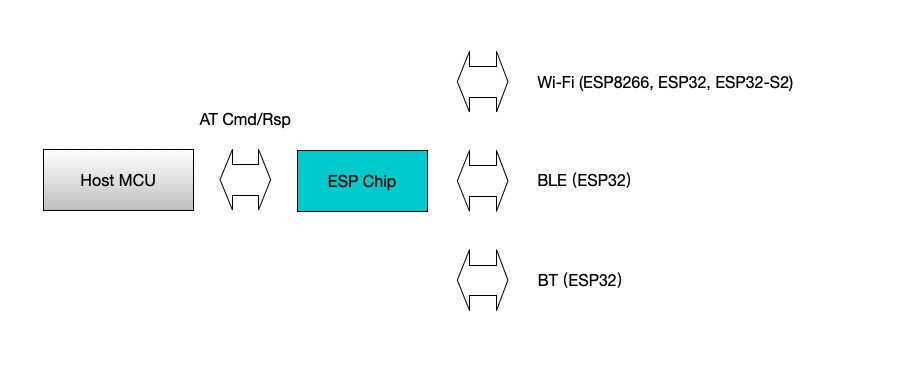
ESP-AT is a solution developed by Espressif to integrate connectivity into customers’ products, which can be quickly moved to mass production. It aims to reduce software development costs and quickly form products. With ESP-AT commands, you can quickly join the wireless network, connect to the cloud platform, realize data transmission and remote control functions, and realize the interconnection of everything through wireless communication easily.

ESP-AT is a project based on ESP-IDF or ESP8266_RTOS_SDK. It makes an ESP board work as a slave, and an MCU as a host. The host MCU sends AT commands to the ESP chip and receives AT responses back. ESP-AT provides a wide range of AT commands with different functions, such as Wi-Fi commands, TCP/IP commands, Bluetooth LE commands, Bluetooth commands, MQTT commands, HTTP commands, and Ethernet commands.


Please note that ESP32 AT uses two UART ports: UART0 is used to download firmware and log output; UART1 is used to send AT commands and receive AT responses.

All ESP32 modules use GPIO1 and GPIO3 as UART0, but they use different GPIOs as UART1. The following sections illustrate which GPIOs you should connect for each ESP32 series of modules.


In my case:
XIAO TX connect to GPIO16 (RX)
XIAO RX connect to GPIO17 (TX)
Wthout hardware flow control., just ignore CTS/RTS.

Suggested to provide separated power supply to ESP32:

At beginning, I power the ESP32-S module from XIAO 3V3. But it re-boot repeatedly, caused by:
Brownout detector was triggered

It's caused by power low. With separated power from breadoard power supply to ESP32-S, this problem fixed.

Monday, November 16, 2020

Install esptool on Raspberry Pi OS (32 bit)

esptool.py is a Python-based, open source, platform independent, utility to communicate with the ROM bootloader in Espressif ESP8266 & ESP32 chips, and also ESP32-S2.

To install on Raspberry Pi (running 32 bit Raspberry Pi OS), open Terminal and enter the command:

$ sudo pip install esptool

or install Development mode, allows you to run the latest development version from this repository.

$ git clone https://github.com/espressif/esptool.git
$ cd esptool
$ pip install --user -e .


Friday, August 28, 2020

TensorFlow Lite Micro support on the ESP32

The ESP32 is widely used MCU with Wi-Fi/BT/BLE. With TensorFlow Lite for Microcontrollers executing on ESP32, this opens up scenarios for all kinds of use-cases that are triggered by local inference. ESP32 has 2 CPU cores and a bunch of optimizations, making it easier to run heavy TF Micro workfloads. 

ESP32 is pretty powerful for a microcontroller. Clocked at 240MHz, with just a single core it can do the detection well under 1 second (roughly ~700ms; additional optimizations are on the way to reduce this even further). This leaves the second core free for other tasks from your application.

more on Announcing TensorFlow Lite Micro support on the ESP32

Tuesday, August 18, 2020

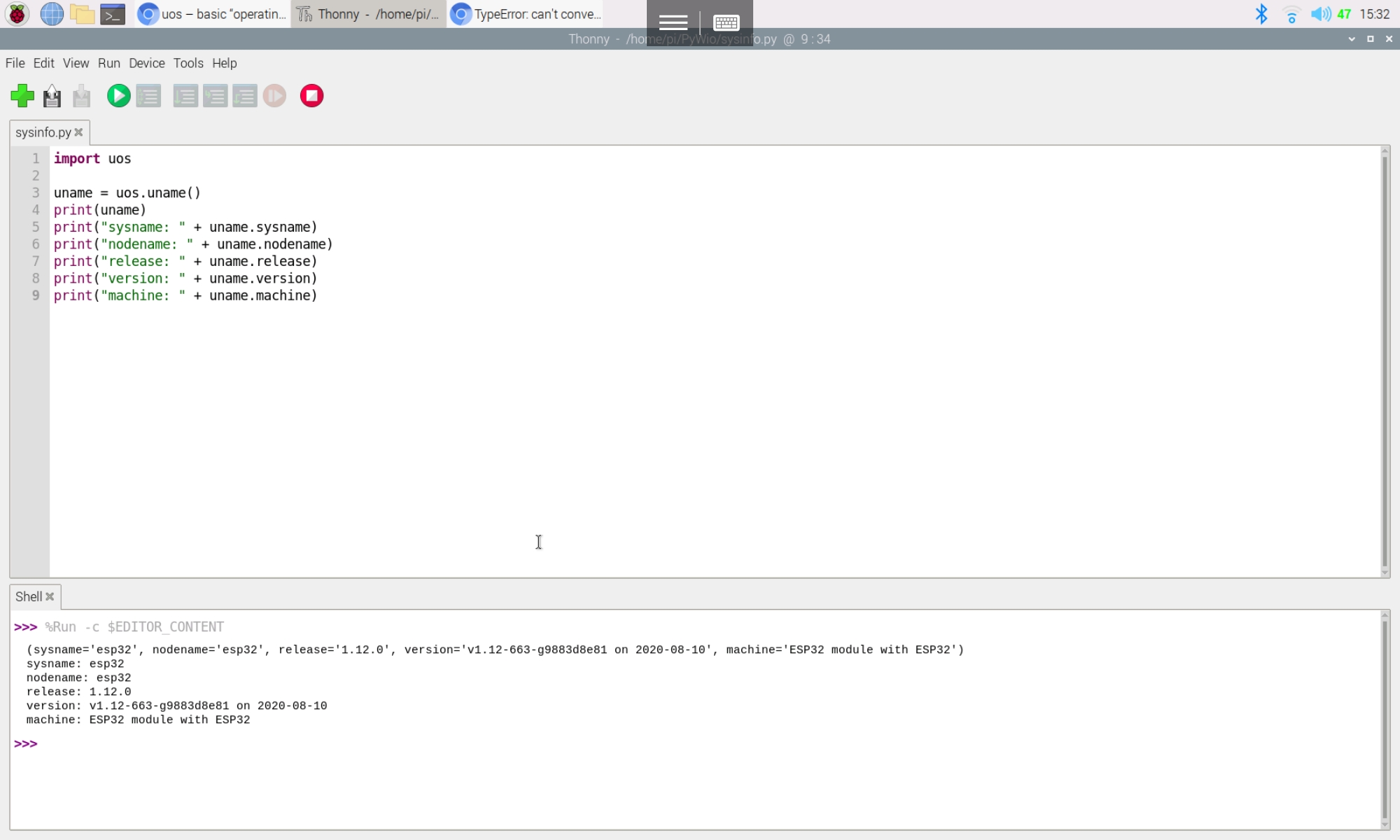
MicroPython (ESP32): micropython.mem_info() to get memory information

 The function mem_info() of micropython module Print information about currently used memory. If the verbose argument is given then extra information is printed.

The information that is printed is implementation dependent, but currently includes the amount of stack and heap used. In verbose mode it prints out the entire heap indicating which blocks are used and which are free.

ref: https://docs.micropython.org/en/latest/library/micropython.html?highlight=mem_info#micropython.mem_info


Friday, August 14, 2020

Simple digital input/output on ESP32/MicroPython


A simple exercise of digital input/output on ESP32/MicroPython, digitalIn.py.

from machine import Pin
from time import sleep

LED2 = Pin(2, Pin.OUT)
IN32 = Pin(32, Pin.IN, Pin.PULL_UP);

while True:
    v = IN32.value()
    LED2.value(v)
    print(v)
    sleep(0.1)

  • Note that GPIO6-11 are usually used for SPI flash.
  • GPIO34-39 can only be set as input mode and do not have software pullup or pulldown functions.


Thursday, August 13, 2020

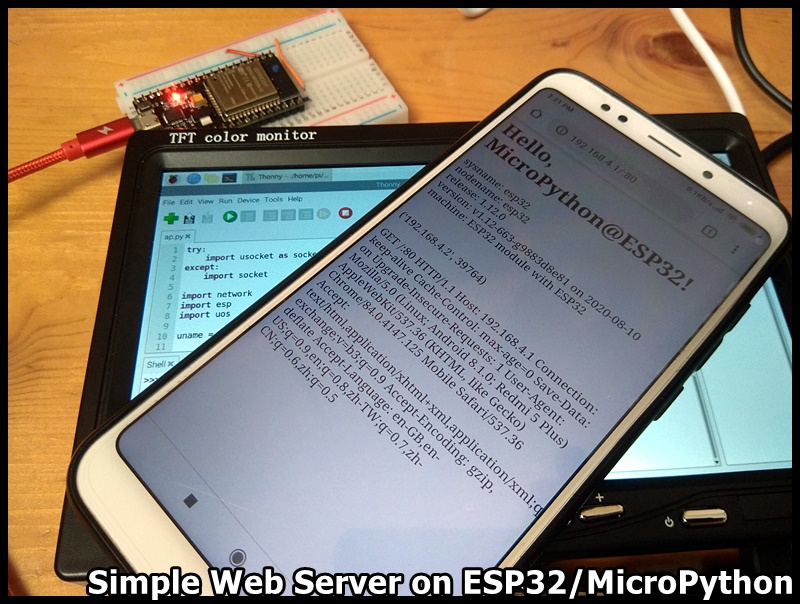
Simple web server on ESP32 using MicroPython


It's a ESP32/MicroPython exercise to implement a simple web server.


ap.py
try:
    import usocket as socket
except:
    import socket
  
import network
import esp
import uos

uname = uos.uname()

ap = network.WLAN(network.AP_IF)
ap.active(True)

ssid = "ssid"
password = "password"
ap.config(essid=ssid, password=password)

while ap.active() == False:
    pass

print('Access Point Active')
print(ap.ifconfig())
print("Connect to " + ssid + ":" + "password = " + password);
print("Visit: " + ap.ifconfig()[2] + ":80")

print('===== ===== =====')

res_01 = """<html>
    <head><meta name="viewport" content="width=device-width, initial-scale=1"></head>
    <body>
    <h1>Hello, MicroPython@ESP32!</h1>"""
res_02= """
    </body>
    </html>"""

res_something = "sysname: " + uname.sysname + "<br/>"\
    "nodename: " + uname.nodename + "<br/>" +\
    "release: " + uname.release + "<br/>" +\
    "version: " + uname.version + "<br/>" +\
    "machine: " + uname.machine + "<br/>"

s = socket.socket(socket.AF_INET, socket.SOCK_STREAM)
s.bind(('', 80))
s.listen(5)

while True:
    conn, addr = s.accept()
    youraddr = str(addr)
    request = conn.recv(1024)

    conn.send(res_01)
    conn.send(res_something)
    conn.send("<br/><br/>")
    conn.send(youraddr)
    conn.send("<br/><br/>")
    conn.send(request)
    conn.send(res_02)
    conn.close()


Tuesday, August 11, 2020

microPython exercise (ESP32): get system info

The uos module contains functions for filesystem access and mounting, terminal redirection and duplication, and the uname and urandom functions. Its uname() function return a tuple containing information about the underlying machine and/or its operating system. The tuple has five fields in the following order, each of them being a string:

  • sysname – the name of the underlying system
  • nodename – the network name (can be the same as sysname)
  • release – the version of the underlying system
  • version – the MicroPython version and build date
  • machine – an identifier for the underlying hardware (eg board, CPU)

Example, sysinfo.py

import uos

uname = uos.uname()
print(uname)
print("sysname: " + uname.sysname)
print("nodename: " + uname.nodename)
print("release: " + uname.release)
print("version: " + uname.version)
print("machine: " + uname.machine)